Most business charts answer a question about quantity. A network chart answers a question about connection. It puts entities on the slide as nodes, draws a line between any two that are related, and lets the resulting shape carry the message: who talks to whom, which supplier feeds which plant, which accounts share a decision maker, where a process doubles back on itself.
That shift in question is why the format feels unfamiliar to audiences trained on bars and lines. There is no axis to read against, no value to compare at a glance, and position on the canvas usually means nothing. What the viewer is meant to notice is structure: dense pockets, thin bridges, orphaned corners.
Used well, a network chart shows, at a glance, a relationship pattern that would take four paragraphs of prose to describe. Used carelessly, it produces the “hairball,” a tangle of overlapping lines that signals complexity without communicating anything about it. The difference is rarely the tool. It is the decision about what counts as a node, what counts as an edge, and how much of the full network actually belongs in front of a business audience. What follows covers the definition, the encoding, the readings the format supports, the build process, the models it gets mistaken for, and the errors that most often ruin it.
Two Different Things Are Called a Network Chart
First, settle the terminology, because two unrelated visuals share the name, and the confusion can make real meetings go sideways. Ask a data analyst for a network chart, and you get a relationship graph. Ask a project manager for one, and you get a schedule.
The Relationship Graph
This article focuses on this version. Entities become nodes, relationships become edges, and the picture describes a state of affairs rather than a sequence. A supplier map, a co-authorship graph, an account penetration map, and a fraud ring all belong here. No start and no finish, no duration attached to anything, and the same pair of nodes may be connected for several different reasons at once.
The Project Schedule Network Diagram
In project management, a network diagram means the precedence structure of a schedule. Activities sit inside boxes, arrows carry dependencies, and the drawing exposes the critical path. Modern practice uses the Precedence Diagram Method, also called activity-on-node, where each task occupies a box, and arrows show only the relationship between tasks. Older activity-on-arrow notation, associated with PERT, puts milestone events in the nodes and activities on the arrows instead. Both are directed, both are acyclic by definition, and both carry duration data that a relationship graph does not.
Knowing Which One the Room Expects
The tell is the question being asked. If the audience wants to know what happens next and when, they want the schedule version, and it belongs closer to a flowchart or a Gantt view than to a graph. If the audience wants to know who is connected to whom and how strongly, they want the relationship graph. Naming the version in the slide title costs four words and prevents the wrong reading.
What the Nodes and Edges Are Actually Encoding
A network chart has a small vocabulary. Each element carries a specific piece of meaning, and problems usually start when you use one to express something it can’t.
Nodes
A node stands for one entity of one type: a person, a team, a legal entity, a system, a SKU, an account. Node size is the most reliable secondary channel, and it usually encodes either a volume attribute such as revenue or headcount, or a structural attribute such as how many connections the node has. Node color works best for category rather than quantity, since a viewer can tell red from blue instantly but cannot rank six shades of blue reliably.
Edges
An edge asserts that a relationship exists. That relationship must be defined precisely enough that anyone could reproduce the chart from the underlying data. “Works with” is not a definition. “Exchanged more than twenty messages in the quarter” is. Edge thickness carries weight (volume, frequency, or value), and edge color usually carries relationship type.
Direction
An edge can be undirected, where the relationship runs both ways by nature, or directed, where an arrowhead shows that A does something to B. Co-membership and shared ownership are not. Mixing the two on one canvas without a visual distinction is one of the fastest ways to lose the audience.
Position
This is the part that surprises people. In most network layouts, coordinates carry no meaning. Force-directed algorithms treat nodes as magnets that repel each other and edges as springs that pull connected nodes together, then let the arrangement settle. Two nodes near each other are usually related, but their absolute placement is an artifact of the algorithm and its starting seed. Run it again and the whole picture rotates. Say so on the slide if there is any chance the audience will read left as early and right as late.
Reading Structure: Hubs, Brokers and the Ones on the Edge
Network charts have a small set of readings that recur across almost every business context. Learning them turns the picture from decoration into analysis.
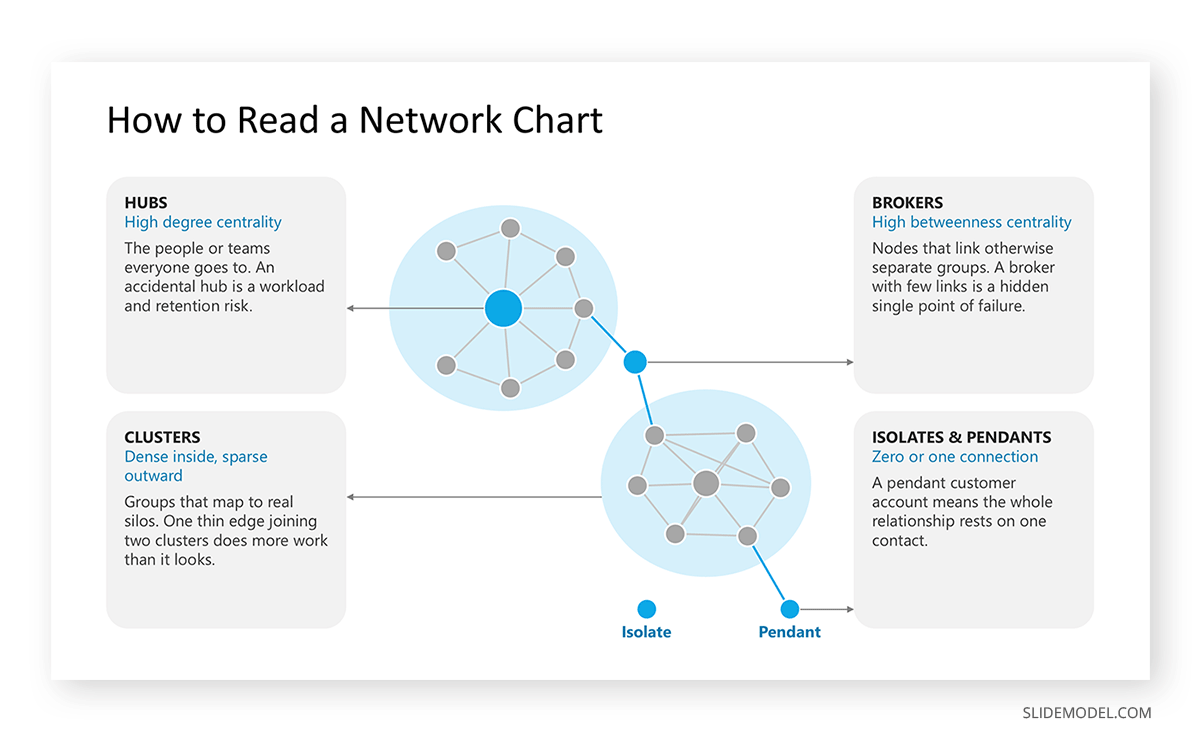
Hubs are nodes with many connections, which network analysts call high degree centrality. In an organizational context, these are the people or teams everybody goes to. High degree is not automatically good news: a hub that has grown by accident is a workload concentration and a retention risk.
Brokers are nodes that sit on the path between others, measured as betweenness centrality, meaning the extent to which a node connects parts of the network that would otherwise be disconnected. In the claims example, the verification desk scored low on degree and very high on betweenness. High degree and high betweenness often coincide, but the cases where they diverge are usually the interesting ones, because a broker with few connections is a single point of failure that no headcount report will flag.
Clusters are groups of nodes that connect densely to each other and sparsely outward. In an operating model, they map to real silos. When two clusters are joined by a single thin edge, that edge is doing more work than its appearance suggests.
Isolates and pendants are nodes with no connections or only one. In a customer relationship map, a pendant account means the entire relationship rests on one contact. That reading alone justifies the chart for many sales organizations.
Where a Network Chart Belongs in a Slide Deck
The format is worth the audience’s effort when the connections themselves are the finding.
Organizational network analysis is the most common corporate use. Communication or collaboration data reveals how work actually flows, which frequently contradicts the published organizational structure. Post-merger integration teams use the same view to see whether two workforces have started to interact or are still operating as separate blocks.
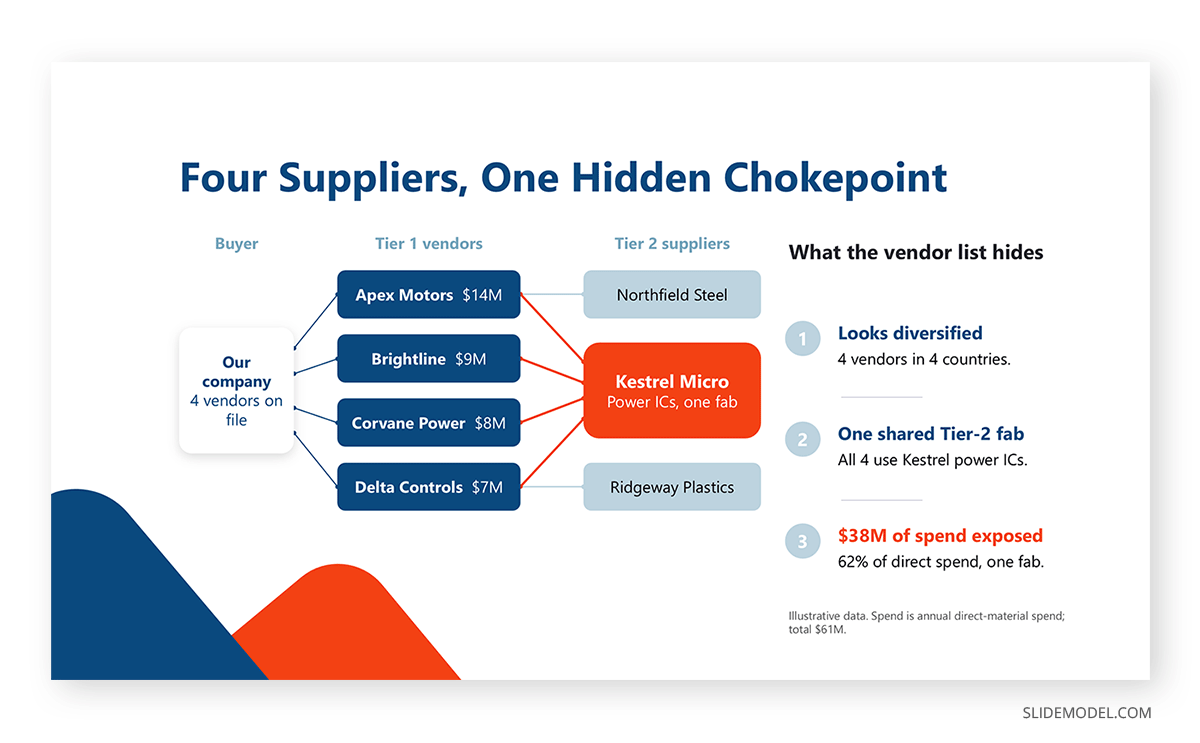
Supply chain and vendor mapping benefits when second-tier dependencies matter. Four unrelated suppliers converging on one component manufacturer is a concentration risk that a vendor spreadsheet hides completely.
Account and stakeholder mapping in complex sales uses the format to show relationship coverage across a buying group, which pairs naturally with a formal stakeholder mapping exercise. Fraud and anti-money-laundering teams use it to expose rings sharing addresses, devices, or accounts. Technology teams use it for infrastructure and service dependencies, where the picture can answer what breaks if a node fails.
The common thread is that the value lies in the shape of the connections, not in any measured quantity. When the audience mainly needs to compare magnitudes, a different chart serves them better.
Building A Network Chart Step-by-Step
A network chart for analysis and a network chart for a presentation are different artifacts. The analytical version can hold two thousand nodes. The presentation version rarely holds more than about thirty before it stops communicating.
Start from an edge list, not a drawing
Build a two-column table of source and target, with optional columns for weight and relationship type. Every subsequent decision depends on this table being correct and consistently defined. Do the filtering here as well: drop edges below a weight threshold, collapse individuals into teams, and cut node types that are not part of the argument. Reducing a network to its meaningful core is analytical work, not a shortcut.
Choose the layout deliberately
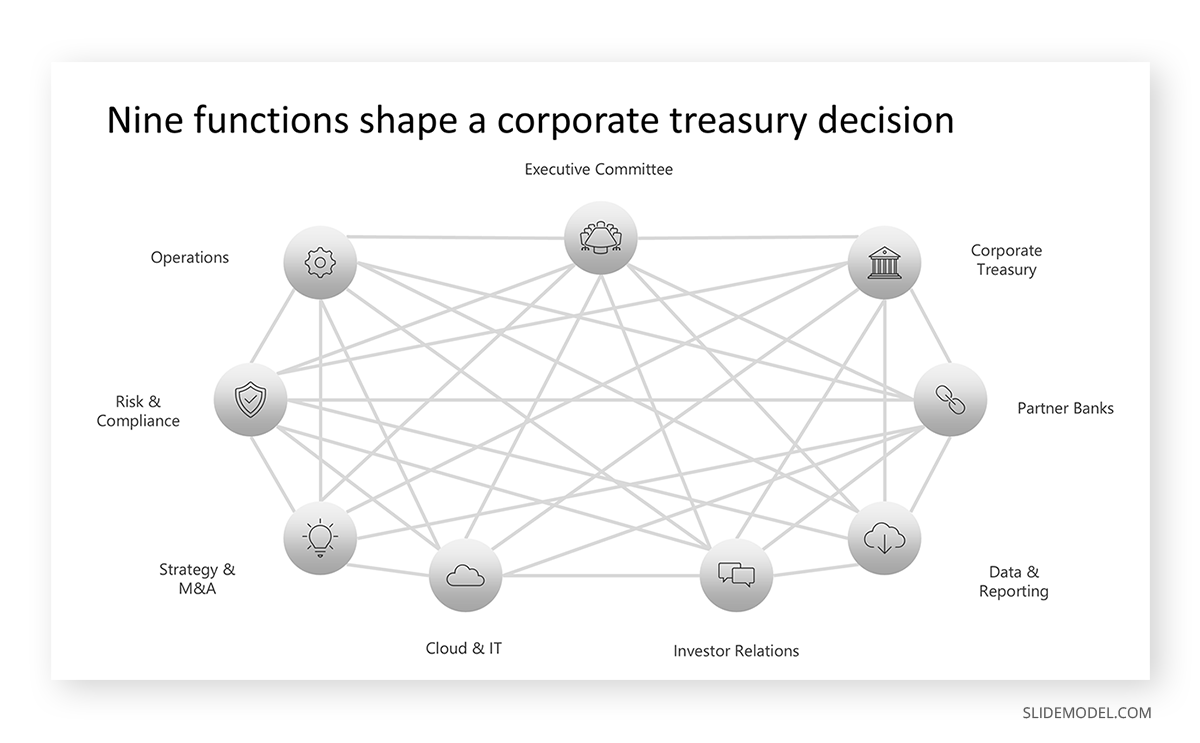
Force-directed layouts suit sparse networks with visible clusters. Circular and arc layouts handle dense networks far better, because node positions are fixed and only the edges overlap. Hierarchical layouts suit anything with a clear flow direction. For dense graphs with a manageable node count, edge bundling groups related connections into shared pathways and cuts visual clutter substantially. If the network resists every layout and stays a hairball, that is evidence the format is wrong for this data at this level of aggregation.
Draw it where you can control it
For a presentation-scale network, PowerPoint is a reasonable home. Place the nodes as shapes, then use connectors rather than plain lines so that moving a node keeps the edge attached, a habit worth knowing when working with editable shapes on a slide. Set node size through a consistent rule and write that rule into the caption. Send edges to the back layer so they never cross a label. Keep labels horizontal, and give the two or three nodes carrying the message a stronger fill while everything else stays neutral gray. SmartArt handles hierarchies well but not arbitrary graphs, so it helps for tree structures and gets in the way here.
Use a specialist tool when the network is large
Gephi, Kumu, Cytoscape, and several browser-based tools compute layouts and centrality measures properly. Analyze there, then rebuild only the presentation subset natively so annotations, highlights, and animation stay editable. A flat exported image of two thousand nodes on a slide impresses nobody and answers no question.
Network Chart vs Other Models
Several formats also draw boxes joined by lines. The difference is what the lines are allowed to mean.
Against an Org Chart or Tree Diagram
A tree is a network with one rule: one parent per node and no cycles. That constraint is what makes an org chart in PowerPoint easy to read at a glance. A network chart drops the rule, which buys the ability to show matrix reporting, mutual dependencies, and loops, at the cost of instant readability. If the data genuinely forms a hierarchy, use the tree diagram and keep the clarity.
Against a Sankey diagram
Both show flow between entities with weighted connections. A Sankey diagram enforces conservation: what enters a node must leave it, and it encodes magnitude as bandwidth along a left-to-right progression. Choose Sankey when quantities must add up, and the flow has stages. Choose a network chart when relationships loop back, when there is no natural progression, or when what matters is who connects to whom rather than how much moves.
Against a Flowchart or Process Map
A flowchart is prescriptive: it states what should happen and in what order, with decision points and defined terminators. A network chart is descriptive: it shows what did happen or what currently exists. The claims example makes the contrast concrete: the process map and the network chart of the same operation disagreed, and that disagreement was the insight.
Against an Adjacency Matrix
The same relationship data can be shown as a grid with entities on both axes and cells marking connections, which is effectively a heat map treatment of the network. Matrices are far more legible than node-link views for dense networks and make specific pair lookups easy. They lose the intuitive sense of paths and clusters, which is usually why the node-link version wins for an executive audience.
Against a Mind Map or Concept Map
A mind map radiates from one central idea and is a thinking aid rather than a data visual. A concept map allows any-to-any links but labels each edge with a verb, making it closer in spirit to an entity-relationship diagram. Network charts derive their edges from data rather than reasoning, and that provenance lets you check them.
What to Put Beside a Network Chart
A network chart establishes structure. It is poor at quantities, so pair it with something that handles them.
A ranked bar chart of the top nodes by degree or betweenness turns the visual impression into an ordered list a reader can quote. Placing it directly beside the network view lets the audience match names to shapes without hunting.
A small-multiple series of the same network at three or four points in time shows whether structure is changing, which a single snapshot cannot. Keeping node positions fixed across the frames is essential; otherwise, the layout algorithm creates movement that does not exist in the data.
A treemap or a simple table alongside the graph carries the volumes attached to each node, which node size can only suggest. A short annotated callout on the two or three nodes that matter does more for comprehension than any legend, and fits the broader habit of structuring slides around a narrative rather than around the data source. On a recurring reporting slide, a network view usually belongs on its own rather than crammed into a dashboard layout, since it needs room to breathe.
Common Mistakes When Creating Network Charts
Showing the whole network
The most common error by a wide margin. Every node in the dataset goes on the slide, the layout collapses into a dense clump, and the presenter says, “as you can see, it is complex.” The audience sees complexity and learns nothing. Filter to the subgraph that supports the point.
Leaving the relationship undefined
If the slide never states what an edge means, viewers invent their own definition and half of them get it wrong. One line of caption stating the rule and the data source settles it.
Reading position as meaning
Force-directed coordinates are arbitrary. Presenters point at the center of the canvas and say “these are the important ones,” which is only true if importance was deliberately encoded there. State what position means, or state that it means nothing.
Encoding too many attributes at once
Node size, node color, node shape, edge thickness, edge color, and edge style are six channels. Using all of them makes the chart a puzzle. Two encodings beyond the connections themselves is a sensible ceiling for a presentation.
Relying on color alone to separate categories
Around one in twelve men has some form of color vision deficiency, and projectors flatten contrast further. Category distinctions should survive in grayscale, so combine hue with shape, border style, or direct labels. The same discipline applies here as in any accessible slide design, and choosing a restricted palette using basic color theory improves legibility more than adding a legend.
Treating the picture as the analysis
A network chart shows structure; it does not explain it. A dense cluster might be a healthy working team or a group excluding everyone else. The chart raises the question, and interviews, process knowledge, or additional data provide the answer. Presenting the shape as a conclusion invites a challenge the presenter cannot answer.
Comparing two networks drawn with different layouts
You can’t visually compare two charts built from separate layout runs, even when the underlying data is nearly identical, because the algorithm rearranges everything. Fix the coordinates before showing any before-and-after pair.
FAQs
Is a network chart the same as a network graph or a node-link diagram?
Yes, in ordinary business usage those three terms describe the same visual. Software and academic documentation tends to prefer graph, since graph theory supplies the underlying mathematics, while node-link diagram distinguishes it from matrix representations of the same data. Network diagram is the ambiguous term because, in project management, it means a schedule.
How many nodes can a network chart hold before it stops working?
For a slide viewed for under a minute, around thirty nodes is a practical ceiling, and fifteen to twenty reads more comfortably. Analytical tools handle thousands, but that view belongs in an appendix rather than in a live presentation. If the point requires more, aggregate individuals into groups.
Can I build a network chart in Excel?
Not as a native chart type. Excel has no node-link option in its chart gallery, so the usual routes are add-ins or preparing the edge list in Excel and drawing the visual elsewhere. For presentation-scale networks, drawing the nodes and connectors directly on the slide gives more control than any workaround.
What layout should I choose?
Use force-directed for sparse networks with distinct clusters, circular or arc when density is high and you need to limit overlap, and hierarchical when the data has a clear flow direction. Try more than one before settling, since the same dataset can look chaotic under one algorithm and orderly under another.
How do I decide node size?
Pick one rule and state it. Sizing by degree emphasizes connectors, sizing by a business quantity such as revenue or headcount emphasizes weight in the organization, and sizing everything equally is a legitimate choice when the connections alone carry the message. Scale by area rather than by radius; otherwise, a value twice as large appears four times as big.
What is the difference between a network chart and a chord diagram?
A chord diagram arranges all entities around a circle and draws weighted ribbons between them across the middle. It handles dense many-to-many flows more gracefully than a node-link layout because the entity positions are fixed. The tradeoff is that path structure disappears, so questions about who reaches whom indirectly become hard to answer.
Do network charts need a legend?
They need the encoding explained, though a caption often does the job better than a legend box. Something along the lines of “circle size shows headcount, line thickness shows monthly handovers” takes one line and removes the back-and-forth glancing that a corner legend forces.
How do I show change over time?
Small multiples with fixed node positions work best for a presentation, letting the audience compare frames directly. Animation between states can work in a live setting but tends to hide as much as it reveals. A supporting line chart of a network measure such as average connections per node gives the trend a number.
What data do I need to build one?
An edge list with a source column and a target column, at minimum. Weight and relationship type columns are optional and often worth having. Common sources include collaboration platform metadata, case management handover logs, transaction records, CRM contact histories, and manually gathered relationship surveys.
When should I not use a network chart?
When quantities matter more than connections, when the data forms a strict hierarchy, when there is a defined sequence with durations, or when the network is dense enough that every layout produces a hairball. Each of those cases has a format that answers the question more directly, and the distinction between a chart and a graph matters less than whether the audience can extract the finding in the time available.
Final Words
A network chart succeeds or fails on decisions made before anything is drawn: what counts as a node, what counts as an edge, which parts of the network belong in front of this audience, and what single reading the picture should produce. Those choices do more for the result than any layout algorithm.
The practical test is to hand the finished slide to someone with no context and ask what they notice first. If they name the hub, the loop, or the isolated cluster the chart was built to expose, it works. If they say it looks complicated, the network still needs filtering. Relationship data rewards that effort, because the patterns it holds are the ones spreadsheets and org charts are structurally incapable of showing.