Your employment record is read before you speak, before you shake hands, and often before anyone in the room has decided whether you are worth their time. A recruiter scanning a resume may spend fewer than fifteen seconds on it before forming a first impression; a hiring panel reviewing a career history slide deck will absorb your professional narrative in the time it takes to flip through five slides. In both cases, the quality of that first read depends almost entirely on how well you have organized, framed, and communicated your work experience.
The gap between a career history that advances a candidacy and one that stalls it rarely comes down to the underlying experience. It comes down to presentation: which roles are emphasized, how accomplishments are described, whether the career trajectory reads as intentional or accidental, and whether the format matches what the audience actually needs to evaluate. This article covers each of those decisions in turn, from structuring your employment record and writing job titles with precision to framing quantified results and designing slides that make your career progression visible at a glance.
What a Career History Presentation Actually Communicates
Before you write a single line or design a single slide, it helps to understand what your audience is actually looking for. When a recruiter reviews your employment history, they are forming a mental model of your career trajectory: have you taken on increasing responsibility over time? Do your job titles reflect genuine progression or a pattern of lateral movement? Are there patterns in the sectors or types of organizations you have worked in? These are the questions running in the background of every review, and the structure of your work history either answers them clearly or leaves the reader to fill in the gaps with assumptions.
For hiring managers, the focus shifts toward role-specific depth. They want to know whether your responsibilities in previous positions align with the demands of the role they need to fill. Relevant experience becomes the primary lens through which everything else is evaluated. A lengthy list of past jobs matters far less than clear evidence that the work you have done builds directly toward the opportunity at hand. The ability to identify which parts of your employment record speak most directly to the audience in front of you is what separates a strong career presentation from one that fails to land.
In academic presentation contexts, the expectations differ in emphasis. A career presentation before a committee or leadership group needs to show not only what you did but how your decisions and contributions connect to larger outcomes. Skills, qualifications, and demonstrated judgment carry as much weight as the formal employment record itself. Whether you are delivering this information through a document or a slide deck, that audience-first orientation should guide every formatting decision you make.
Structuring Your Employment Record for Maximum Clarity
The Case for Reverse Chronological Order
The organization of your employment history communicates something before the reader processes a single word. An entry that leads with a clear job title, the organization name, the dates of employment, and a focused description of responsibilities and accomplishments gives the reader exactly what they need to assess your background efficiently. The most widely accepted approach is reverse chronological order: starting with the most recent position and working backward in time. This structure serves the reader by front-loading the experience most likely to be relevant. A hiring panel reviewing a candidate for a senior role wants to see recent performance first, not entry-level responsibilities from fifteen years ago.
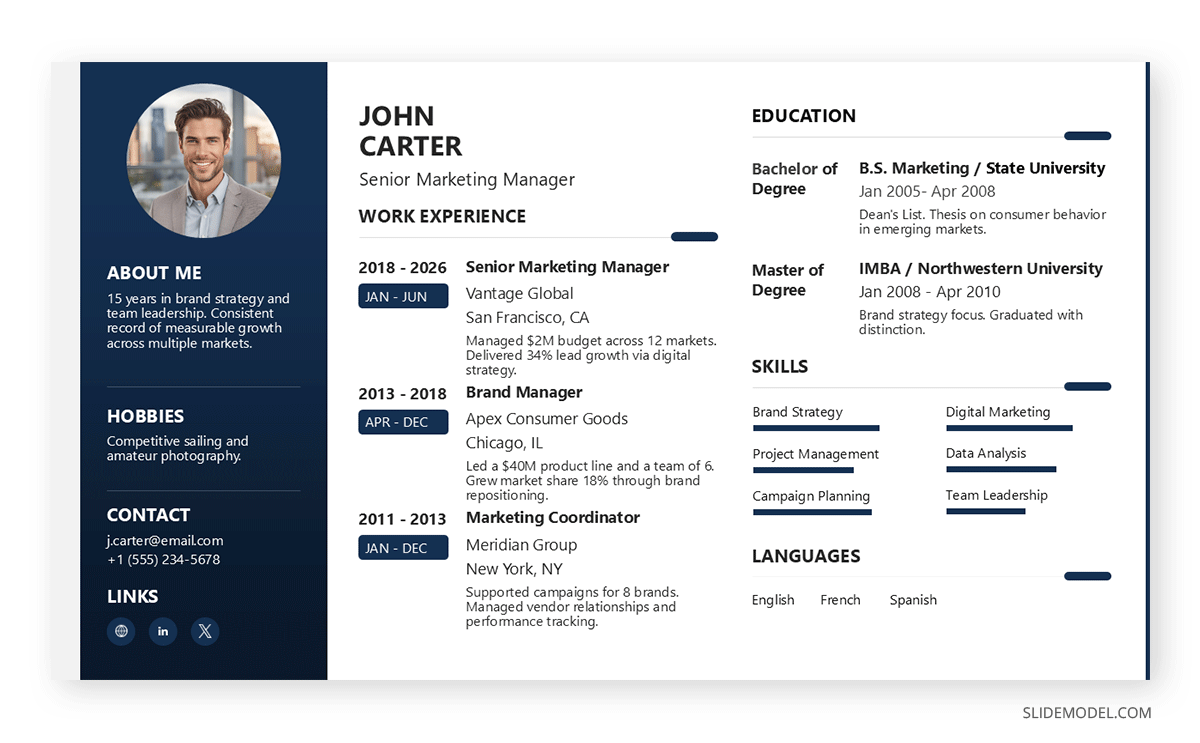
The same logic applies when structuring a career history slide deck. A presentation that opens with your current or most recent role and works backward in time respects the audience’s attention: they immediately see who you are today before tracing the path that brought you here. Dedicating one slide per major role, with the position title as the slide header and two or three focused accomplishments in the body, keeps each entry digestible without forcing the audience to read dense prose. For professionals who want to move beyond a default list format, creative resume ideas applied to the slide format can add visual interest without sacrificing readability or professional tone.
That said, the format should serve the goal rather than default to convention without consideration. Professionals changing industries or returning to the workforce after a career break sometimes benefit from a functional or hybrid format that leads with skills and accomplishments rather than a strict timeline. Whatever structure you choose, consistency across all entries is non-negotiable. Date formats, title casing, and punctuation should be uniform throughout the document, and the same discipline applies to slides: a consistent layout template across all role slides prevents the presentation from feeling as if it were assembled from separate sources.
Writing Job Titles, Responsibilities, and Scope
The way you write job titles and describe responsibilities carries more weight than most professionals realize. An entry labeled simply “Manager” tells the reader nothing about the role’s level, function, or scale. A more informative entry, such as “Regional Operations Manager, team of 15, covering six states,” communicates scope and context immediately. Where a formal title does not adequately reflect actual responsibilities, adding a brief clarifying descriptor is acceptable, provided it accurately represents the work performed. It’s the same logic applied to LinkedIn profile headlines, and certainly boosts the attractiveness factor of your career presentation.
When translating job titles into a slide format, treat the title and organization name as the primary visual element of the slide, with employment dates positioned as a secondary text line below. This visual hierarchy draws the eye to the most important information first and allows the audience to locate each role at a glance without reading every word on the slide. Slide layout choices matter considerably here: a two-column layout, with the role details on one side and key accomplishments on the other, works particularly well for career history slides because it separates context from evidence without requiring separate slides for each element.
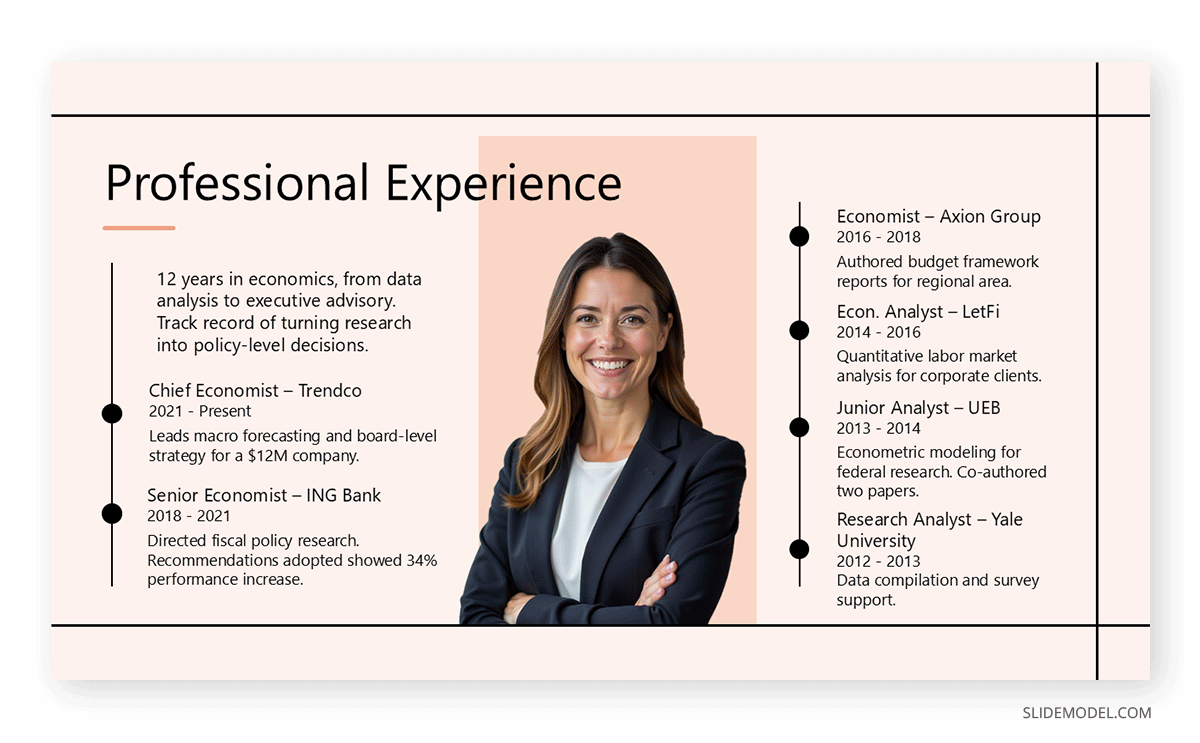
When describing responsibilities in any format, avoid language that reads like a position description copied from the original job posting. The goal is to capture what you specifically contributed, not the generic duties the role was expected to fulfill. “Responsible for managing client relationships” is far less useful than “managed a portfolio of 38 enterprise accounts, serving as the primary contact for contract negotiations and renewals.” Scope details, such as team size, budget authority, and geographic reach, belong in this description as well, whether it appears on a resume or a slide. Without them, the reader has no way to gauge whether your experience is a good fit for the role’s demands. Yet remember to balance text with the slide design, or you risk creating a text-wall slide.
Framing Accomplishments with Quantified Results
Accomplishments are the most persuasive element in any career history presentation, and quantified results make them considerably more credible. A hiring committee reviewing two candidates with comparable job titles and tenure will consistently respond more favorably to the one who can point to specific, measurable outcomes. Numbers function as evidence: they convert vague language into verifiable information and distinguish genuine performance from a list of duties performed.
Quantification does not require access to confidential figures or precise data you may no longer have. Reasonable approximations are acceptable when they are defensible. “Reduced customer complaint volume by approximately 30% over 18 months” or “managed an annual marketing budget of roughly $500,000” both communicate meaningful scale without overclaiming precision. What matters is that the reader can understand the scope and significance of what you did, not that the figure is exact.
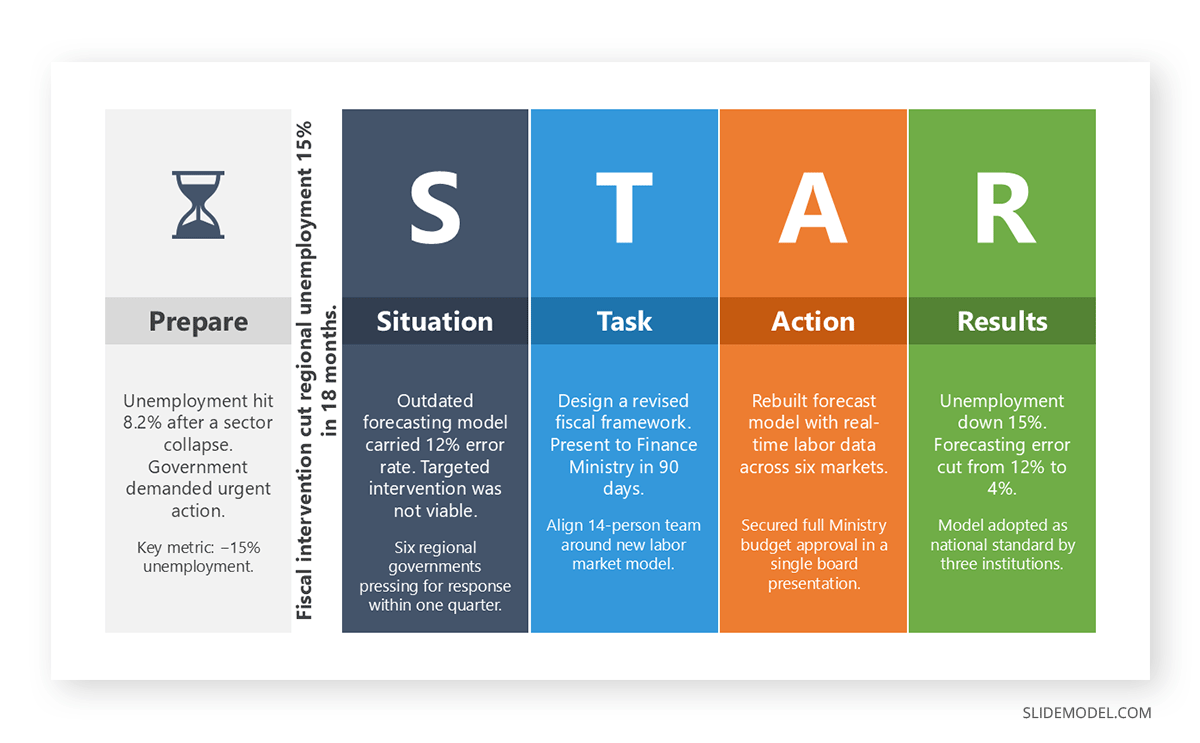
When organizing accomplishments, connecting a number to an outcome adds the most clarity. “Increased quarterly revenue by 22%, placing the team among the top five performers in the region” is considerably more informative than “increased sales.” This approach works particularly well when structured using the STAR method (Situation, Task, Action, Result), which provides a disciplined way to describe the context and impact of a professional achievement. On slides, quantified results deserve visual emphasis beyond what prose alone can provide. Placing a key metric in a large callout box, using a contrasting font weight, or isolating the number in a highlight element ensures the audience absorbs the most important evidence even during a quick scan. A slide that leads with “22% revenue increase” in a prominent visual element and supports it with a brief explanatory sentence underneath communicates far more efficiently than a bulleted list of equal-weight accomplishments.
Demonstrating Career Progression Over Time
Career progression is one of the primary signals a hiring audience looks for when reviewing an employment history. Evidence that responsibilities have grown, decisions have become more consequential, and the scope of influence has expanded over time tells a story of professional development that is far more compelling than any single accomplishment in isolation. A professional who joined an organization as a coordinator and advanced to the director level over eight years is conveying a trajectory that requires no additional explanation, provided the entries are written with enough specificity to make the growth legible.
A well-designed timeline slide makes this progression immediately visible to a live audience in a way that a written document cannot replicate. Rather than asking viewers to reconstruct a career arc from a sequence of text entries, a horizontal timeline with clearly labeled nodes for each major role allows them to read the trajectory in seconds. The essential guide to making timelines covers the structural choices that make timeline slides readable under presentation conditions, including how to balance label density with visual clarity. For professionals building this in PowerPoint, our guide on creating a timeline in PowerPoint follows a step-by-step approach that keeps the final result polished without requiring advanced design skills.
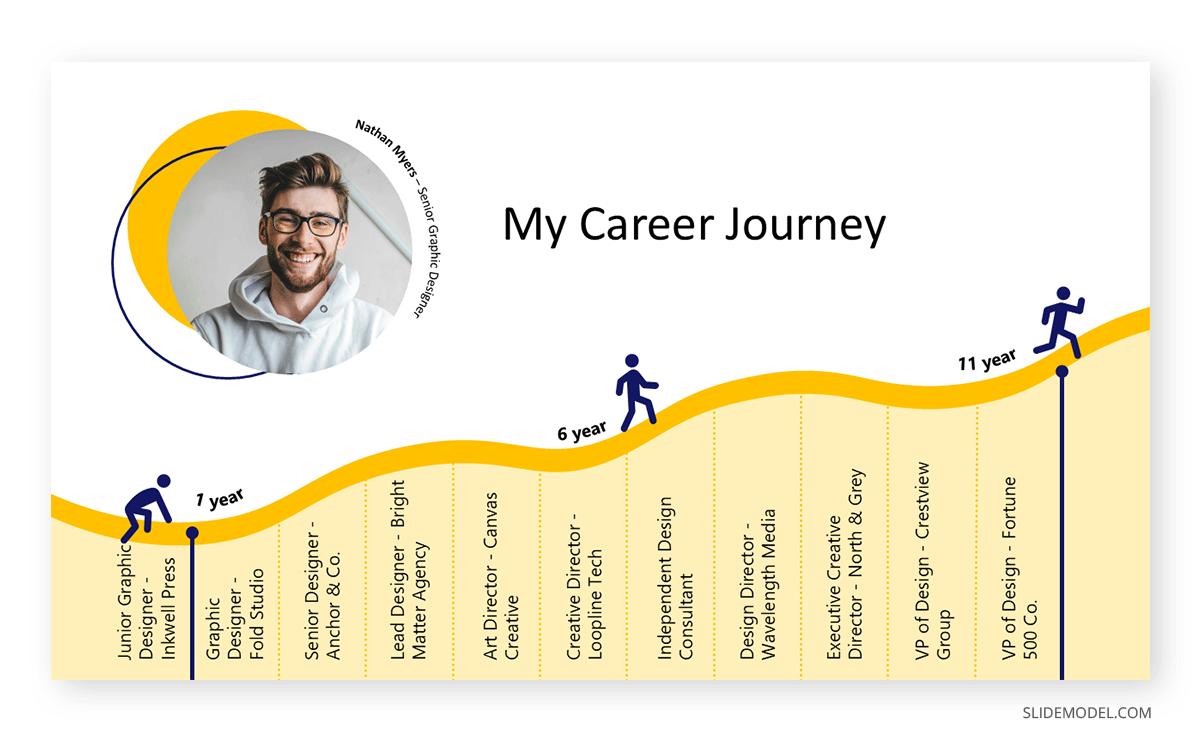
Where progression has been lateral rather than vertical, the framing matters considerably. Two positions at similar title levels can still demonstrate meaningful development if the second role involves a broader scope, a different function, or a more demanding environment. The writing needs to make that distinction explicit, and a slide annotation or brief callout text can reinforce it visually by noting what changed between roles. A career development plan framing can also help contextualize lateral moves as intentional skill-building steps rather than flat movement, particularly in formal presentation settings where the audience expects a narrative behind the employment record.
Career pivots require additional framing. When an employment record includes a significant change in field or function, a brief contextual note within the relevant entry helps prevent misreading. On slides, this can take the form of a short transition note between role slides or a visual connector on the timeline that signals a deliberate change in direction. Professionals who have deliberately changed direction often find that their cross-functional background becomes a genuine differentiating factor when presented as a considered professional decision rather than an unexplained discontinuity.
Tailoring Your Experience and Using Job-Specific Keywords
One of the most common errors in career history presentation is treating the employment record as a fixed document that goes out unchanged to every opportunity. The list of past roles stays the same, but the emphasis, depth of description, and framing of each entry should shift based on the audience and the specific position being pursued. A document tailored for a financial analyst role and one prepared for a communications director draw from the same employment history but foreground entirely different aspects of it.
The same tailoring logic extends to the slide deck. When preparing a career presentation for a specific audience, consider opening with the experience most relevant to that audience rather than defaulting to a strict reverse-chronological order. A slide deck delivered to a technology firm might lead with a technical leadership role from several years ago if that role is more directly relevant than the current position. Building an interview portfolio organized by competency area makes this reordering process considerably more efficient, since materials grouped by function or achievement type are easier to adapt without having to rebuild the presentation from scratch each time.
Action verbs are the workhorses of effective career writing. Starting each accomplishment statement with a precise verb creates a more direct sentence than passive phrasing. “Directed the quarterly financial close across four business units” communicates considerably more than “was responsible for financial close activities.” The same principle applies to slides: verb-led bullet points are easier to scan and more authoritative in tone than noun-heavy descriptions. Different career levels call for different registers; entry-level candidates benefit from verbs such as developed, coordinated, and analyzed, while senior professionals should reach for language that conveys authority and ownership. For a comprehensive reference on high-impact vocabulary, our article on powerful words for presentations covers language selection across a range of professional communication contexts, including both written documents and live presentations.
Presenting Your Career History in a Formal Setting
Career history is not communicated only through written documents. In many professional and academic contexts, individuals are expected to present their work experience verbally, whether in a panel interview, a board introduction, or a formal career review. These settings require the ability to compress a complex employment record into a coherent, time-bound narrative that an audience can follow in real time, without the benefit of scrolling back through a document.
Slide design choices carry significant weight in these contexts, and the principles of effective visual communication apply as much to a career presentation as they do to any other formal deck. A clean typographic hierarchy, with the role title in a larger weight and accomplishment text in a lighter body font, keeps each slide readable from a distance. Adequate white space prevents individual slides from feeling overloaded, which is a particularly common problem when presenters try to pack every detail from a resume onto a small number of slides. The laws of UX for presentation design offer a useful framework for thinking about cognitive load, visual hierarchy, and audience engagement on each slide, principles that are directly relevant to career presentations where the audience is processing unfamiliar information about you for the first time.
For guidance on structuring and delivering this type of material, you can check our article on how to give a compelling interview presentation, which provides a practical framework that covers both slide structure and verbal delivery. A well-prepared elevator pitch covering the most significant positions and the connecting thread between them allows a professional to respond to “walk me through your background” with confidence and direction. The goal is not to recite a resume from memory but to present a narrative that is selective, purposeful, and clearly oriented toward the current opportunity. A professional bio template can serve as a useful foundation for the opening slide of a career presentation, condensing the professional narrative into a format the audience can absorb before the detailed role slides begin.
Rehearsal is a must-do presentation tip for navigating your work history with confidence. Practicing with an online teleprompter and running the deck through a slideshow-length calculator to confirm it fits within the allotted time are two preparation steps that most candidates overlook. You can try our presentation tools, which cover both, along with a countdown timer to keep pacing on track during the live presentation.
Highlighting Skills and Qualifications Without Overclaiming
Skills and qualifications play a supporting role in most career history presentations. They contextualize the experience described in each entry and signal readiness for the demands of the target role. The challenge is presenting them substantively without producing a generic list of terms that appears on every resume in the field. The most effective approach anchors skills in specific experiences rather than asserting them in the abstract. Instead of stating “strong analytical capability,” a more credible entry demonstrates it through a specific accomplishment: “analyzed retention data across five product lines to identify pricing sensitivities, resulting in a revised model that reduced churn by 14%.” The skill is shown rather than claimed.
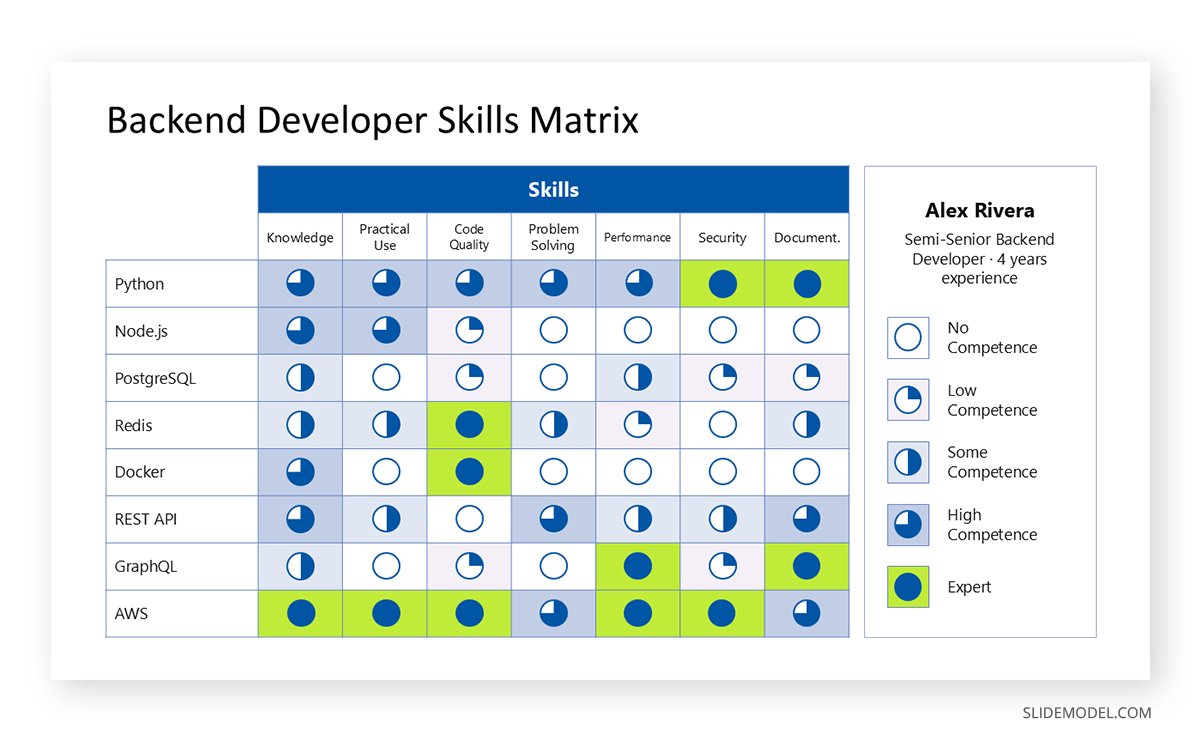
When presenting skills in a slide format, a visual structure works considerably better than a long, unformatted list. A two-column layout that pairs each competency category with a brief illustrative example, or a simple grid that maps skills against proficiency levels, gives the audience an organized view of your capabilities without requiring them to read through a wall of text. A skills matrix is a structured format for exactly this purpose, and it translates directly from a document tool into a slide layout with minimal adaptation. When presented as a single, well-designed slide, it becomes one of the most useful reference points in a career presentation, particularly for audiences who need to assess fit across multiple competency areas simultaneously.
In interview contexts, pairing a skills summary slide with a 30-60-90 day plan shifts the presentation from retrospective to forward-looking, showing the audience not only what you have accomplished but how you intend to apply those capabilities in the new role. This combination is particularly effective in final-round interviews where the audience has already evaluated your background and wants to see evidence of preparation and judgment. Professional credentials should be listed with the granting institution and completion date in both document and slide formats, without vague claims that cannot be grounded in a specific credential or documented result.
FAQs
What is the best format for presenting a career history?
Reverse chronological order is the most widely accepted format because it leads with the most recent and typically most relevant experience. However, a functional or hybrid format may be more appropriate for professionals changing industries, returning after a career break, or whose strongest experience is not their most recent. The format should serve the presentation’s goal rather than defaulting to convention without considering what the specific audience needs to see.
Should I include every job I have ever held?
The standard guidance is to include the last 10 to 15 years of employment, with the cut-off determined by relevance rather than by a fixed rule. Older roles that are directly pertinent to the position being pursued can be included even outside that window. Unrelated early positions that add no meaningful context can be omitted or summarized at the end of the employment section without disrupting the overall narrative.
How do I explain gaps in my employment history?
Address gaps briefly and factually without over-explaining. A short note is usually sufficient: “Career break for family caregiving responsibilities, 2022-2023” or “Took time for professional development and re-certification.” Most hiring managers are far less concerned about gaps than about whether the candidate can perform the role in question. On a timeline slide, a gap can simply appear as unmarked space on the visual, which is less conspicuous than a written entry that draws attention to its own absence. Health-related gaps should be directly ignored unless they imply more than 6 months; if you choose to disclose them, you can simply refer to the situation without entering into personal details.
What should I include under each job entry?
Each entry should include the job title, organization name, employment dates (month and year), and a focused description of key responsibilities and accomplishments. Accomplishments should be quantified where possible. In a slide format, limit each role to two or three accomplishment statements to keep the slide readable at a glance. A brief note about the organization’s size or industry is helpful for employers unfamiliar with the company who need context to assess the scale of your experience.
How do I demonstrate career progression if my moves have been mostly lateral?
Two positions at similar title levels can still reflect meaningful professional development if the second involves a broader scope, a different function, or a more demanding environment. Focus on what was new or more complex: a larger team, a higher-budget portfolio, cross-functional responsibilities, or a new geographic market. On a career timeline slide, brief connector annotations between role nodes can make this evolution visible without requiring the audience to interpret it from dates and titles alone.
Is reverse chronological order always the best approach?
Not always. While it is the default for most corporate hiring contexts, a functional or skills-based format can be more effective for career changers, professionals returning to the workforce, or those whose most compelling experience does not appear in the most recent role. In a slide format, this might mean opening with a “Key Accomplishments” slide before moving into the role-by-role timeline, so the audience encounters your strongest evidence before they see the chronological structure.
How do I tailor my career history for different job applications?
Review the job description carefully and identify the core competencies the employer is prioritizing. Then adjust the depth and framing of relevant entries so those elements are visible early in the document or deck. The factual content should remain accurate throughout; what changes is the emphasis and the level of detail allocated to each accomplishment. In a presentation, this might mean moving a particular role slide closer to the front or expanding its accomplishment section for a specific audience.
What are the most effective action verbs for career history writing?
The most effective verbs reflect the actual level of authority involved in the role. For senior professionals, words such as directed, negotiated, restructured, and oversaw convey the scope of decision-making. At the mid-career level, managed, coordinated, developed, and implemented are strong choices. Entry-level candidates benefit from verbs like contributed, analyzed, supported, and facilitated. These verb choices are equally important on slides, where each bullet point should open with a strong, specific verb rather than a noun phrase or passive construction.
How do I quantify accomplishments in roles where outcomes are hard to measure?
Focus on scope, frequency, or comparative measures when direct metrics are unavailable. “Facilitated monthly training sessions for 45 new hires” or “managed 12 concurrent client projects averaging $80,000 each” communicate meaningful information without requiring a revenue figure. On slides, even a scope-based number placed in a visual callout adds more weight than a purely qualitative statement. The goal is to give the audience a concrete sense of scale, regardless of whether the number represents a financial outcome.
Should I include part-time or freelance work in my career history?
Yes, if the work is relevant and can be described with the same specificity as a full-time role. Label the arrangement clearly as part-time, contract, or freelance to avoid ambiguity about the employment type. In a slide deck, contract and freelance roles can appear on the timeline in a visually distinct style, such as a different node shape or a dotted connector line, to distinguish them from full-time positions without diminishing their value.
If freelancing is your full-time job, then consider yourself an agency rather than underselling your worth. You have already managed to maintain a customer portfolio, which is an extremely valuable skill beyond your job.
How do I present a career change without it appearing unfocused?
Frame the change as a deliberate decision supported by a clear rationale. Identify the skills, interests, or professional circumstances that motivated the move and make that reasoning visible in your career narrative. In a presentation, a brief transition slide between the “before” and “after” sections of the timeline, with one or two sentences explaining the motivation, can make a career pivot read as purposeful rather than reactive. The more clearly you articulate what you were moving toward, the less the audience focuses on the divergence from your previous path.
How do I present my career history verbally in a job interview?
Prepare a structured summary covering your key roles in sequence, with one or two sentences on the most significant accomplishment at each position. Practice delivering it in under two minutes, so you have a baseline that can expand or compress based on the interviewer’s interest. The narrative should flow toward the current opportunity, making it clear why your background positions you well for the role. Speak from genuine familiarity with your own experience rather than reciting from memory; the difference in delivery is immediately perceptible to an experienced interviewer.
Final Thoughts
Presenting a career history well is a skill that develops with deliberate attention to structure, language, and audience. Whether the context is a resume, a panel interview, or a slide-based career presentation, the principles remain consistent: organize chronologically by default, write accomplishments with specificity, quantify results where available, and adapt the emphasis to the needs of the immediate audience. Slide design is not a separate concern from content strategy; the two work together to control what the audience sees first, what they remember longest, and how confidently they can assess your professional background.
The employment record is not simply a log of past positions. When written and presented thoughtfully, it becomes a coherent argument for why a professional is the right person for the next opportunity. That requires more than recording job titles and dates. It requires selecting the right details, framing them with appropriate context, and presenting a career trajectory that reads as purposeful and considered. Professionals who approach their career history with this level of intentionality, across every format it takes, consistently make a stronger impression than those who treat the employment record as a routine formality to be completed and submitted.