UX practitioners face a particular challenge with presentations: the work itself is a process, not just a product. A visual deliverable, such as a wireframe or prototype, represents the end of a journey that involved research, analysis, synthesis, and many decisions along the way. When you present a UX case study, your job is to recreate that journey for your audience in a way that is clear, credible, and evidence-based.
Whether you are presenting UX design work to a hiring panel, sharing UX research findings with product stakeholders, or walking a client through a completed project, the underlying challenge is the same. You need to explain not just what you designed, but why you made those decisions, how you tested your assumptions, and what actually changed as a result. The techniques behind effective storytelling in presentations apply directly here: structure your narrative so the audience understands the context, the design challenge, and how the work resolved it.
This article covers how to structure and deliver a UX case study presentation that effectively communicates your process, regardless of your audience or context.
What Audiences Are Really Evaluating
The Gap Between Work and Communication
One of the most persistent misconceptions among UX practitioners is that a strong portfolio speaks for itself. In practice, how you present a UX project often carries as much weight as the project outcomes. Hiring managers and senior stakeholders are not simply evaluating your visual output. They are trying to understand how you think, how you handle ambiguity, and whether your decisions were grounded in user research or driven by assumption.
A case study presentation that showcases polished screens without explaining the reasoning behind them leaves the audience working to fill in gaps. They may appreciate the visual quality of the work, but they walk away unsure about the rigor of the process. In a hiring context, that uncertainty tends to work against the candidate.
The key point is that audiences are evaluating your judgment. They want to see that you identified the right problem, gathered evidence to inform your approach, explored multiple directions before committing to one, and measured whether your solution actually achieved its goal. Each of those elements needs to appear in how you tell the story of your project.
Tailoring for Different Audiences
Not all UX case study presentations serve the same purpose, and the audience you are presenting to significantly shapes what you should emphasize. When presenting UX design work in an interview, your audience typically includes designers, product managers, and potentially engineering leads. They will focus on your process, your decision-making framework, and your collaboration with cross-functional teams.
When presenting UX research findings to internal stakeholders, the audience often includes people who are not trained designers. They may be product managers, executives, or business analysts who need to understand what the research means for upcoming decisions rather than how the research was conducted. In these situations, the priority shifts from demonstrating your craft to communicating insights that inform action.
Understanding your audience before you build the presentation changes what you include, how much detail you provide, and what language you use. A deep dive into interaction design patterns that would engage a UX team might lose a group of executives who need a direct understanding of what users are struggling with and what it is costing the business. Executive presentations follow different conventions than design critiques: leading with the business implication rather than the methodology tends to produce better engagement from senior decision-makers. Adjusting your level of abstraction to match the audience is one of the most important preparation steps you can take.
How to Structure a UX Case Study Presentation
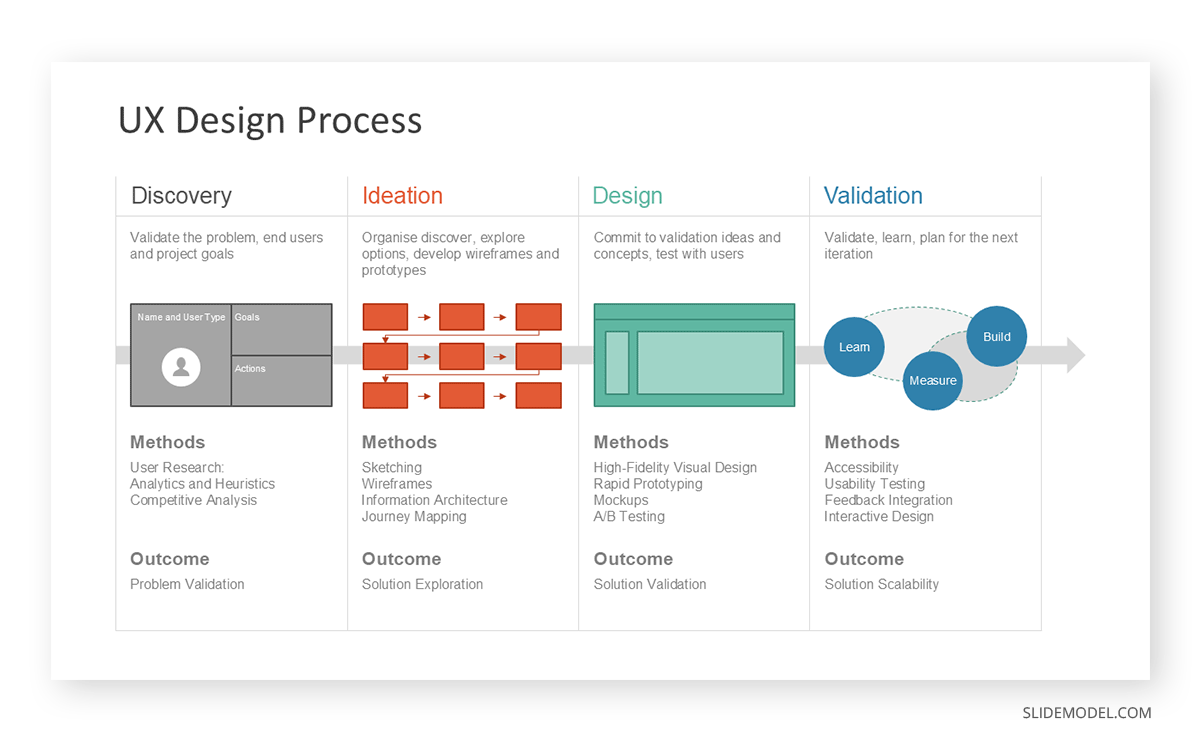
A UX case study presentation should follow a narrative structure that mirrors the actual design process. This gives the audience a framework for understanding your decisions in context, rather than evaluating isolated outputs without the reasoning behind them. If you are working on the written version alongside the presentation, reviewing guidance on writing and presenting a case study can help you make structural decisions during the drafting stage that pay off when the material is delivered live.
Define the Problem Before Anything Else
The single most important slide in a UX case study is the one that establishes the problem you were solving. Many practitioners rush past this section and jump directly to their research methodology or early sketches. That approach forces the audience to work backward to understand why the work mattered in the first place.
A clear problem statement should explain who was affected, what went wrong, and the consequences for the user or the business. If you were redesigning an internal tool that caused frequent errors for customer service agents, state that clearly and, if possible, quantify the impact. Grounding the audience in the problem creates the context that makes every subsequent decision legible. Without that foundation, even excellent design work can appear arbitrary.
Wherever possible, connect the problem to business outcomes from the start. Framing the challenge in terms of measurable impact, whether that is error rates, task completion times, or user satisfaction scores, demonstrates the kind of business awareness that distinguishes experienced practitioners from those focused solely on the craft.
Walk Through Your Research Process
The research phase of a UX project often produces more material than can reasonably fit into a presentation. The goal is not to present everything you did, but to demonstrate that your process was systematic and that it produced insights that genuinely shaped your design direction. A well-structured research presentation connects raw evidence to the themes that emerged from the synthesis, making it clear that your decisions are based on real user data rather than assumptions.
Explain which methods you chose and why those methods were appropriate given your constraints. If you ran usability tests rather than a survey, explain the reasoning behind that choice. If you worked with secondary research because time or access was limited, acknowledge that and explain how you compensated for those constraints.
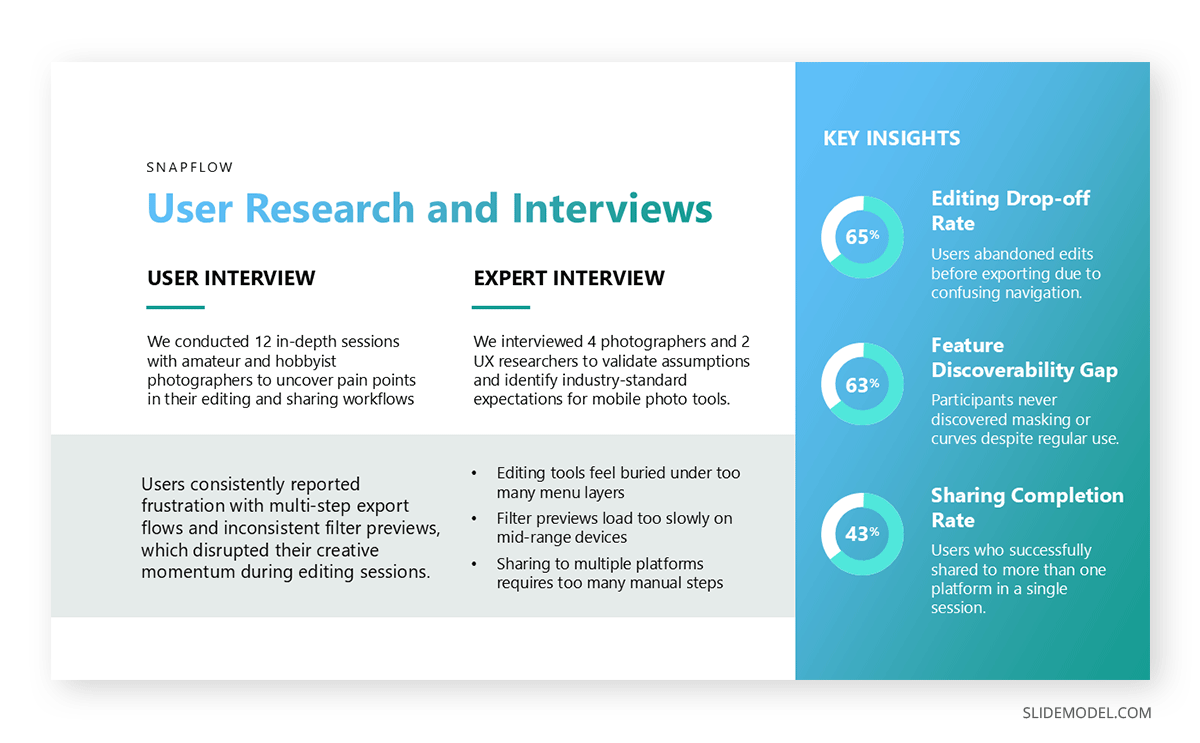
Showing specific quotes from user interviews, patterns from observation sessions, or key statistics from behavioral data provides the audience with concrete evidence that your insights come from real people. Resist the temptation to present research as a list of findings without showing the underlying evidence. The evidence is what makes the insights credible.
Show the Decisions, Not Just the Deliverables
One of the clearest differentiators in UX case study presentations is whether the presenter shows their work. This approach mirrors the format used when presenting a design thinking process: the value lies not in the final output but in showing the progression through problem definition, ideation, prototyping, and testing. Displaying early explorations alongside the final solution, with a clear explanation of what changed between iterations and why, gives the audience the full picture they need to evaluate your judgment.
If your initial direction failed a usability test, that failure is valuable information. It shows that your process was genuinely iterative rather than linear, and it demonstrates that you adjusted course based on evidence rather than intuition. Omitting failures in favor of a smooth-looking progression makes the presentation feel curated, reducing trust rather than building it.
Annotated screenshots and short video clips of prototypes being tested can make this section particularly effective. The audience sees the design evolve in response to real feedback, which is exactly what they are looking for. Each iteration should be framed around the question that prompted it and the finding that resolved it.
Connect Design Outcomes to Business or User Impact
UX work does not exist in isolation from the broader product or business. It affects conversion rates, task completion rates, support ticket volume, user satisfaction scores, and other measurable outcomes. If you have access to data that shows what changed after your design was implemented, that data belongs in your case study and should be presented prominently.
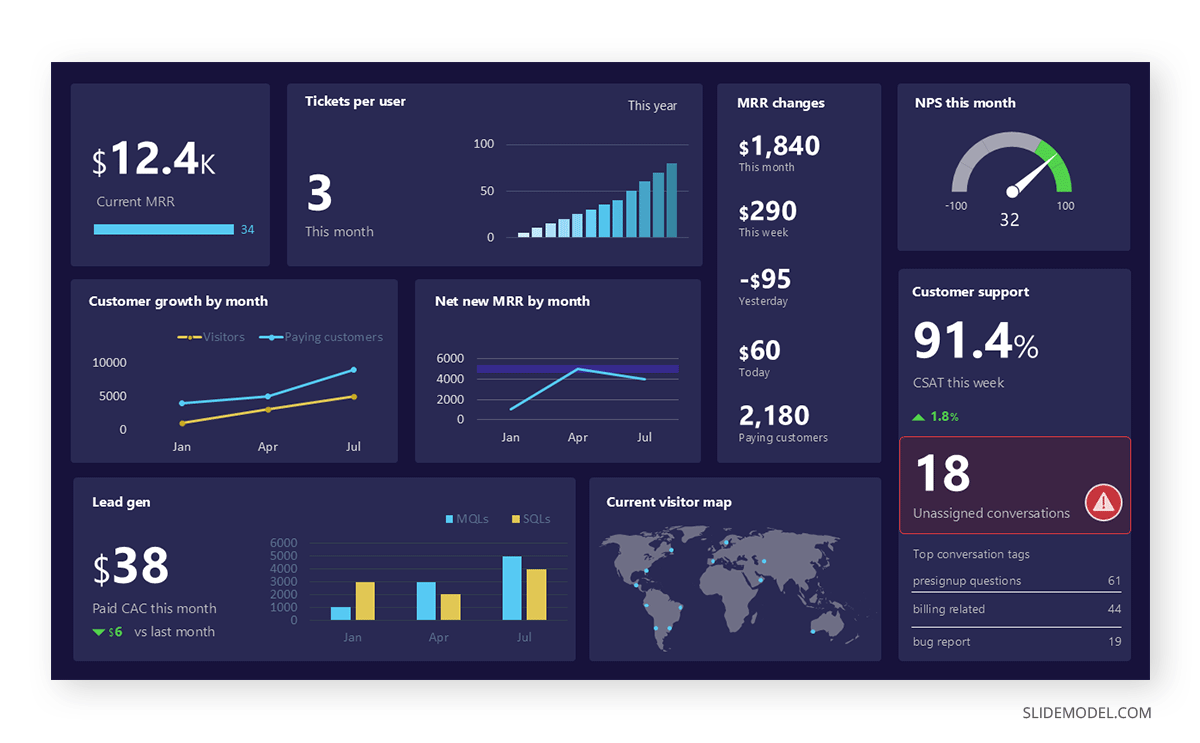
Even when hard metrics are not available, qualitative outcomes carry weight. A reduction in user complaints, positive feedback from customer service teams, or improved behavior observed in follow-up research all serve as evidence that the design achieved its intended purpose. Connecting your work to outcomes also demonstrates business awareness, which is increasingly expected of senior UX practitioners across all industries.
Presenting UX Research Findings to Non-Design Audiences
When the purpose of the presentation is to share research findings rather than to walk through a completed project, the challenge shifts from storytelling to translation. Research artifacts, including affinity maps, journey maps, and behavioral patterns, can be difficult for non-designers to interpret without guidance, and presenting them without guidance often leaves stakeholders uncertain about how to use the information.
The most effective UX research presentations frame findings around decisions that the audience needs to make. Rather than presenting everything the research revealed, select the findings that directly inform the questions your stakeholders are currently asking. If the product team is deciding whether to invest in a mobile-first redesign, lead with evidence on how users currently access the product on mobile and where they fail.
Organizing findings into clear themes with supporting evidence is more effective than presenting individual data points in sequence. The principles behind effective data presentation apply directly to research readouts. Each theme should lead with the key insight, be supported by quotes or metrics, and connect to a clear implication for the product or business. When the audience can trace the path from evidence to implication without having to make inferences themselves, the research becomes actionable rather than purely informational.
Applying established laws of UX for presentation design can also help you structure research slides so that the most important information is immediately visible and the audience does not have to search for the key takeaway on each slide. Design principles like visual hierarchy and proximity apply as much to how you present research as to how you design products.
How to Present a UX Case Study in an Interview
Presenting a UX case study in an interview setting introduces specific constraints that require deliberate preparation. Most interview panels will allocate between 20 and 45 minutes for a portfolio walkthrough, which means you need to be selective about how much depth you go into for any single project and how many projects you attempt to cover.
Choose one or two case studies that best demonstrate the skills most relevant to the role you are interviewing for. A generalist product design role might call for a project that shows breadth across research, interaction design, and measurement. A specialized research role should feature a project where your research process was particularly rigorous and where the findings had a measurable impact on the product direction.
Practice presenting each case study at two different paces: a five-minute overview and a fifteen-minute deep dive. Interviewers sometimes redirect the conversation, ask follow-up questions early, or ask you to skip ahead to a specific section. Being able to adjust your pace without losing the thread of the story makes you appear confident and well-prepared. A strong interview presentation is one in which the interviewer leaves with a clear picture of your thinking process, not just your visual output.
Anticipate the questions that will come at the end of the presentation. Interviewers routinely ask what you would do differently if you could start the project over, how you handled disagreements with stakeholders, and what constraints affected the outcome. Having honest, reflective answers demonstrates maturity and self-awareness. It also helps to review how to handle negative feedback in presentations before the session, since design critiques in interview settings can be direct. Prepare these answers in advance and resist the impulse to present only a positive view of how the project went.
Understanding what interviewers look for in a case study interview can help you calibrate how much time to spend on each section and which aspects of your process to foreground. Panels that include senior designers will typically want to engage in detail with your design decisions. In contrast, panels that include product managers may focus more on how your work connects to user needs and business outcomes.
Slide Design for UX Presentations
The slides you use to present a UX project should support your narrative without competing with it. Dense slides covered in text force the audience to read rather than listen, disrupting the narrative structure and reducing comprehension. Every slide should have a clear focal point, and the content on each slide should directly support the point you are making at that moment in the presentation.
Each slide should communicate one idea. If you are walking through your research methodology, show the method visually with a brief label rather than a paragraph describing it in full sentences. If you are presenting a usability finding, display the quote or the behavioral observation prominently and reserve your verbal explanation for the interpretive detail. The slide provides the evidence; your narration provides the meaning.
Annotating screenshots and wireframes is one of the most effective techniques available in a UX case study presentation. Rather than describing what the user saw in a given interface, show the interface and use callouts to highlight the elements relevant to the finding or decision. This approach keeps the slide visually focused while giving the audience the specific context they need to follow your reasoning.
Consistency in slide layout helps the audience track their place in the story. Using a predictable structure for before-and-after comparisons, research evidence slides, and outcome slides gives the presentation a sense of coherence. When every research finding slide follows the same format, the audience quickly learns how to read them, which means less cognitive effort spent on structure and more attention available for content.
Common Mistakes When Presenting UX Work
The most damaging mistake in a UX case study presentation is beginning with the solution. Opening with your final screens before establishing the problem and the research context deprives the audience of the framework they need to evaluate those screens meaningfully. The design work looks arbitrary without the reasoning that produced it, and the audience has no way to judge whether the decisions were appropriate to the problem.
A second common issue is presenting only the successes. Projects rarely go smoothly from problem definition to final launch. Skipping the points where the design failed tests or where stakeholder feedback forced a significant pivot makes the presentation feel incomplete. More practically, it removes the moments that most clearly reveal how a designer works under pressure and whether they respond to evidence or defend their initial direction.
A third problem affects many practitioners who present UX research findings: data without interpretation. Showing a chart or a list of quotes without explaining what those data points mean and what they imply for the product forces the audience to draw their own conclusions. In a research presentation, your job is to do that interpretive work for the audience and connect each finding to the decision it should inform.
Finally, avoid treating the conclusion as a formality. The final section of a UX case study should clearly state what changed as a result of the design, what you would approach differently with the benefit of hindsight, and what questions remain open. Ending abruptly after displaying the final deliverable leaves the audience without a clear sense of what the project actually achieved or what you learned from the experience.
FAQs
What is a UX case study?
A UX case study is a documented account of a design project that explains the problem addressed, the research methods used, the decisions made during the design process, and the resulting outcomes. It differs from a portfolio screenshot because it shows the reasoning and process behind the work, not just the final output.
How long should a UX case study presentation be?
For interview settings, most case study presentations run between 20 and 45 minutes, including time for questions. For stakeholder presentations focused on research findings, 30 minutes is a common target. The appropriate length depends on your audience and the complexity of the project, but covering fewer projects in greater depth generally yields better results than rushing through many superficially.
How do I present a UX project if I cannot share client work publicly?
Many UX practitioners work under NDAs that restrict public sharing. In a presentation context, you can often share work selectively with hiring panels on the understanding that it is confidential. Alternatively, you can describe your process and outcomes without showing the actual screens, or use clearly labeled sanitized versions of the work that remove identifying information.
What should I include in each section of a UX case study?
A well-structured case study should cover the problem definition, the research approach and key findings, the design decisions and iterations, and the measured or observed outcomes. Each section should be detailed enough to give the audience genuine insight into your process, but concise enough to maintain their attention throughout.
How do I present UX research findings to stakeholders who are not designers?
Focus on implications rather than methods. Stakeholders who are not trained in UX research care most about what the findings mean for product decisions. Frame each finding around the question it answers or the action it recommends, and support it with clear evidence such as quotes or behavioral data. Avoid presenting research artifacts, such as affinity maps or journey maps, without a substantial explanation of what they show.
How do I present a UX case study in an interview?
Select one or two projects that are most relevant to the role. Walk through each using a narrative structure that begins with the problem, moves through your research and design process, and ends with outcomes. Practice at different paces so you can adjust to the time available, and prepare honest answers for questions about what you would do differently.
What is the best structure for a UX case study presentation?
The most effective structure follows the design process itself: problem statement, research approach, key insights, design decisions and iterations, and outcomes. This structure gives the audience a logical framework for understanding your choices and makes it easy to ask follow-up questions at any point in the presentation.
How many case studies should I include in a UX interview presentation?
One or two is usually sufficient. Depth is more valuable than breadth in most interview contexts. A single well-presented case study that shows your complete process from research to outcome reveals more about your capabilities than several shallow overviews of projects you cannot discuss in detail.
How do I present UX design work that involved a team?
Be clear about your individual contribution while acknowledging the collaborative context. Explain what you were personally responsible for, how you worked with other team members, and which decisions you led versus those that were shared. Interviewers understand that design is a collaborative discipline; they want to know where your contribution sat within the broader effort.
Should I include failures and setbacks in a UX case study?
Yes. Showing where initial directions failed or where feedback prompted significant changes demonstrates that your process was genuinely iterative and evidence-based. Experienced interviewers and stakeholders are often more impressed by an honest account of how a project evolved than by a presentation that shows only polished outcomes and omits the difficult moments.
How do I keep a UX case study presentation from becoming too long?
Be disciplined about what to include. Each piece of content should serve the narrative. If a research finding did not meaningfully affect your design direction, it can be mentioned briefly rather than shown in detail. A clear narrative arc helps you identify which material supports the story and which is tangential to the main argument.
What is the difference between a UX portfolio and a UX case study?
A UX portfolio is typically a collection of deliverables that shows the range and quality of your work across multiple projects. A UX case study is a structured account of a single project that explains the process behind those deliverables. In a presentation context, case studies are generally more effective because they provide the context needed to evaluate your decisions rather than just your outputs.
How do I present UX work if my outcomes were negative or inconclusive?
Frame negative or inconclusive outcomes honestly and explain what they revealed. A design that did not achieve its intended goal still produced learning that informed the next direction. Presenting this honestly demonstrates intellectual integrity and shows that you are capable of evaluating your own work critically rather than retrospectively justifying every decision you made.
How important are the visuals in a UX case study presentation?
Slides should support your narrative rather than substitute for it. Clear, well-annotated visuals of research artifacts, wireframes, and final designs help the audience follow your process. But the quality of your explanation and reasoning carries more weight than visual production value. A well-reasoned case study with straightforward slides typically outperforms a visually impressive presentation with a weak narrative structure.
How do I handle questions I cannot answer during a UX case study presentation?
Acknowledge the question honestly and explain what you would do to find the answer. If you do not have access to certain data or did not measure a particular outcome, say so directly and describe what additional research you would conduct. Interviewers and stakeholders respond well to honesty and a demonstrated awareness of what remains unknown, rather than to confident answers that do not withstand scrutiny.
Final Thoughts
Presenting a UX case study is fundamentally an exercise in communication. The visual work is the evidence; the presentation is the argument. Whether you are sharing UX research findings with a product team, presenting UX design work to a hiring panel, or walking a client through a completed project, the structure and delivery of your presentation shape how the work is understood and evaluated.
The most effective case study presentations are those that make the reasoning visible. They begin with a clear problem, show the evidence that informed key decisions, demonstrate how the design evolved in response to what was learned, and conclude with an honest account of what changed and what remains open. Audiences across all contexts are better equipped to engage with work they can follow from beginning to end.
Taking the time to prepare a structured, evidence-based presentation is not a separate task from doing good UX work. It is the final step in translating user insights into clear, credible communication for the people who need to act on them.