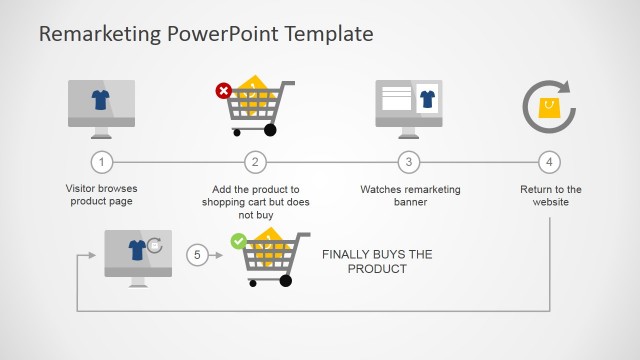
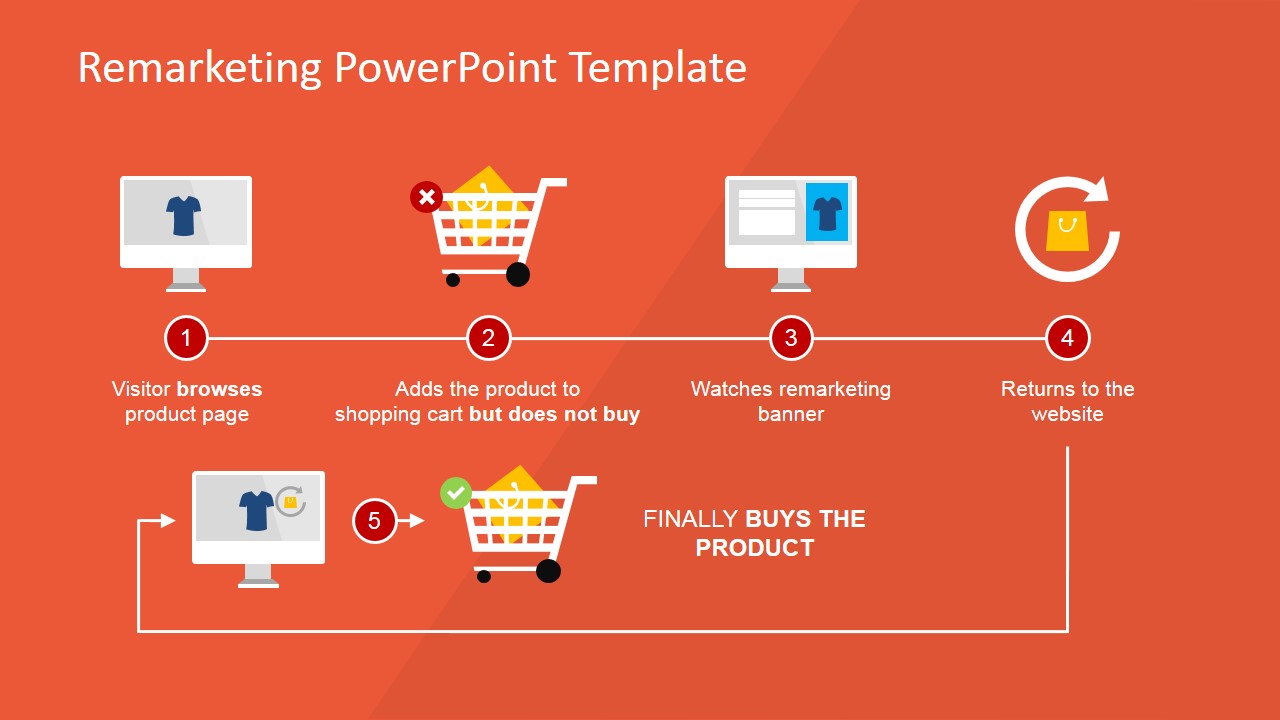
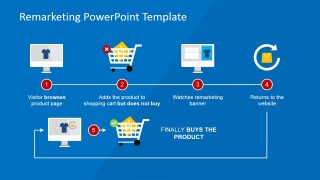
Flat Remarketing PowerPoint Template is a presentation template containing a Remarketing process flow & diagram design that you can use to present a remarketing campaign to a client or audience.
You can use online remarketing campaigns to reconnect with people who have visited your website or used a mobile application before, so it becomes an effective approach to reconnect with your audience showing relevant ads as they browse a website.
This remarketing PowerPoint template has a modern flat style and useful slide designs for PowerPoint presentations. Transitions and subtle animated elements were added to the template in order to make it look really nice. Inside this remarketing PPT presentation design you can find:
- A complete remarketing process flow diagram for PowerPoint created with editable shapes and cliparts.
- Nice vertical transition effect are shown as the presentation progresses.
- Useful clipart designs for shopping experience and online marketing presentations created with PowerPoint shapes so you can easily change colors and resize without affecting the picture quality.
- Flat icons and modern background colors following the latest trend for web design.
Here you can see a live preview:
Alternatively to flat remarketing PowerPoint templates you can download more online & e-commerce PowerPoint presentations with catchy background & themes that can be helpful to make presentations on online marketing strategy, search engine marketing or prepare a presentation on Internet business.
What’s inside this template
Example presentation scenarios
- A digital marketing manager can use the process flow diagram to explain how abandoned cart visitors are re-engaged through remarketing ads and brought back to complete a purchase.
- An agency account strategist can use the numbered step slides to walk a retail client through visitor browsing, cart abandonment, banner exposure, website return, and conversion.
- An e-commerce team lead can use the cart and product page illustrations to train staff on where remarketing fits inside the online sales funnel.
- A sales presenter can use the blue recap slide to summarize a proposed retargeting campaign before discussing budget, timing, or next steps.
Features
- 100% editable presentation template
- Compatible with Microsoft PowerPoint and Google Slides
- 16:9 aspect ratio slides
- Scalable vector shapes, icons and illustrations
- Ready with Animations & Transitions in PowerPoint
- AI-Ready for Microsoft Copilot and Claude
- Instant access and download
Frequently asked questions
Q: How should a presenter explain the remarketing journey without overwhelming the audience?
A: Start with the full process flow so the audience sees the entire customer loop, then move through the numbered detail slides one action at a time. Keep each step tied to a single customer behavior: browse, abandon cart, see banner, return, and buy. End with the blue recap slide to reinforce the full sequence.
Q: Who is this template best suited for in a business presentation?
A: This template fits marketers, e-commerce managers, and agency teams who need to explain retargeting mechanics to decision makers who may not work in ad platforms every day. The flat shopping cart, monitor, and banner illustrations translate campaign logic into customer actions, making it useful for client pitches, internal planning, and staff training.
Q: Why does the template use shopping and website illustrations instead of abstract marketing diagrams?
A: The shopping cart, product page, and return arrow act as familiar metaphors for the remarketing path. They make the process feel concrete: a visitor leaves, sees a relevant reminder, returns, and completes the purchase. This visual language reduces jargon and helps non-specialist audiences follow the cause-and-effect chain.









Flat Remarketing PowerPoint Template
8-slide remarketing presentation template with process flow diagrams, cart icons, and online advertising steps
Flat Remarketing PowerPoint Template is an 8-slide deck for explaining an e-commerce remarketing campaign. It includes a full process flow diagram, numbered step slides, shopping cart illustrations, and product page scenes for marketers, agencies, and sales teams. It is built for Microsoft PowerPoint and Google Slides.
- Category
- Business PowerPoint Templates
- Rating


 Loading...
- Aspect ratio
- 16:9
- Item ID
- 6665-01
- Colors
 Microsoft PowerPoint
  Microsoft Copilot
  Claude for PowerPoint
 Other formats supported
Subscribe today and get immediate
access to download our PowerPoint templates.