Invoice PowerPoint Template is a simple and lightweight presentation template design for PowerPoint including slides representing a set of paid and unpaid invoice layouts. This invoice template provides blue and red PowerPoint theme versions of invoices. Users can pick the desired invoice slides or customize the PowerPoint theme and adapt the invoice based on their own invoicing requirements. Most invoice templates are available in A4 page side format. This invoice PowerPoint template includes widescreen size for presentation purposes. However, you can modify and present these invoice slides to issue a payment receipt in a different style.
PowerPoint provides a range of designing features, which is why people use Microsoft PowerPoint to custom create invoice styles. Users can take advantage of Invoice PowerPoint Templates to personalize an invoice. The template provides basic components that are necessary for any invoice, giving users a structure to modify.
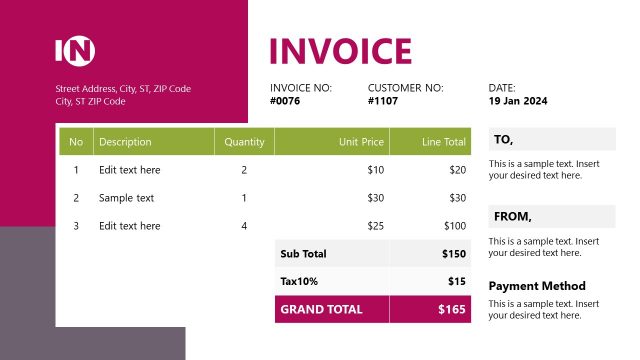
The Invoice PowerPoint Template slides consist of logo and company name title placeholders. Users can replace the logo with the company’s logo and add the name. Enter address and contact information below the company name. On the right side of the invoice template, add information about the invoice including invoice number, date, due date, and reference numbers. The invoice always contains information about the recipient and invoice issuer. This invoice PowerPoint has two sections to provide these details as billed to and site address.
The accounting invoice template for PowerPoint and Google Slides display rows in a table for service or product sale details. These invoicing slides can be customized according to the nature of the invoice. PowerPoint Invoice layouts are a perfect tool for creative-minded people who can adjust elements into an attractive invoice to present to their clients or to create presentation slides showing how a specific invoice will look for a company. The invoices can also be used by Purchasing departments or to describe the procurement process, these can be also combined with slides related to Purchase Order and Procurement processes. Once designed, the invoice templates are re-usable for various finance or reporting presentations. The invoice templates are simple PowerPoint layouts to suit individual business needs. You can also record the sales transaction on PowerPoint to show activity or accounting.
What’s inside this template
Example presentation scenarios
- A finance manager can present a proposed invoice format to leadership, using the line-item table and totals section to show how charges, tax, and final payment amounts will appear.
- An accounting team can train staff on invoice review, using the bill-to, site-address, invoice number, due date, and total fields to explain where key billing information belongs.
- A procurement presenter can connect purchase order or payment workflows to a visual invoice example, using the unpaid and paid-stamp layouts to distinguish pending and completed transactions.
- A consultant or service provider can show a client-facing billing format during onboarding, using the logo area, business address block, and itemized description table to discuss what clients will receive.
Features
- 100% editable presentation template
- Compatible with Microsoft PowerPoint and Google Slides
- 16:9 aspect ratio slides
- Scalable vector shapes, icons and illustrations
- AI-Ready for Microsoft Copilot and Claude
- Instant access and download
Frequently asked questions
Q: How should a presenter explain an invoice slide without making it feel like a static form?
A: Start with the recipient and invoice metadata, then move down to the line-item table and totals. This creates a simple reading path from identity, to obligation, to amount due. The paid-stamp slides can close the explanation by showing how the same invoice changes once the transaction is completed.
Q: Who is this invoice template best suited for in a business presentation?
A: It fits presenters who need to discuss billing as part of a larger finance, procurement, or client onboarding story. Accounting teams can use it to explain invoice fields, procurement teams can connect it to purchase order processes, and service providers can show clients how billed work will be summarized.
Q: Why include both standard and paid-stamp invoice layouts?
A: The two states help the audience separate invoice creation from payment completion. A clean invoice form explains structure and required information, while the red PAID stamp works as a strong visual signal for closure. This contrast is useful when presenting approval steps, payment status, or transaction lifecycle.


Invoice PowerPoint Template
4-slide 16:9 invoice presentation template with line-item tables and paid-stamp layouts
The Invoice PowerPoint Template is a 4-slide 16:9 presentation template for showing invoice formats in Microsoft PowerPoint and Google Slides. It includes blue and red invoice form layouts, paid-stamp versions, line-item tables, bill-to and site-address sections, invoice metadata, subtotal, tax, and total fields for finance, accounting, procurement, or payment discussions.
- Category
- Business PowerPoint Templates
- Rating

 Loading...
- Aspect ratio
- 16:9
- Item ID
- 8422-01
 Microsoft PowerPoint
 Microsoft Copilot
 Claude for PowerPoint
Other formats supported
Subscribe today and get immediate
access to download our PowerPoint templates.