The editable Invoice Template for PowerPoint is a creative design invoice layout. An invoice is an official document issued by the seller. It mentions the sale details like pricing, the number of products, or service details. This editable invoice solves the problem of designing an invoice or bill every time before it is issued. The invoice PowerPoint template can be used by shop sellers, service providers, accounting officers, or other personnel from the finance department. Also, small businesses can document their sales record using this simple invoice template. It can also be presented before the students or beginners to describe the critical components of the invoice.
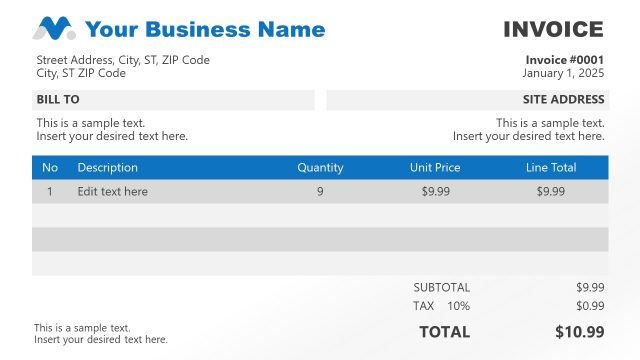
The Invoice Template for PowerPoint carries an organized format. The header of the slide depicts the title of the Invoice, company address, and logo. In the middle of the first slide, there is a 5×3 table that displays the number of items along the rows and description, quantity, unit price, and line price along the column. Users can mention their custom values between these columns and rows to prepare their invoices accordingly. The grand total of tax entities can be written at the bottom of this chart. There are text areas on either side of this central table to note the credentials like customer number, date, invoice number, payment method, etc. The sections for To and From can be used to mention the name of the seller and customer, respectively.
The second layout for this invoice template differs with respect to the arrangement of invoice components like customer and seller info, payment method, etc. Users can choose between the two formats to prepare their customized invoice templates. The template is entirely editable and easy to use. Sellers can enter the details in pre-defined fields and take a print or email the document to their buyers. So, grab this PowerPoint template and quit the tradition of manually designed invoices.
What’s inside this template
Example presentation scenarios
- A small business owner can prepare a client-facing billing example by filling the line-item table, invoice number, customer number, date, tax, and grand total areas.
- An accounting trainer can explain invoice components to students by walking through the header, To and From blocks, payment method field, and itemized pricing table.
- A service provider can compare two document layouts before sending a proposal-related invoice, using the first slide for a balanced form and the second slide for a stronger left-side information panel.
- A finance team can document a simple sales record for an internal review by replacing the sample descriptions, quantities, unit prices, subtotal, tax, and grand total.
Features
- 100% editable presentation template
- Compatible with Microsoft PowerPoint and Google Slides
- 16:9 aspect ratio slides
- Scalable vector shapes, icons and illustrations
- AI-Ready for Microsoft Copilot and Claude
- Instant access and download
Frequently asked questions
Q: How should a presenter explain invoice details clearly with this template?
A: Start with the identifiers at the top: invoice number, customer number, and date. Then move through the line-item table from description to quantity, unit price, and line total. Close with subtotal, tax, grand total, and payment method so the audience understands both the transaction detail and the payment action.
Q: Who is this template best suited for?
A: This template fits small business owners, service providers, accounting staff, and instructors who need to show a clean invoice structure without building a form from scratch. It works well for a single billing example, a finance process explanation, or a classroom lesson about required invoice fields.
Q: Why are there two invoice layouts instead of one?
A: The two layouts support different reading patterns. Slide 1 spreads customer, seller, and payment notes around the main table, which is useful for balanced review. Slide 2 groups those details in a strong left panel, leaving the invoice table and totals to read as the main financial record.


Invoice Template for PowerPoint
2-slide 16:9 presentation template for invoice tables, totals, and payment details in PowerPoint and Google Slides
Invoice Template for PowerPoint is a 2-slide business presentation template for preparing or explaining invoice documents. It includes editable invoice headers, line-item tables, tax and grand total rows, To and From fields, and payment method panels. It is intended for sellers, service providers, accounting staff, and finance training in Microsoft PowerPoint and Google Slides.
- Category
- Business PowerPoint Templates
- Rating

 Loading...
- Aspect ratio
- 16:9
- Item ID
- 21369-01
- Colors
 Microsoft PowerPoint
 Microsoft Copilot
 Claude for PowerPoint
Other formats supported
Subscribe today and get immediate
access to download our PowerPoint templates.