Our Digital Divide PowerPoint Template is a compilation of human illustrations representing the digital divide concept. The digital divide signifies the gap between communities and people due to differences in technology access. For instance, some people and groups don’t have access to high-speed internet, smartphones, and computers. The reasons behind this digital divide are numerous, i.e., poor economic conditions, lack of motivation and awareness, geographical barriers, and traditions. Consequently, the digital divide deprives people of making progress and getting quality education to match world standards. NGOs and government organizations strive to bridge this digital divide by running awareness campaigns and providing funds.
This Digital Divide PowerPoint template carries creative scenes to visually describe the digital divide and its consequences. Users can edit these visuals and add the relevant description to each slide using the text areas. On the title slide is a scene in which two humans are shown standing on two separate pieces of earth. The two human characters hold complementary parts of the socket wire. The scene indicates the separation of people due to the digital divide. Users can discuss the effects of the digital divide with this infographic illustration. Similarly, the next slide shows two mobile phones; one with an internet connection and the other with no telecom signals. Two human hands are emerging from the mobiles and cannot join together.
The Digital Divide PowerPoint Template also carries the slides with a robotic hand visual and Wi-Fi sign. Presenters can use this slide to demonstrate the importance of robotics and technology in different fields of life. Users can also depict the bridging of this digital divide through the scene of a walking human character on a pencil illustration from the notebook to a digital tablet. Further, this digital divide presentation template has visual scenes of a human character walking up the stack of books to reach the laptop. So, professionals can relate these infographics to their presentation points. Editable timelines and graphical elements are also provided in this template to represent statistical data. This PPT layout is editable with PowerPoint, Google Slides and Keynote. Presenters can use these slides or copy the visuals to other presentations.
What’s inside this template
Example presentation scenarios
- An education leader can use the book ladder and laptop slides to explain how limited device access affects student progress and digital learning opportunities.
- A nonprofit program manager can present a community connectivity initiative using the disconnected cable cover, smartphone illustration, and milestone timeline to frame the problem and next steps.
- A public policy analyst can report on digital inclusion metrics with the percentage bars, stacked area chart, and 100% column chart while keeping the topic connected to human impact.
- A telecommunications or social impact team can use the robotic hand and Wi-Fi slides to discuss technology access, automation, and infrastructure priorities for underserved communities.
Features
- 100% editable presentation template
- Compatible with Microsoft PowerPoint and Google Slides
- 16:9 aspect ratio slides
- Scalable vector shapes, icons and illustrations
- AI-Ready for Microsoft Copilot and Claude
- Instant access and download
Frequently asked questions
Q: How should a presenter structure the message with this digital divide template?
A: Start with the disconnected cable cover to establish the access gap as a human issue. Use the smartphone, robotic hand, and education slides to explain causes and consequences. Move into the timeline and chart slides only after the audience understands the problem, so the metrics feel like evidence rather than isolated statistics.
Q: Who is this template best suited for?
A: This template fits educators, nonprofits, public agencies, and social impact teams presenting digital inclusion, internet access, device availability, or digital learning barriers. The human illustrations help nontechnical audiences connect with the issue, while the timeline and chart slides give program managers enough structure to report progress or propose action.
Q: Why do the visual metaphors help explain the digital divide?
A: The separated platforms, reaching hands, book ladder, and Wi-Fi symbols translate an abstract social issue into recognizable scenes. These metaphors show separation, connection attempts, and upward mobility before the deck introduces timelines and charts. That sequence makes the data easier to interpret because the audience already has a visual model for the problem.
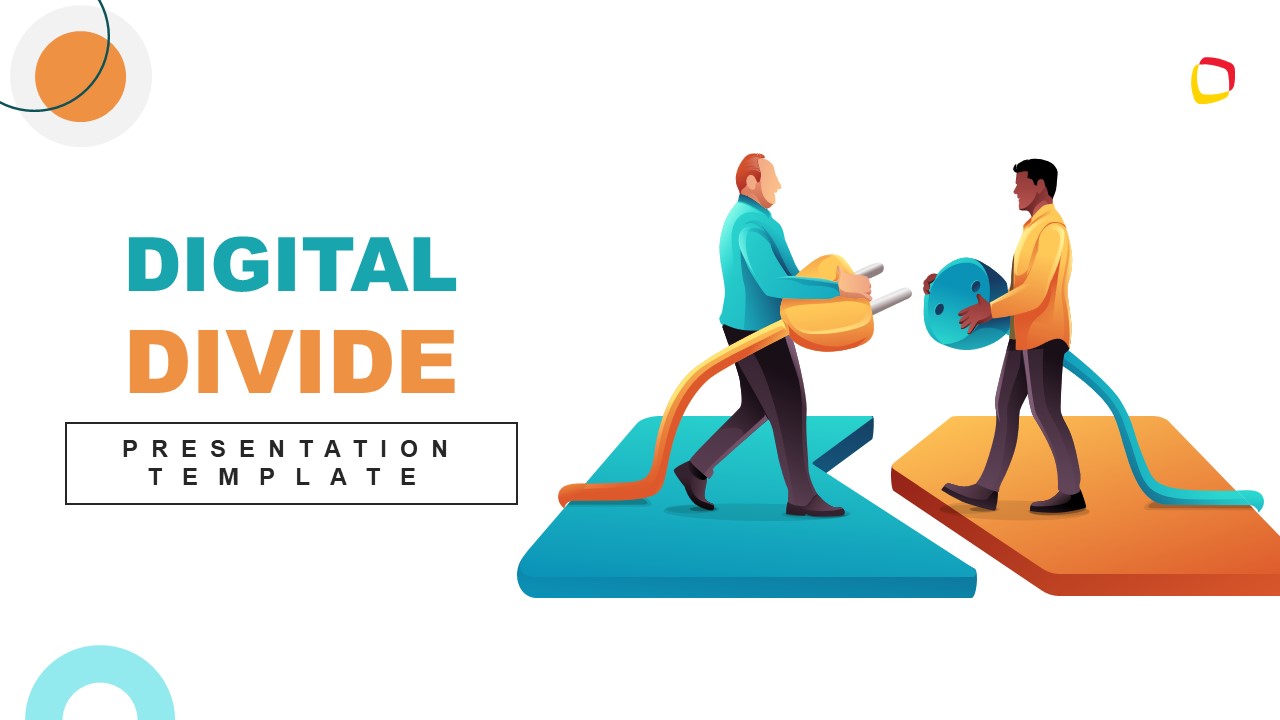


Digital Divide PowerPoint Template
13-slide presentation template for digital divide awareness with technology illustrations, timeline, and data charts
Digital Divide PowerPoint Template is a 13-slide deck for explaining technology access gaps through human illustrations, device scenes, a timeline, progress bars, area charts, and a stacked column chart. It is suited for educators, nonprofits, public agencies, and policy presenters working in Microsoft PowerPoint or Google Slides.
- Category
- Template Backgrounds
- Rating

 Loading...
- Aspect ratio
- 16:9
- Item ID
- 60555-01
 Microsoft PowerPoint
 Microsoft Copilot
 Claude for PowerPoint
Other formats supported
Subscribe today and get immediate
access to download our PowerPoint templates.