Billiards is a game played on a rectangular table that is covered with felt fabric. There are two famous billiards games i.e., snooker, played with 21 balls and pool played with 15 balls. The SlideModel templates of billiards present pool games, also known as pocket billiards. The term pool came from the pots/ pockets, one in each corner and one on each of the long sides. Billiards games are played with a cue stick to pot 15 balls into the pockets. The balls from 1-8 are in solid colors, and 9-15 are in stripes. Two people or groups can play this game and compete by shooting maximum balls in the pockets.
The Billiards templates can be used in many ways to describe topics of business, entertainment, sports, and education. If you are presenting the benefits of playing billiards games, the graphics can improve critical thinking and mental focus. A similar idea can be used to express business ideas, critical decisions, or keeping ahead of competitors. Another business example is the solid-color and striped balls that can represent two teams to discuss task performance. The pool tables also remind of bars, gambling, and play centers. You can add these slides to an entertainment topic presentation.
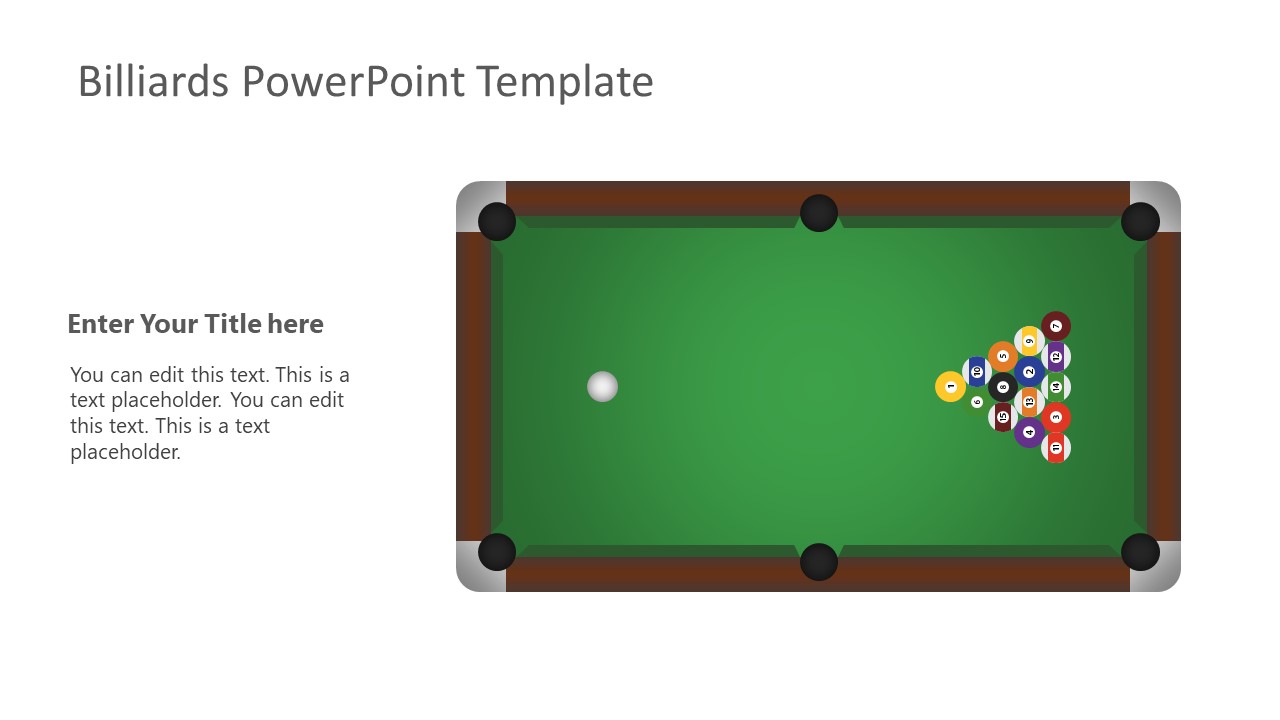
The Billiards PowerPoint Template presents illustrations of tabletop games played with cue sticks and balls. There are nine layouts to show different scenes of the game. The equipment is cue sticks, 15 balls, a triangular rack, and chalk. This template offers both blue and green table top slides. The blue tabletop is used in televised championship programs to make the balls visible for viewers.
The Billiards PowerPoint Template presents flat shapes of tabletop, balls, and other equipment. You can customize the design of shapes and reuse them to create the desired scene. You can also animate the pool billiards illustrations to show how it is played. One example of creating animation is to add a cue stick clipart on a tabletop slide and apply moving animation on the stick. It will visualize striking the balls, followed by scattered balls in next slide. Alternatively, you can download other templates related to billiard, like the 3D triangular layer diagram or billiard balls.
The Billiards templates can be used in many ways to describe topics of business, entertainment, sports, and education. If you are presenting the benefits of playing billiards games, the graphics can display how it improves critical thinking and mental focus. A similar idea can be used to express business ideas, critical decisions, or keeping ahead of competitors. Another business example is the solid-color and striped balls that can represent two teams to discuss task performance. The billiards games or cue sports are said to have health benefits such as hand-eye coordination, improved stretching, and even burning calories. You can make a convincing healthcare presentation using graphics from the Billiards PowerPoint template. The pool tables also remind of bars, gambling, and play centers. You can these slides into alike entertainment topic presentation.
What’s inside this template
Example presentation scenarios
- A sports instructor can introduce pool rules and equipment by using the pool table scenes, triangular rack, cue sticks, cue ball, and numbered billiard balls.
- A business facilitator can explain competitive positioning or decision sequencing by mapping teams, moves, or priorities to the numbered ball grid and racked ball layouts.
- An entertainment venue manager can present a billiards night, tournament plan, or recreational offer with the green and blue table scenes and cue equipment illustrations.
- An educator can discuss critical thinking, focus, and cause-effect behavior by using the scattered ball table scene to show how one action changes later outcomes.
Features
- 100% editable presentation template
- Compatible with Microsoft PowerPoint and Google Slides
- 16:9 aspect ratio slides
- Scalable vector shapes, icons and illustrations
- AI-Ready for Microsoft Copilot and Claude
- Instant access and download
Frequently asked questions
Q: How should a presenter use the billiards theme without making the message feel like a novelty?
A: Anchor each billiards visual to one clear idea. Use the title cover to set the metaphor, the pool table scenes to discuss positioning or cause and effect, and the numbered balls to identify steps, roles, or priorities. Keep text short so the game imagery explains the concept rather than competing with it.
Q: Who is this template best suited for beyond cue sports presentations?
A: It works well for trainers, facilitators, educators, and entertainment presenters who need a memorable way to explain strategy, focus, competition, or staged decision making. The numbered balls can represent tasks or teams, while the table layouts can frame movement, planning, and outcomes in a format audiences quickly understand.
Q: Why do the pool table and ball layouts help communicate strategy concepts?
A: Billiards is a useful visual metaphor because every shot depends on position, sequence, and the next move. The racked balls suggest starting conditions, the scattered table shows consequences, and the cue stick signals action. That structure helps audiences connect abstract planning decisions to a familiar physical scene.



Billiards PowerPoint Template
10-slide billiards presentation template with pool table scenes, numbered balls, and cue sports illustrations
Billiards PowerPoint Template is a 10-slide, 16:9 presentation template for cue sports, games, entertainment, and critical thinking topics. Visible layouts include a title cover, pool table scenes, numbered billiard ball icons, a triangular rack, crossed cue sticks, and chalk with cue illustrations for Microsoft PowerPoint and Google Slides.
- Category
- Shapes
- Rating

 Loading...
- Aspect ratio
- 16:9
- Item ID
- 2116-01
- Colors
 Microsoft PowerPoint
 Microsoft Copilot
 Claude for PowerPoint
Other formats supported
Subscribe today and get immediate
access to download our PowerPoint templates.