Slide 2 of 5 from Thermometer Shapes for PowerPoint
1068-thermometer-shape-2
Thermometer Charts for PowerPoint
- Chart
- Gauge
- Evaluation Slide
- 16:9
- 100% Editable
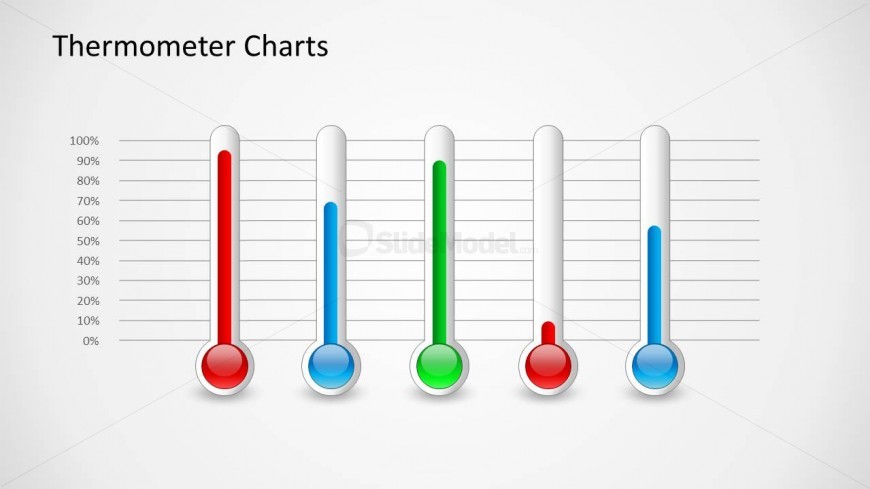
The Thermometer Charts slide from the Thermometer Shapes for PowerPoint template offers a clear visual method to evaluate performance metrics and project completion rates. Featuring editable shapes and vector icons, this slide layout supports straightforward comparison of multiple data points, making it suitable for business presentations and corporate slide decks. Its design integrates well with pitch deck templates and Google Slides templates focused on data visualization.
What’s on This Slide
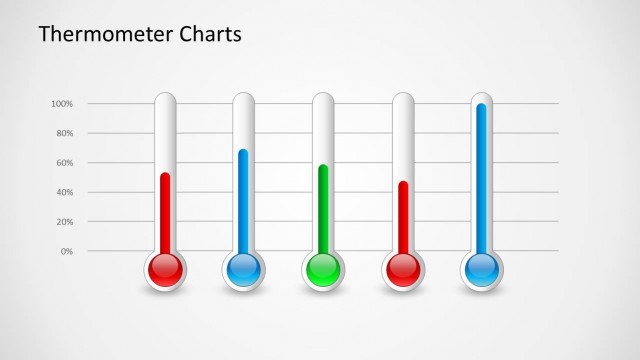
The slide features four vertical thermometer charts aligned horizontally across the center. Each thermometer is designed with a circular base and a vertical tube, displaying varying levels indicated by colored liquid. The leftmost thermometer is red, followed by a blue one, a green one in the middle, and another red thermometer on the right. A horizontal grid with percentage markings runs behind the thermometers, providing a reference scale from 0% to 100%. The title 'Thermometer Charts' is positioned at the top left in bold text.
How to Use It
This layout serves to visually represent levels or progress using thermometer charts. It is effective for displaying metrics such as performance indicators, project completion rates, or survey results. This slide fits well in a presentation sequence after introducing key metrics or objectives, allowing for a clear visual comparison of multiple data points. It is suitable for business reviews, project updates, or performance assessments, where visualizing data in a straightforward manner is essential.
Text Placeholders & Capacity
Keep your copy within these limits so it fits without resizing. The title slot can hold approximately 3-4 words comfortably.
| Placeholder | Count | Max characters (approx.) |
|---|---|---|
| Slide title | 1 | 20 |
Slide Keywords
Download unlimited PowerPoint templates, charts and graphics for your presentations with our annual plan.
DOWNLOADReturn to Thermometer Shapes for PowerPoint.