Slide 2 of 3 from Project Team Structure PowerPoint Template
Project Team Structure Overview
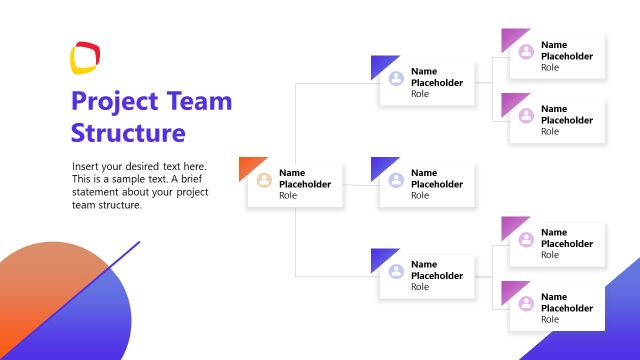
The Project Team Structure Diagram slide from the Project Team Structure PowerPoint Template offers a clear organizational chart ideal for business presentations and pitch decks. This layout uses editable shapes and vector icons to visually represent team roles and reporting lines, enhancing clarity in project presentations and team introductions. Its structured design supports effective communication of team dynamics within corporate presentation slide decks.
The layout features a hierarchical diagram with a central node at the top. This node is a hexagon containing a placeholder for a name, positioned centrally. Below, two branches extend to additional hexagonal nodes, each containing a name placeholder. Further down, these nodes split into two additional layers, creating a total of six nodes in the lower section. Each node is visually distinct, using different background colors for clarity. Text placeholders are aligned within each shape, and connecting lines illustrate the relationships between nodes. The overall structure is organized and clear.
This layout serves as an organizational chart, illustrating team structure and reporting lines. It fits well after an introductory slide, providing clarity on team roles and relationships. This structure is useful in business presentations to showcase team members, their roles, and how they connect within a project. It can also be applied in onboarding sessions to familiarize new employees with team dynamics and hierarchies.
Keep your copy within these limits so it fits without resizing. Node labels can hold up to 20 characters each.
| Placeholder | Count | Max characters (approx.) |
|---|---|---|
| Item heading | 6 | 20 |
| Item body | 6 | 20 |
Download unlimited PowerPoint templates, charts and graphics for your presentations with our annual plan.

DOWNLOADReturn to Project Team Structure PowerPoint Template.