Slide 1 of 3 from Project Team Structure PowerPoint Template
Project Team Structure Presentation Template – Cover Slide
Project Team Structure Overview
- Diagram
- Org Chart
- Org Structure Slide
- 16:9
- 100% Editable
The Project Team Structure Diagram slide from the Project Team Structure PowerPoint Template offers a clear organizational chart layout ideal for business presentations. This slide template uses editable shapes and vector icons arranged hierarchically to outline team roles and reporting relationships effectively. It supports team introductions and project role overviews within a corporate presentation or pitch deck template, providing a professional visual framework for project team communication.
What’s on This Slide
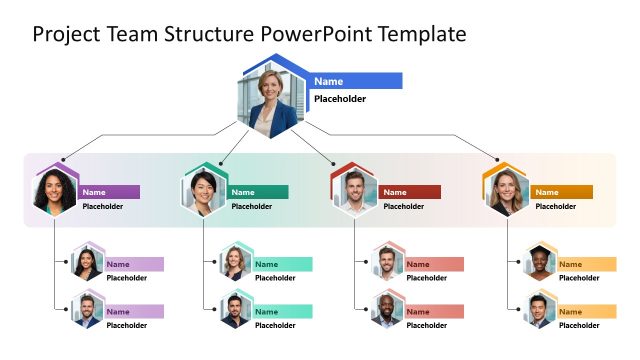
The layout features a central hexagonal node at the top with a placeholder for a name and image. Below, two branches extend from this node, each leading to additional hexagonal nodes representing team members. The nodes are arranged in a hierarchical structure, with some nodes in green and others in red and orange. Each node has a corresponding name placeholder. Connecting lines indicate relationships between nodes. The background is white, providing contrast to the colored nodes. The overall composition is balanced and visually organized.
How to Use It
This layout serves as an organizational chart, effectively illustrating team structure and reporting relationships. It fits within a presentation sequence that introduces team members or outlines project roles. Ideal for business scenarios such as team introductions, project kick-offs, or organizational overviews, this structure clearly communicates hierarchy and roles. It should be used when detailing team dynamics or presenting team capabilities in a project context.
Text Placeholders & Capacity
Keep your copy within these limits so it fits without resizing. Node labels can hold up to 20 characters each, while node bodies can accommodate around 50 characters.
| Placeholder | Count | Max characters (approx.) |
|---|---|---|
| Item heading | 6 | 20 |
| Item body | 6 | 50 |
Slide Keywords
Download unlimited PowerPoint templates, charts and graphics for your presentations with our annual plan.
DOWNLOADReturn to Project Team Structure PowerPoint Template.