Slide 4 of 4 from Matrix Project Team Structure PowerPoint Template
Matrix Project Team Structure Slide Template
Matrix Project Team Structure Overview
- Diagram
- Matrix Grid
- Org Structure Slide
- 16:9
- 100% Editable
The Matrix Project Team Structure slide from the Matrix Project Team Structure PowerPoint Template offers a clear matrix grid layout ideal for visualizing team assignments across departments like Finance, IT, Marketing, and HR. This editable slide supports organizational planning and resource allocation by displaying project teams in a structured format, making it a practical addition to business presentations or corporate slide decks.
About This Slide
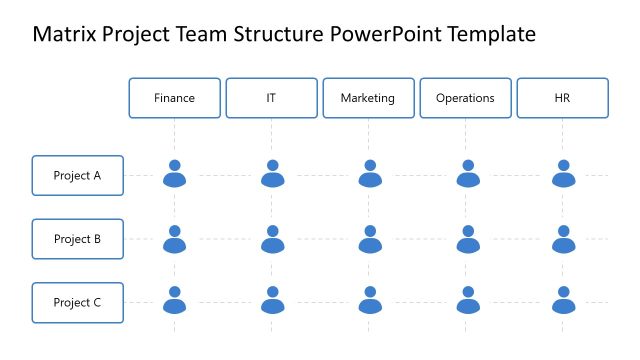
The Matrix Project Team Structure Slide Template is a professional presentation slide featuring a clean and organized layout. The slide displays a 3×4 grid matrix, with columns representing departments such as Finance, IT, Marketing, Operations, and HR, and rows representing projects like Project A, Project B, and Project C. Each cell in the matrix contains an icon representing team members, allowing for a clear visualization of team assignments across projects and departments.
The color scheme is predominantly blue and white, with semi-transparent bars highlighting specific team members, providing a visually appealing and easy-to-understand structure. This template is ideal for project managers to present team structures during meetings, ensuring stakeholders have a clear understanding of team dynamics.
This Matrix Project Team Structure Slide is part of the Matrix Project Team Structure PowerPoint Template, which can be customized for various business presentations. It is suitable for illustrating team development, goals, and introductions, making it a valuable tool for business presentations.
Download this slide for PowerPoint & Google Slides presentations, and tailor it to your specific needs.
What’s on This Slide
The layout features a matrix structure with four columns labeled Finance, IT, Marketing, and HR at the top. Three rows represent Project A, Project B, and Project C, with icons of team members placed in the matrix cells. The central area for Project B is highlighted with a light green background, indicating emphasis. Each team member icon is circular and evenly spaced within their respective cells. Text placeholders exist for project names and team member roles, aligned centrally within their cells. The overall design is clean and organized, facilitating easy comprehension of team structures.
How to Use It
This layout serves as a team structure overview, effectively displaying team members across various projects and departments. It fits well in presentations discussing team organization, project assignments, or resource allocation. This structure is useful for project management meetings, team introductions, or organizational planning sessions. It allows stakeholders to quickly grasp team dynamics and responsibilities, making it suitable for both internal and external communications.
Text Placeholders & Capacity
Keep your copy within these limits so it fits without resizing. Node labels can hold about 20 characters each, while node bodies can accommodate roughly 30 characters.
| Placeholder | Count | Max characters (approx.) |
|---|---|---|
| Item heading | 3 | 20 |
| Item body | 12 | 30 |
Slide Keywords
Download unlimited PowerPoint templates, charts and graphics for your presentations with our annual plan.
DOWNLOADReturn to Matrix Project Team Structure PowerPoint Template.