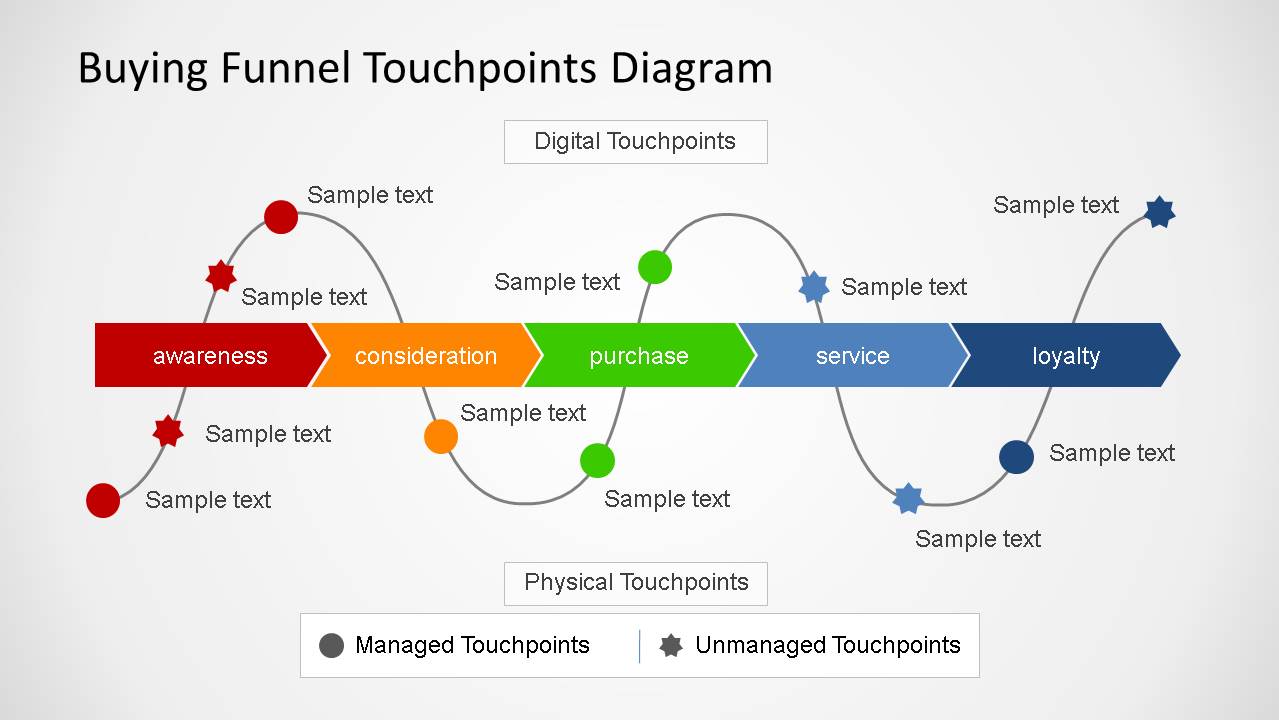
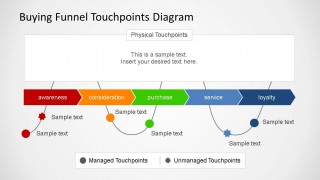
Buying Funnel Touchpoint Diagrams is a model used to combine multi-channel marketing with touchpoint based marketing. This presentation is based on two dimensions of touchpoints (Digital, Physical) E.g: for Digital touchpoint you can consider Search, Blog or a Website, in the Physical dimension you can consider TV, a Store or Word of Mouth. Also the diagram differentiates between managed and un-managed touchpoints, in order to plan on which ones the marketing plan can have a direct effect.
Each slide is fully customizable in order to enable the user to change evry characteristic of the model, include, exclude touchpoints or even change the flow of the buying funnel.
What’s inside this template
Example presentation scenarios
- A marketing manager can use the horizontal funnel to show leadership where digital touchpoints influence awareness, consideration, purchase, service, and loyalty.
- A customer experience lead can use the managed versus unmanaged markers to clarify which interactions the organization controls and which require monitoring or partnership.
- A consultant can use the digital and physical touchpoint panels to compare online channels with store, TV, or word-of-mouth interactions during a journey mapping workshop.
- A brand strategist can use the curved touchpoint path to explain how repeated contacts connect across funnel stages rather than appearing as isolated campaign tactics.
Features
- 100% editable presentation template
- Compatible with Microsoft PowerPoint and Google Slides
- 16:9 aspect ratio slides
- Scalable vector shapes, icons and illustrations
- AI-Ready for Microsoft Copilot and Claude
- Instant access and download
Frequently asked questions
Q: How should a presenter explain the buying funnel without overcrowding the diagram?
A: Start with the five funnel stages and define what each stage means for the audience. Then add only the most important touchpoints on the curved path. Use the managed and unmanaged legend to separate controllable campaign actions from outside influences, so the audience can see ownership before discussing tactics.
Q: Who is this template best suited for in a marketing planning session?
A: This template fits marketing, customer experience, and brand teams that need a shared view of touchpoints across the buying process. It is strongest when the discussion involves channel mix, customer contact planning, or responsibility across teams, because the diagram shows digital, physical, managed, and unmanaged interactions in one frame.
Q: Why does the design use a curved path around a straight funnel?
A: The straight funnel keeps the buying stages easy to follow, while the curved path suggests that customer interactions happen repeatedly around those stages. The dot and star markers make the touchpoints visible without turning the slide into a list, and the legend gives the symbols a clear planning purpose.


Buying Funnel Touchpoint Diagrams
3-slide 16:9 presentation template for buying funnel touchpoints, digital channels, and physical customer interactions
Buying Funnel Touchpoint Diagrams is a 3-slide presentation template for mapping customer touchpoints across a five-stage buying funnel. It includes a horizontal awareness-to-loyalty funnel, curved touchpoint paths, managed versus unmanaged markers, and digital or physical touchpoint text panels for marketing, customer experience, and journey planning in PowerPoint and Google Slides.
- Category
- Process Diagrams
- Rating


 Loading...
- Aspect ratio
- 16:9
- Item ID
- 6435-01
- Colors
 Microsoft PowerPoint
 Microsoft Copilot
 Claude for PowerPoint
Other formats supported
Subscribe today and get immediate
access to download our PowerPoint templates.