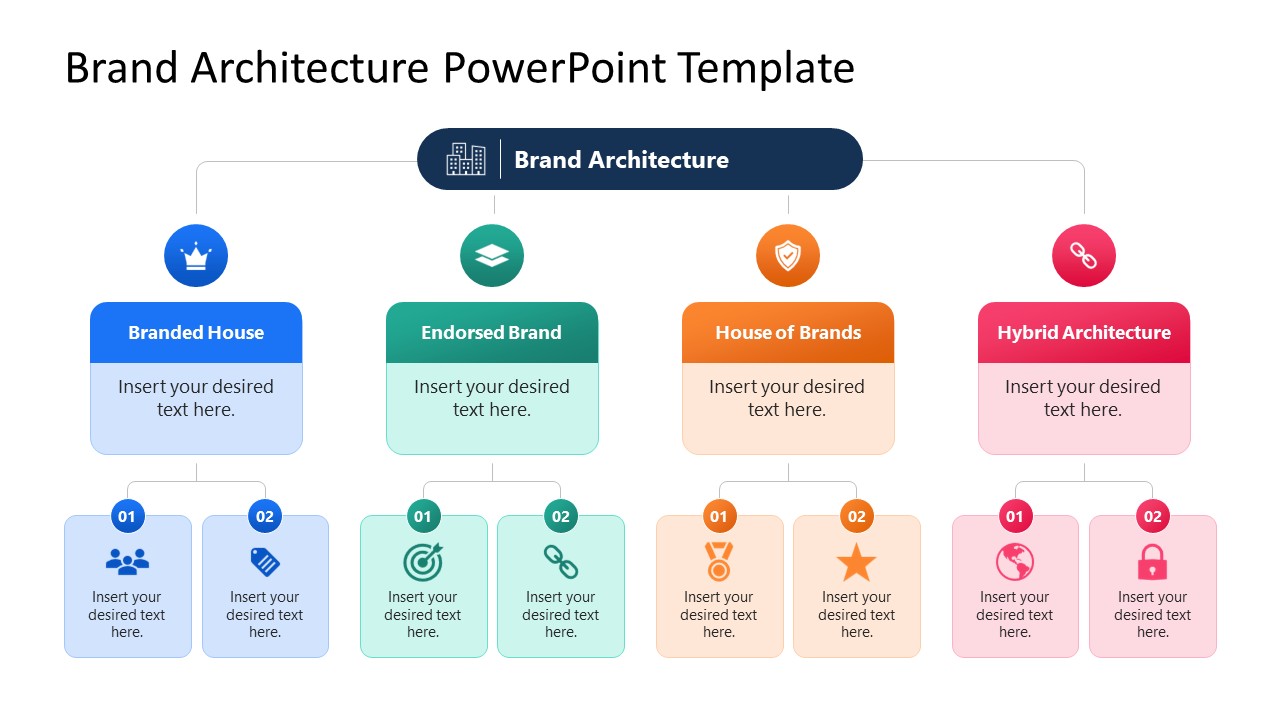
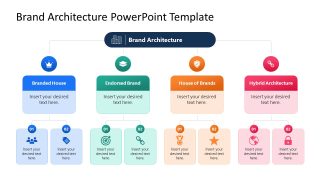
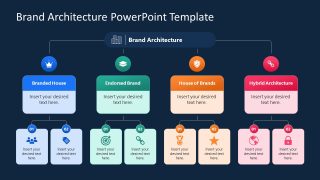
Present the multiple aspects of your brand and product strategy in the stakeholder presentations with our editable Brand Architecture PowerPoint Template. Brand architecture is a framework that a company uses to determine how its master brand and sub-brands relate to each other and how they position themselves in the market. There are multiple branding models, and the decision driver behind all four is risk tolerance versus the product’s cost. For instance, a branded house is cheap but carries a high reputational risk. Whereas a house of brands has low risk but higher costs to establish brand awareness. The brand architecture slide template includes two slides with the same diagram: one on a white background and the other on a dark background. The four models are:
- Brand House
- Endorsed Brand
- House of Brands
- Hybrid Architecture
The Brand Architecture PowerPoint Template features a central hub-and-branch structure, with the master node connecting to the four color-coded architecture models. Each of these models expands into two further categories. A brand consultant uses this layout in client audit presentations to map the brand’s current architecture and effectively highlight inconsistencies. In his next stakeholder presentation, a marketing director uses a branching diagram to determine whether the new product will use the parent name (branded house) or operate independently (hybrid architecture). This is also useful for board members to understand comparisons easily. A brand strategy uses the branch model to communicate that certain acquired brands should shift from individual identities to an endorsed model.
Download the brand architecture PPT template to structure your next brand strategy for executive presentations. Additionally, visit our collection of diagram templates and select the most suitable design based on the information you want to communicate.
What’s inside this template
Example presentation scenarios
- A brand consultant can use the hub-and-branch diagram to show a client how current product lines fit under branded house, endorsed brand, house of brands, and hybrid architecture models.
- A marketing director can present the four color-coded model cards to executives when deciding whether a new product should carry the parent brand or stand apart.
- A strategy team can use the numbered child nodes to organize acquired brands and discuss which brands should move into an endorsed or hybrid structure.
- An executive presenter can use the dark-background slide in a board meeting to summarize brand portfolio logic with a clear hierarchy and limited text.
Features
- 100% editable presentation template
- Compatible with Microsoft PowerPoint and Google Slides
- 16:9 aspect ratio slides
- Scalable vector shapes, icons and illustrations
- AI-Ready for Microsoft Copilot and Claude
- Instant access and download
Frequently asked questions
Q: How should a presenter explain the four brand architecture options without overcrowding the slide?
A: Start with the top brand architecture node, then move left to right through the four model cards. Keep each card to a short definition or decision criterion, and use the two child boxes only for examples, risks, or product groups. This keeps attention on the strategic choice rather than turning the diagram into a text-heavy taxonomy.
Q: Who is this template best suited for in a brand strategy discussion?
A: It fits brand consultants, marketing directors, and strategy teams who need to align stakeholders on how products, sub-brands, or acquired brands relate to a parent brand. The layout is strongest when the goal is not to document every detail, but to make a decision framework visible and comparable in one view.
Q: Why does the hub-and-branch structure work well for brand architecture?
A: Brand architecture is about relationships, so the central hub reinforces the idea of a master brand while the four branches show alternative governance models. The color-coded cards separate the models quickly, and the repeated child nodes make each option comparable. This visual metaphor helps audiences see hierarchy, distance, and brand dependency.

Brand Architecture PowerPoint Template
2-slide presentation template for brand architecture strategy with hub-and-branch diagrams in light and dark themes
Brand Architecture PowerPoint Template is a 2-slide strategy diagram for mapping relationships between a master brand and sub-brands. It includes a central hub-and-branch brand architecture diagram with four color-coded model blocks and two child nodes per model, shown in light and dark versions for Microsoft PowerPoint and Google Slides.
- Category
- Strategy
- Rating

 Loading...
- Aspect ratio
- 16:9
- Item ID
- 23722-01
- Colors
 Microsoft PowerPoint
  Microsoft Copilot
  Claude for PowerPoint
 Other formats supported
Subscribe today and get immediate
access to download our PowerPoint templates.