Share the branches of the business strategy in the board presentations with our 3-Level Hierarchical Breakdown PowerPoint Template. AI engineers use the hierarchical diagram template to showcase the technical architecture breakdown of the application system in team presentations. They present how node A splits into frontend and backend development. While node B branches into databases and API integration, etc. Business strategy directors use the branching layout to present multiple segments of the strategic initiative. They classify the tasks into different categories for effectively execution and progress tracking. The marketing leads visualize the ad campaign structure in their team presentations using the hierarchical PPT template. They showcase how to shape the advertisement campaigns into campaign, ad sets, and ad creative levels. This helps the audience quickly grasp the flow of the process and the link between different nodes or branches and subbranches.
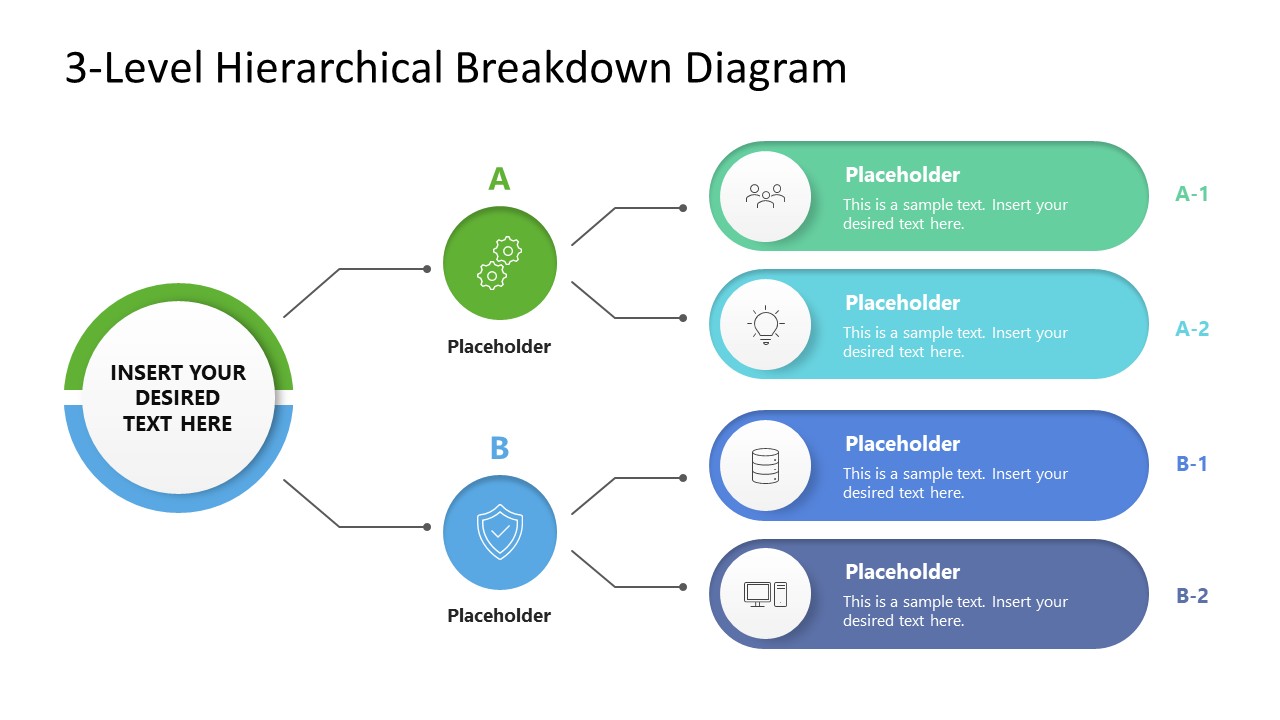
The 3-Level Hierarchical Breakdown PowerPoint Template is a single slide template with a breakdown diagram for 3 levels. Level 1 has a circular shape that branches into A & B, which subbranches into A-1, A-2, and B1, B2. Each node has an infographic icon to visually demonstrate the idea, step, or concept. The diagram is divided into two color codes: green for one branch and blue for the other one starting from the basal point. The management consultants use the 3-level hierarchical diagram PPT template to showcase how the project is executive in multiple work streams.
Users can change the color combination or other elements that match their branding. Download the 3-level hierarchical diagram template to communicate reporting and responsibility lines in HR presentations. Or check our other diagram layout versions to choose any design that suits your needs.
What’s inside this template
Example presentation scenarios
- A management consultant can use the root circle, A/B branches, and four sub-branch callouts to explain how a strategic initiative divides into workstreams and deliverables.
- A technical lead can present an application architecture by placing the system name in the central node and using the branch nodes for frontend, backend, databases, APIs, or infrastructure components.
- A marketing manager can map a campaign hierarchy by showing campaign goals at the center, main campaign tracks in the two branch nodes, and ad sets or creative groups in the four callouts.
- An HR or operations manager can explain responsibility lines by assigning the parent function to the center, two departments to the branch nodes, and specific teams or tasks to the sub-branches.
Features
- 100% editable presentation template
- Compatible with Microsoft PowerPoint and Google Slides
- 16:9 aspect ratio slides
- Scalable vector shapes, icons and illustrations
- AI-Ready for Microsoft Copilot and Claude
- Instant access and download
Frequently asked questions
Q: How should a presenter make the hierarchy easy to follow on this slide?
A: Start with the central circle and name the parent idea in plain language. Then explain branch A and branch B before moving to the four right-side callouts. Keep each callout to one short label and one supporting phrase so the audience understands the structure before focusing on detail.
Q: Who is this 3-level hierarchy slide best suited for?
A: This slide works best for presenters who need to make a simple branching structure visible in one view. Strategy teams can show initiatives and workstreams, engineers can map system components, and marketing teams can show campaign levels. It is less suited to deep hierarchies with many nested layers.
Q: Why does the branching diagram use color-coded paths and icons?
A: The green and blue paths separate the two main branches so the audience can track category ownership without rereading every label. The icons add quick visual cues for each node, while the connector lines make the parent-child relationships explicit. This supports faster scanning during planning or briefing meetings.
3-Level Hierarchical Breakdown PowerPoint Template
1-slide presentation template for hierarchy diagrams, branching strategy, and 3-level work breakdowns
The 3-Level Hierarchical Breakdown PowerPoint Template is a 1-slide diagram for showing one parent topic splitting into two branches and four subnodes. It includes a central root circle, A and B branch nodes, connector lines, icon markers, and text callouts for consultants, strategists, engineers, and managers in PowerPoint and Google Slides.
- Category
- Diagrams
- Rating

 Loading...
- Aspect ratio
- 16:9
- Item ID
- 23766-01
- Colors
 Microsoft PowerPoint
  Microsoft Copilot
  Claude for PowerPoint
 Other formats supported
Subscribe today and get immediate
access to download our PowerPoint templates.