Slide 2 of 2 from Brand Architecture PowerPoint Template
Brand Architecture Chart PPT Diagram Template
Brand Architecture Diagram for Strategy Presentations
- Diagram
- Tree Hierarchy
- Strategic Analysis Slide
- 16:9
- 100% Editable
The Brand Architecture Diagram slide from the Brand Architecture PowerPoint Template offers a clear hierarchical layout ideal for brand strategy discussions. This slide uses editable shapes and vector icons to visually represent different brand structures, supporting marketing presentations and corporate presentations focused on brand management. It enhances communication of complex brand relationships within a business presentation or pitch deck template.
What’s on This Slide
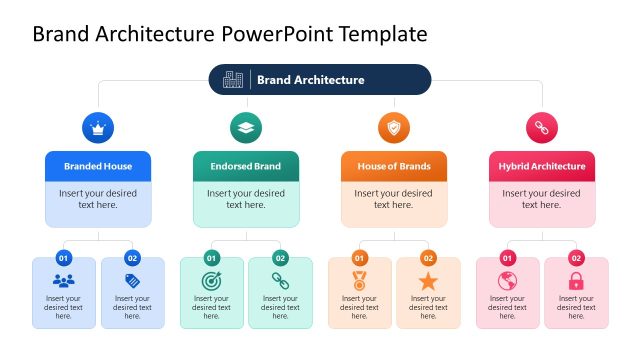
The layout features a central node labeled 'Brand Architecture' at the top, connected to four lower nodes representing different brand structures: 'Branded House', 'Endorsed Brand', 'House of Brands', and 'Hybrid Architecture'. Each lower node has two sub-nodes beneath it, labeled with placeholders for text. The nodes are circular and rectangular, with icons positioned above each main node. The background is a dark blue, enhancing the visibility of the colorful nodes. Text placeholders are centered within their respective shapes, maintaining a clear visual hierarchy.
How to Use It
This layout serves as a hierarchical diagram to illustrate brand architecture. It fits well in presentations discussing brand strategy, allowing for clear differentiation between brand types. It can be used in business scenarios such as brand management discussions, marketing strategy sessions, or when presenting brand portfolio structures. The layout effectively communicates relationships and categories within a brand framework, aiding in strategic decision-making.
Text Placeholders & Capacity
Keep your copy within these limits so it fits without resizing. Node body slots can accommodate roughly 6-8 words each.
| Placeholder | Count | Max characters (approx.) |
|---|---|---|
| Slide title | 1 | 30 |
| Item heading | 8 | 25 |
| Item body | 8 | 40 |
Slide Keywords
Download unlimited PowerPoint templates, charts and graphics for your presentations with our annual plan.
DOWNLOADReturn to Brand Architecture PowerPoint Template.