A capabilities presentation defines the organization’s identity and outlines its areas of excellence. It consolidates essential information, namely services, operational approach, expertise, and supporting evidence, into a narrative aimed at audiences who may have no prior knowledge of the business. In many cases, it becomes the company’s first formal representation. This makes the introduction an important moment to establish order, intent, and reliability.
This type of presentation has become standard in consulting, sales, business development, and corporate partnerships. Organizations use it to lay the foundation for later negotiations by clarifying what they do, how they work, and what sets them apart. The goal is not to overwhelm the audience with detail but to create a cohesive narrative that makes the company’s strengths both recognizable and credible. The quality of a capabilities presentation frequently shapes whether the client proceeds to a more detailed evaluation stage. When information is orderly and evidence-driven, prospects are more confident in advancing the conversation.
What’s the Purpose of a Capabilities Presentation?
A capabilities presentation fulfills several interconnected purposes that help facilitate early engagement between a company and a potential client. Its first role is to highlight strengths in a concrete, verifiable way. Organizations often have multiple areas of expertise, but prospects need a streamlined explanation of where the company performs best and how those strengths apply to real-world scenarios. The presenter must define these strengths without exaggeration, emphasizing the organization’s consistency and reliability.
Another purpose is to establish trust. Clients evaluating potential partners focus on indicators of stability: experience, execution quality, recognition among past clients, and clarity of communication. A well-composed capabilities deck allows prospects to make an informed judgment by presenting concise evidence. Instead of vague descriptors, it uses tangible examples such as past projects, operational metrics, and demonstrated outcomes. Trust develops when the information is ordered, neutral in tone, and aligned with the expectations of professional audiences.
Recommended lecture: Data-Driven Decision Making in Presentations
The deck also aligns the value proposition with the client’s needs. Prospects want to understand how the organization interprets their challenges and whether the organization’s capabilities can effectively support them. This requires a clear connection between what the company offers and what the audience is likely evaluating. The presenter must demonstrate awareness of the client’s environment and frame capabilities as functional solutions rather than generic offerings.
Finally, a capabilities presentation helps an organization stand out in competitive situations. When multiple companies pursue the same opportunity, the clarity, structure, and credibility of the deck influence which ones move forward. A strong presentation shows discipline, preparedness, and an understanding of how decisions are made during procurement or partnership evaluations.
Key Elements of a Strong Capabilities Presentation
Each component in a capabilities deck supports a specific interpretive function for the audience, so the presenter must ensure that transitions between them are logical and that the information remains consistent in tone and clarity.
Company Overview
The Company Overview provides the foundation. It outlines the mission, vision, and values in practical terms, describing not only what the organization believes but also how those principles guide operations. This section sets the cultural and strategic context for the rest of the presentation, giving the audience a reference point for evaluating later claims.

Recommended lecture: Vision and Mission Statement in Presentations
Core Capabilities and Services
The Core Capabilities and Services expand on operational strengths. Each capability should be explained in a way that demonstrates depth without drifting into unnecessary technical detail. The audience must finish this section with a clear understanding of what the company does best and how those capabilities underpin its engagements.

Unique Value Proposition (UVP)
The Unique Value Proposition clarifies differentiation. Rather than making broad claims of superiority, it explains why the organization’s approach, resources, or methodology produces reliable outcomes. A strong UVP is evidence-based and tied directly to competencies already introduced.

Experience and Track Record
The Experience and Track Record section demonstrates how capabilities translate into real-world execution. It highlights past projects, case summaries, or representative engagements that show consistency and reliability over time. Rather than listing every initiative, this section should focus on relevance, showing work that aligns with the audience’s industry, scale, or problem space. The objective is to demonstrate that the organization has already delivered outcomes similar to those the client seeks.

Recommended lecture: Case Study Slides for Business Presentations
Clients and Strategic Partners
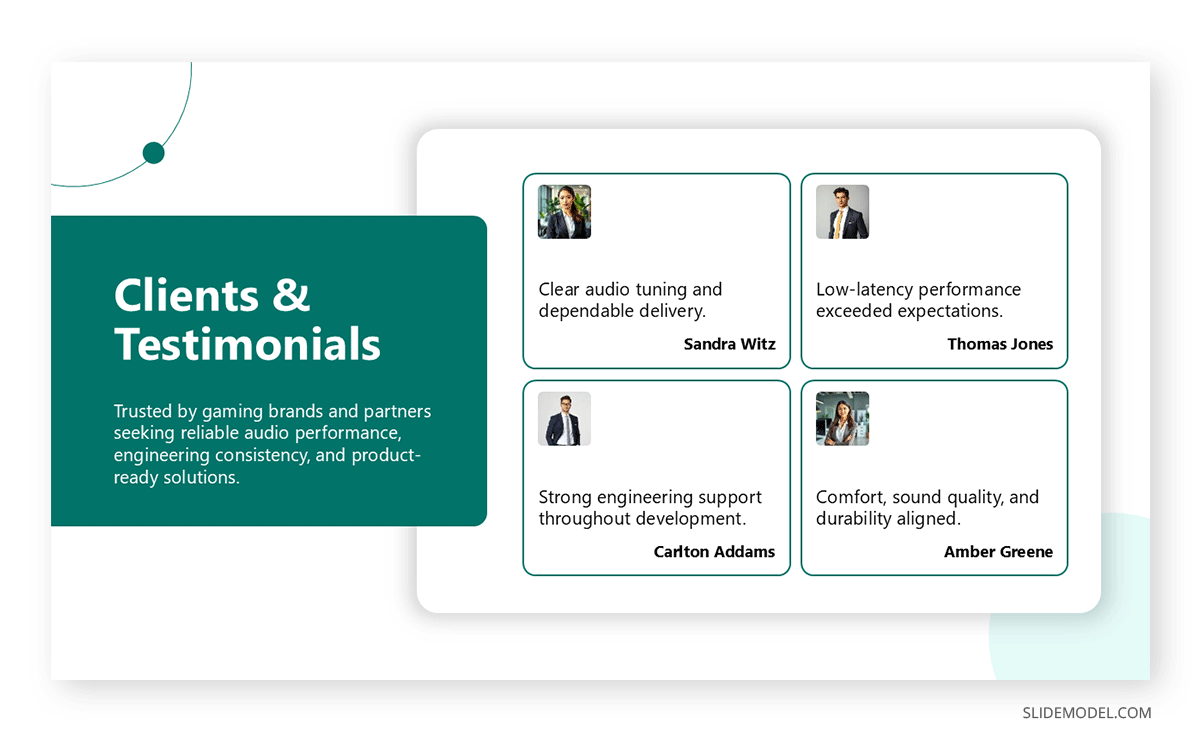
This section builds trust through association. By showcasing clients, partners, or institutions the organization has worked with, it reduces perceived risk for prospective customers. Logos, short descriptors, or grouped categories are often sufficient. The emphasis should be on credibility and alignment, not volume. When confidentiality applies, this section can describe client types or sectors instead of naming specific organizations.
Team Expertise and Leadership
The Team Expertise section answers an implicit question every client has: who will actually do the work. It introduces key professionals, leadership figures, or subject-matter experts whose experience supports the organization’s capabilities. This section should highlight relevant background, roles, and expertise without turning into full biographies. Its purpose is to show depth of talent and continuity, reinforcing confidence in execution.

Recommended lecture: Presenting a Team to an Audience
Process and Methodology
Process and Methodology explain how the organization delivers results. This section outlines the typical stages of engagement, from discovery and planning to execution and evaluation. By visualizing process diagram templates or frameworks, it demonstrates structure, accountability, and repeatability. Clients use this information to assess how the organization manages complexity, timelines, and communication throughout an engagement.

Recommended lecture: How to Present a Design-Thinking Process
Metrics, Results, and Achievements
This section supports claims with measurable indicators. It may include performance metrics, growth figures, efficiency improvements, certifications, awards, or compliance standards. Metrics should be carefully selected, focusing on those that reflect outcomes rather than activities. When presented clearly, this section reinforces credibility and shows that success is tracked and evaluated systematically.
Recommended lecture: Presenting KPIs and Performance Metrics
Call to Action and Next Steps
The Call to Action defines how the conversation should continue. It translates interest into direction by outlining the next logical step, such as scheduling a meeting, requesting a proposal, or initiating a pilot project. This section ensures the presentation functions as a business development tool rather than a static overview. Clear next steps reduce friction and guide decision-making.
Recommended lecture: Call-to-Action Slides That Drive Action
Design Best Practices for Capabilities Decks
Capabilities decks should avoid dense paragraphs and unfocused visuals, favoring layouts that make structure easy to follow. The design must serve the message rather than overshadow it.
Clean slides with controlled spacing help the presenter guide attention. Each slide should communicate a single idea, supported by visual elements that reinforce meaning rather than distract. PowerPoint icons, infographics, process diagrams, and data visualizations make information digestible when used appropriately. These elements help reduce textual load and prevent the presentation from feeling cluttered.
Brand consistency contributes to professionalism. Typography, color palettes, and imagery should reflect the organization’s identity without overwhelming the content. The design tone should match the industry: formal in corporate or consulting contexts, more flexible for creative sectors, but always consistent. Maintaining coherence across slides ensures that the audience perceives stability and attention to detail.
Client-focused design is essential. Instead of describing capabilities in isolation, visuals can frame them in context: workflow diagrams that align with typical client challenges, timeline templates that illustrate delivery structure, or charts showing before-and-after transformations. This helps clients understand not only what the company does but how its work will integrate with their own processes.
Common Mistakes to Avoid
Making the Presentation About the Company Instead of the Client
One of the most frequent mistakes is framing the entire presentation around the organization itself, without connecting capabilities to the client’s context. While a capabilities deck must explain who the company is and what it does, prospects evaluate information through the lens of their own challenges.
When the presentation focuses exclusively on internal achievements, it forces the audience to infer relevance on their own. A stronger approach is to consistently relate capabilities to how they address client needs, risks, or objectives, even when describing internal strengths.
Overloading Slides With Text or Technical Jargon
Capabilities presentations are often overloaded with dense paragraphs, detailed specifications, or specialized terminology. This creates friction during delivery and reduces comprehension, mainly when the audience includes non-technical stakeholders. Excessive text also distracts from the presenter and turns slides into documents rather than communication aids. Precise phrasing, controlled information density, and visual reinforcement allow the audience to follow the narrative without cognitive overload.
Listing Capabilities Without Explaining How They Are Applied
Another common issue is presenting capabilities as isolated items rather than as operational strengths. Simply stating what the company can do does not explain how those capabilities function in practice. Clients want to understand the application, sequence, and responsibility. Without this context, the presentation feels abstract and incomplete.
Effective decks connect capabilities to workflows, methodologies, or examples that demonstrate how expertise is translated into outcomes.
Using Generic or Unsubstantiated Claims
Broad statements such as “industry-leading,” “innovative,” or “best-in-class” lose credibility when unsupported by evidence. Capabilities presentations should rely on demonstrable facts rather than marketing language. When differentiation is claimed, it should be tied to specific processes, results, or experiences already introduced. Precision builds confidence, while vague claims invite skepticism.
Ignoring Narrative Structure and Story Flow
Facts alone do not persuade when they are presented without structure. Capabilities decks that jump between topics without a clear progression force the audience to reorganize the information mentally. This weakens retention and reduces impact.
A strong presentation follows a logical sequence, moving from identity and strengths to proof and execution. Narrative flow helps audiences understand not just what the organization does, but why its approach makes sense.
Recommended lecture: Data Storytelling for Presentations
FAQs
What is the ideal length of a capabilities presentation?
A capabilities deck typically ranges from 12 to 18 core slides. This length provides room to explain the company’s identity, services, methodology, experience, and differentiators without overwhelming the audience. Additional technical materials, case studies, or expanded project data should be placed in an appendix, allowing the presenter to maintain a clear and balanced narrative during the main presentation.
How detailed should service descriptions be?
Descriptions should be specific enough to demonstrate expertise but not so granular that they require specialized knowledge to interpret. The goal is to present service areas as functional solutions rather than technical documentation. Detailed information can be reserved for follow-up meetings or written proposals, where the audience expects more depth.
What type of evidence best supports credibility?
Clients respond well to concise case summaries, measurable outcomes, and, when possible, recognizable client names. Evidence should demonstrate patterns of reliability rather than isolated achievements. When metrics are included, they should be transparent, verifiable, and directly related to the capabilities being presented.
Should pricing appear in a capabilities presentation?
Pricing is usually excluded. Capabilities decks are introductory documents that explain how the organization operates, not define cost structures. Pricing is more appropriate in proposals or scoping discussions, where requirements are more precise and can be matched with accurate estimates.
Can a capabilities presentation replace a proposal?
No. A capabilities deck is a preliminary overview, while a proposal responds to defined requirements and includes scope, methodology, deliverables, and commercial terms. The capabilities presentation can support the proposal by establishing confidence and helping the client understand the company’s overall direction.
How frequently should the capabilities deck be updated?
It should be reviewed at least quarterly or whenever significant organizational changes occur. New projects, updated metrics, new logos, and revised workflows should appear promptly to ensure accuracy. Outdated information reduces credibility and may misrepresent the organization’s capacity.
Should the deck include market analysis or industry trends?
Only when it reinforces understanding of the client’s environment or offers context for the organization’s capabilities. Market data should be concise and relevant. Its purpose is not to showcase research volume but to signal that the organization interprets industry dynamics correctly.
Should a capabilities presentation address potential limitations?
Not explicitly. Early-stage materials should focus on strengths and relevance. Limitations or constraints can be discussed transparently in later stages when the client has outlined specific requirements. At that point, a more granular conversation allows for constructive planning.
Is it acceptable to reuse the same capabilities deck across industries?
The core structure can be reused, but examples and language should be adjusted. Industry-specific terminology, regulatory expectations, and typical challenges differ, so adapting the deck shows awareness of these differences. A generic deck risks appearing disconnected from the audience’s environment.
Final Words
A capabilities presentation is more than a descriptive document. It serves as a strategic tool that shapes clients’ perceptions of the organization before formal negotiations begin. It defines identity, presents strengths, and demonstrates operational stability in a format that prospects can evaluate rapidly. When structured well, it becomes an efficient introduction that prepares the ground for deeper discussions.
Since visual language is one of the key factors that will help you contextualize and summarize dense data into actionable slides, SlideModel templates support this process by providing easy-to-edit, consistent, and organized decks that can speed up the capabilities deck creation process and meet the expectations of professional audiences.
A strong capabilities deck enables the organization to enter conversations with confidence, showing that it has the systems, skills, and experience necessary to contribute to the client’s objectives. When prepared with care, it becomes an essential part of business development and ongoing client relationships.