Slide 1 of 4 from Use Case PowerPoint Diagram
Simple Use Case Diagram Slide Design for PowerPoint
Use Case Diagram for Software Development
- Diagram
- Use Case
- Process Slide
- 16:9
- 100% Editable
The Use Case Diagram slide from the Use Case PowerPoint Diagram template provides a clear visualization of user interactions and system processes. This slide layout is designed for software process explanation and stakeholder presentations, featuring editable shapes and vector icons to represent actors and actions. It supports effective project planning by illustrating how different roles interact with system functionalities, making it a practical addition to business presentation slide decks focused on software development and user requirements analysis.
About This Slide
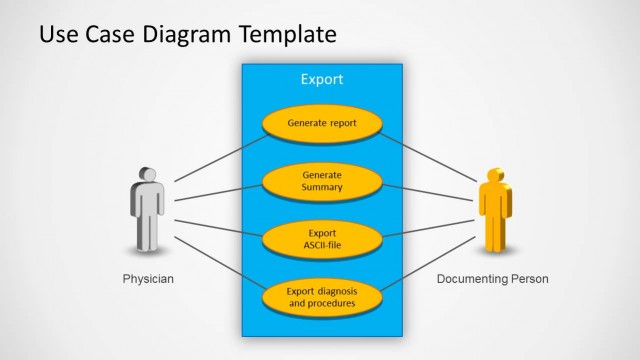
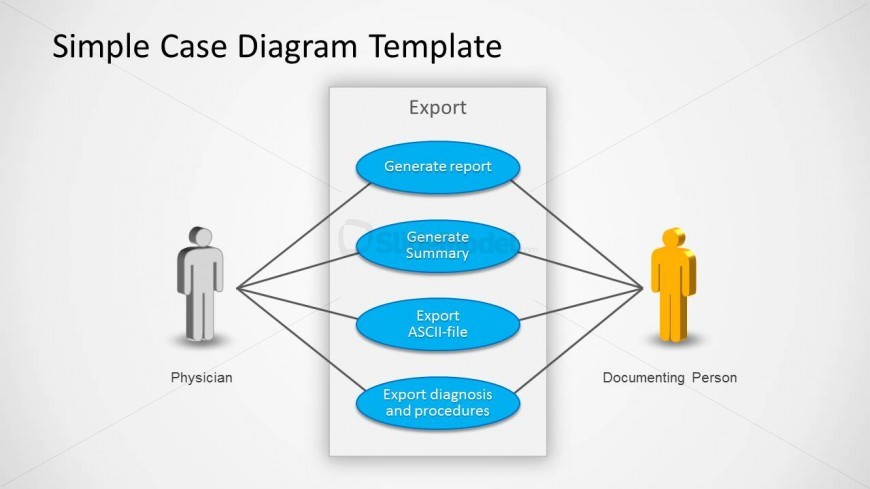
This is an example of slide design under Use Case Diagram template for PowerPoint showing the interaction of an actor and the system in a use case with a Physician and Documenting Person.
What’s on This Slide
The layout features a central rectangular container labeled 'Export' positioned in the center. Four rounded rectangles, representing actions, are aligned vertically within this container. Each action is connected to two figures on the left and right, labeled 'Physician' and 'Documenting Person'. The figures are simple, icon-like representations, one in gray and the other in yellow. Connecting lines extend from the figures to the action items, indicating interaction. Text placeholders exist for the title at the top and for labels under the figures, with a clear visual hierarchy emphasizing the central actions.
How to Use It
This layout serves as a use case diagram, illustrating interactions between actors and system functionalities. It fits within a presentation sequence that introduces software processes or user interactions. Ideal for software development discussions, it can be used to explain user requirements or system behaviors. This structure is beneficial for stakeholders to visualize how different roles interact with specific actions in a system, making it suitable for project planning or analysis sessions.
Text Placeholders & Capacity
Keep your copy within these limits so it fits without resizing. Node labels can hold about 4-5 words each, while the title can accommodate a longer phrase.
| Placeholder | Count | Max characters (approx.) |
|---|---|---|
| Slide title | 1 | 30 |
| Item heading | 4 | 25 |
| Item body | 2 | 20 |
Slide Keywords
Download unlimited PowerPoint templates, charts and graphics for your presentations with our annual plan.
DOWNLOADReturn to Use Case PowerPoint Diagram.