Slide 2 of 4 from Use Case PowerPoint Diagram
1156-use-case-diagram-powerpoint-wide-2
Use Case Diagram Template for Software Development
- Diagram
- Matrix Quadrant
- Concept Explanation Slide
- 16:9
- 100% Editable
The Use Case Diagram with Actors slide from the Use Case PowerPoint Diagram template visually maps user interactions with system functions, ideal for software requirements presentations and UML modeling discussions. This slide layout includes editable shapes and vector icons to clearly represent actors and their actions, supporting detailed system design overviews within business presentation slide decks.
What’s on This Slide
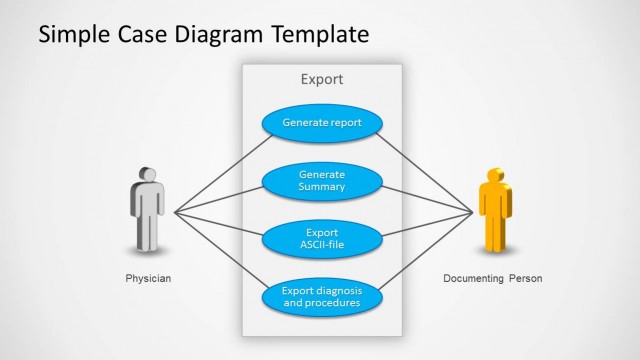
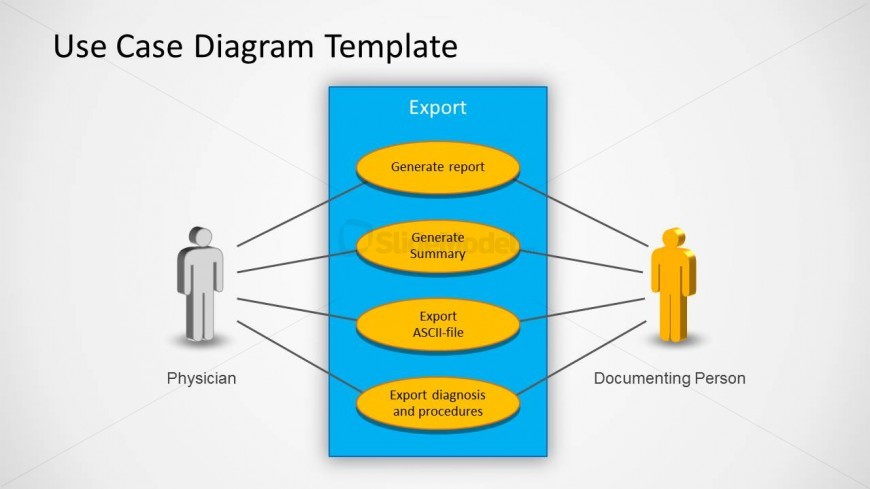
The layout features a central blue rectangle labeled 'Export' with four yellow oval nodes below it, each representing actions: 'Generate report', 'Generate Summary', 'Export ASCII-file', and 'Export diagnosis and procedures'. Two human figures, one labeled 'Physician' and the other 'Documenting Person', are positioned on the left and right sides, respectively. Connecting lines extend from the figures to the action nodes, indicating interactions. The title is positioned at the top center, creating a clear visual hierarchy. Background is light gray, enhancing the diagram's visibility.
How to Use It
This layout serves as a use case diagram to illustrate interactions between actors and system functionalities. It is suitable for presentations focused on software development, product analysis, or UML modeling. This slide can be effectively used to demonstrate user interactions in a system, making it ideal for discussions on requirements or system design. It fits well after problem identification slides, leading into detailed use case discussions or system functionalities.
Text Placeholders & Capacity
Keep your copy within these limits so it fits without resizing. Node labels can accommodate about 5-7 words each.
| Placeholder | Count | Max characters (approx.) |
|---|---|---|
| Slide title | 1 | 30 |
| Item heading | 4 | 40 |
| Item body | 2 | 20 |
Slide Keywords
Download unlimited PowerPoint templates, charts and graphics for your presentations with our annual plan.
DOWNLOADReturn to Use Case PowerPoint Diagram.