Slide 11 of 16 from Procedure Handbook Presentation Template
Issues Identified Overview – Procedure Handbook Deck
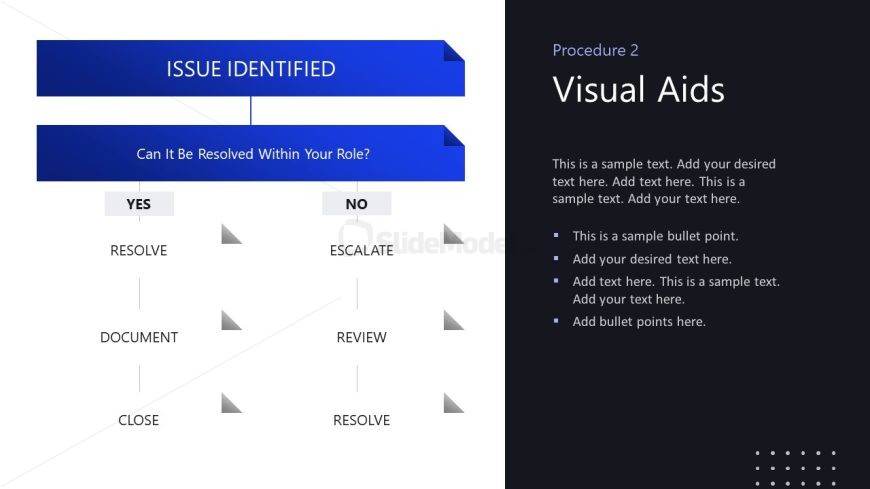
Issue Resolution Flowchart for Procedures
- Diagram
- Flowchart
- Process Slide
- 16:9
- 100% Editable
The Issue Resolution Flowchart slide from the Procedure Handbook Presentation Template offers a clear process diagram designed for business presentations and management training. This slide template uses editable shapes and vector icons to visually guide users through decision points and actions in issue resolution, making it suitable for corporate presentations and operational handbooks that require structured procedural clarity.
What’s on This Slide
The layout features a flowchart design with a central title at the top labeled 'ISSUE IDENTIFIED.' Below, a question asks, 'Can It Be Resolved Within Your Role?' with two branching paths labeled 'YES' and 'NO.' Each path leads to further actions: 'RESOLVE,' 'DOCUMENT,' and 'CLOSE' on the 'YES' side, while 'ESCALATE,' 'REVIEW,' and 'RESOLVE' are on the 'NO' side. Text placeholders are present for additional instructions, aligned to the right. The background is dark, with blue and gray shapes creating a visual hierarchy.
How to Use It
This layout serves as a decision-making flowchart, guiding users through a process of issue resolution. It fits well in a presentation sequence following problem identification slides, providing a structured approach to handling issues. This format is useful in business contexts where clarity in procedural steps is essential, such as management training or operational handbooks. It can also be adapted for team discussions on problem-solving strategies.
Text Placeholders & Capacity
Keep your copy within these limits so it fits without resizing. Node labels can hold about 15 characters each.
| Placeholder | Count | Max characters (approx.) |
|---|---|---|
| Slide title | 1 | 30 |
| Item heading | 6 | 15 |
| Body paragraph | 4 | 100 |
Slide Keywords
Download unlimited PowerPoint templates, charts and graphics for your presentations with our annual plan.
DOWNLOADReturn to Procedure Handbook Presentation Template.