Customize our featured Price Corridor of the Target Mass PowerPoint Diagram to showcase the aspects of the Blue Ocean strategy framework and present the pricing strategy. Blue Ocean Strategy involves the search for new market space where the competition is negligible, and new demand is captured. The target mass’s price corridor is a tool managers use to identify the right place to unlock the mass of potential buyers, and it is a part of the Blue Ocean Strategy. Price corridors refer to strategic prices that attract many target buyers. While setting up the price, two things should be considered: the degree of resource and asset protection and the imitation level for the competitors. We have crafted this template using 100% editable PPT elements. Professionals, project managers, and marketers can present the pricing strategies to the stakeholders in the executive sessions. Our price corridor of the mass PPT template provides users with the data-driven option so that they can mention the results of the analysis with more precision. The price corridor of the target mass has two vital steps:
- Step 1: Determine the price corridor of the mass
- Step 2: Set a price level within the price corridor
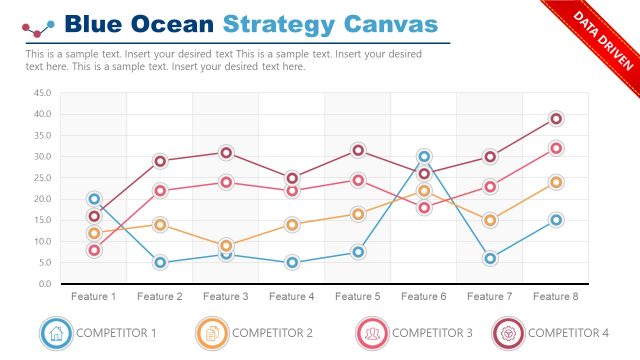
Our Price Corridor of the Target Mass PowerPoint Diagram template contains two slides with data-driven charts. The first slide presents two rectangular title text boxes for step 1 and step 2. Below each step, there is a diagram presenting the respective steps graphically. Three alternative product service types are represented in the diagram: same form, different form with the same function, different form, and function but with the same objective. The values related to the corresponding product service types are displayed using circular shapes, where the size of the circle depicts the number of potential buyers. Three horizontal bars emerge from the price corridor chart to demonstrate the pricing level, i.e., upper, mid, and low pricing. The three columns in step two describe the imitation tier provided to the competitors. In the second slide, a data-driven chart is available for the presenters to describe the price corridor of the target mass interactively.
You can also download our more Blue Ocean Strategy templates for engaging pricing strategy presentations. Users can edit this template using all versions of Microsoft PowerPoint, Google Slides, and Keynote. Moreover, professionals and project managers can edit the colors or other elements of the template according to their preferences. So, download this price corridor PowerPoint template and customize it now!
What’s inside this template
Example presentation scenarios
- A product marketing manager can use the two-step framework diagram to explain how a proposed offer fits the mass-market price corridor before requesting launch pricing approval.
- A strategy consultant can use the bubble chart to compare competitor or substitute offers by price level and estimated buyer mass during a Blue Ocean strategy workshop.
- An executive team can use the imitation tier matrix to discuss whether legal, resource, or capability barriers support upper, mid, or low pricing choices.
- A pricing manager can use the product-service comparison grid to separate same-form alternatives from different-form alternatives when testing strategic price boundaries.
Features
- 100% editable presentation template
- Compatible with Microsoft PowerPoint and Google Slides
- 16:9 aspect ratio slides
- Scalable vector shapes, icons and illustrations
- AI-Ready for Microsoft Copilot and Claude
- Instant access and download
Frequently asked questions
Q: How should a presenter explain the Price Corridor of the Target Mass with this template?
A: Start with Slide 1 to define the two decisions: identify the corridor of the mass, then choose a price level inside it. Explain the three alternative product-service types from left to right, then connect the corridor bands to imitation difficulty. Use Slide 2 only after the audience understands what the bubbles and price levels represent.
Q: Who is this pricing diagram best suited for?
A: This template is best for product managers, marketers, pricing leads, and consultants who need to frame a strategic price recommendation without turning the meeting into a spreadsheet review. It works well when the decision depends on buyer reach, substitute offers, competitor imitation risk, and whether a low, mid, or upper price position is defensible.
Q: Why does the layout use corridors, bubbles, and imitation tiers?
A: The corridor metaphor makes pricing feel like a bounded strategic zone rather than a single guessed number. Bubble size lets the presenter show the relative mass of potential buyers, while the imitation tiers connect price choice to protection level. Together, the visuals help executives compare opportunity size and competitive risk in one view.


Price Corridor of the Target Mass PowerPoint Diagram
2-slide pricing strategy presentation template with price corridor bubble chart and imitation tier diagram
This 2-slide pricing strategy template explains the Price Corridor of the Target Mass framework for Blue Ocean discussions. It includes a two-step framework diagram, product-service comparison grid, imitation tier matrix, and price corridor bubble chart for marketers, product managers, and executives working in Microsoft PowerPoint or Google Slides.
- Category
- Strategy
- Rating

 Loading...
- Aspect ratio
- 16:9
- Item ID
- 8445-01
- Colors
 Microsoft PowerPoint
 Microsoft Copilot
 Claude for PowerPoint
Other formats supported
Subscribe today and get immediate
access to download our PowerPoint templates.