Slide 8 of 14 from Key Customer Onboarding PowerPoint Template
Six Points Presentation – Account Setup Guide for Onboarding
Account Setup Guide for Customer Onboarding
- Text Layout
- List Blocks
- Process Slide
- 16:9
- 100% Editable
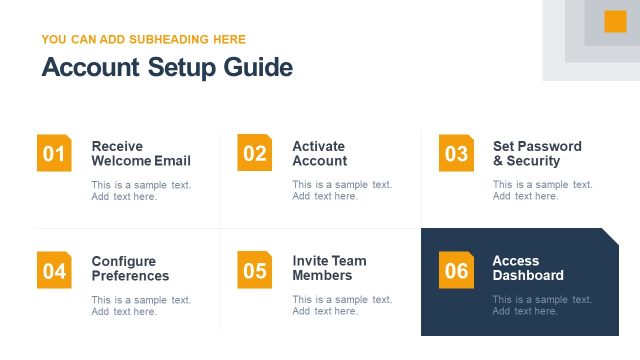
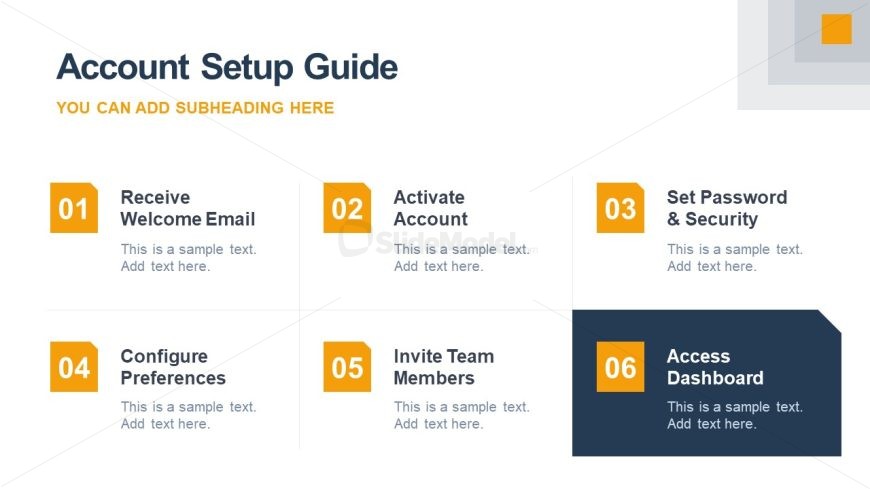
The Account Setup Guide slide from the Key Customer Onboarding PowerPoint Template offers a clear, step-by-step process layout ideal for customer onboarding and training sessions. This slide uses editable shapes and a structured grid to present six sequential steps, supporting corporate presentations that require detailed process documentation. Its design enhances clarity in business presentations and pitch deck templates by visually organizing essential setup actions.
What’s on This Slide
The layout features a grid of six sections arranged in two rows and three columns. Each section contains a number and a title, with placeholders for additional text below. The first column includes sections labeled 01 to 06, with the last section having a darker background for emphasis. The sections are visually separated by white space, and the overall color scheme includes a mix of dark blue, orange, and gray. Text placeholders are centrally aligned within each section, contributing to a clear visual hierarchy.
How to Use It
This layout serves as a step-by-step guide for account setup, ideal for onboarding presentations. It fits well after introductory slides and before detailed process explanations. This format is useful for businesses aiming to streamline customer onboarding by clearly outlining necessary actions. It can be applied in training sessions or customer success meetings to facilitate understanding of the setup process.
Text Placeholders & Capacity
Keep your copy within these limits so it fits without resizing. Node body slots can accommodate roughly 10-12 words each.
| Placeholder | Count | Max characters (approx.) |
|---|---|---|
| Slide title | 1 | 30 |
| Subtitle | 1 | 40 |
| Item heading | 6 | 30 |
| Item body | 6 | 50 |
Slide Keywords
Download unlimited PowerPoint templates, charts and graphics for your presentations with our annual plan.
DOWNLOADReturn to Key Customer Onboarding PowerPoint Template.