Slide 28 of 31 from Go-To-Market PowerPoint Template
Multiple Channels of Go-To Market PowerPoint
Multi-Channel Go To Market Strategy Slide
- Diagram
- Comparison Split
- Strategy Slide
- 16:9
- 100% Editable
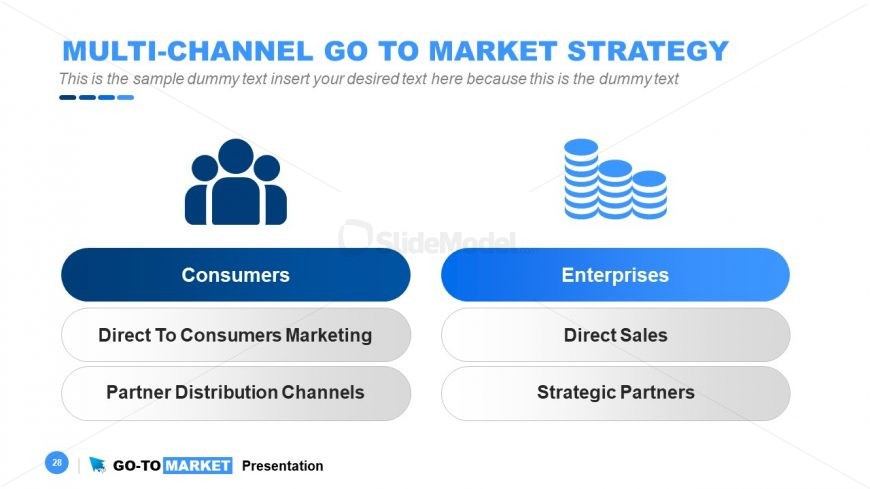
The Multi-Channel Go To Market Strategy slide from the Go-To-Market PowerPoint Template offers a clear comparison of marketing approaches for consumers and enterprises. Designed for business presentations, this slide layout supports market segmentation analysis and product launch planning using editable shapes and icons to enhance clarity in corporate presentations.
What’s on This Slide
The layout features two main sections, one for 'Consumers' and one for 'Enterprises,' positioned side by side. Each section contains a heading and three bullet points beneath it. The 'Consumers' section has a dark blue background, while the 'Enterprises' section uses a gradient from light to dark blue. Icons representing consumers and enterprises are placed above their respective sections, with the consumer icon on the left and the enterprise icon on the right. Text placeholders exist for titles and bullet points, with the title centered at the top and the bullet points aligned left within their sections.
How to Use It
This layout serves as a comparative analysis of marketing strategies for different target audiences. It fits well in a presentation sequence focused on market segmentation or strategy development. This structure is useful for business scenarios where distinct approaches for consumer and enterprise markets need to be highlighted, such as in product launches or marketing strategy discussions. It helps in clearly delineating strategies tailored for different customer segments.
Text Placeholders & Capacity
Keep your copy within these limits so it fits without resizing. Bullet point slots can hold about 5-6 words each.
| Placeholder | Count | Max characters (approx.) |
|---|---|---|
| Slide title | 1 | 40 |
| Item heading | 2 | 20 |
| Item body | 6 | 30 |
Slide Keywords
Download unlimited PowerPoint templates, charts and graphics for your presentations with our annual plan.
DOWNLOADReturn to Go-To-Market PowerPoint Template.