Slide 31 of 31 from Go-To-Market PowerPoint Template
Go To Market Framework PowerPoint Slide
Go-To Market Framework Overview
- Diagram
- Funnel
- Strategy Slide
- 16:9
- 100% Editable
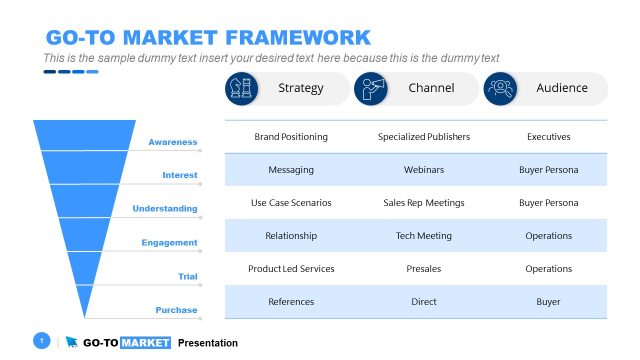
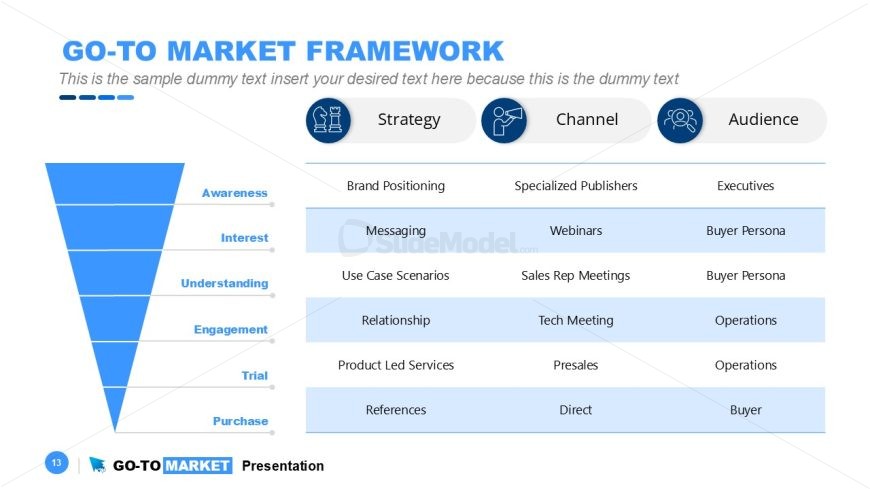
The Go-To Market Framework slide from the Go-To-Market PowerPoint Template presents a structured funnel diagram to illustrate marketing strategy stages from awareness to purchase. This slide layout supports clear communication of strategy, channels, and audience targeting, making it ideal for business presentations such as product launches and sales training. Its design integrates editable shapes and vector icons, enhancing customization within professional slide templates.
What’s on This Slide
The slide features a funnel diagram on the left, with six horizontal segments labeled Awareness, Interest, Understanding, Engagement, Trial, and Purchase. Each segment is colored in a gradient of blue, with the widest section at the top and narrowing towards the bottom. To the right, there are three columns titled Strategy, Channel, and Audience. Each column contains text placeholders for specific strategies and audience engagement methods. The slide includes icons representing strategy and audience engagement, positioned above the column headers. The overall layout is structured and visually organized, emphasizing the flow from awareness to purchase.
How to Use It
This layout serves as a framework for presenting a go-to-market strategy. It is suitable for summarizing key marketing strategies, channels, and target audiences in a cohesive manner. This slide fits well towards the end of a presentation, summarizing the strategic approach after discussing market analysis and product positioning. It can be used in business scenarios such as product launches, marketing strategy sessions, or sales training, where clarity in strategy and audience targeting is essential.
Text Placeholders & Capacity
Keep your copy within these limits so it fits without resizing. Body slots can accommodate roughly 30 words each.
| Placeholder | Count | Max characters (approx.) |
|---|---|---|
| Slide title | 1 | 30 |
| Body paragraph | 1 | 180 |
| Item heading | 6 | 15 |
| Item body | 6 | 30 |
| Column header | 3 | 15 |
Slide Keywords
Download unlimited PowerPoint templates, charts and graphics for your presentations with our annual plan.
DOWNLOADReturn to Go-To-Market PowerPoint Template.