Slide 1 of 2 from Circular Diagram for PowerPoint
Circular Diagram with 6 Boxes and Description Text Box
Circular Diagram with 6 Steps for Presentations
- Diagram
- Circular Cycle
- Process Slide
- 16:9
- 100% Editable
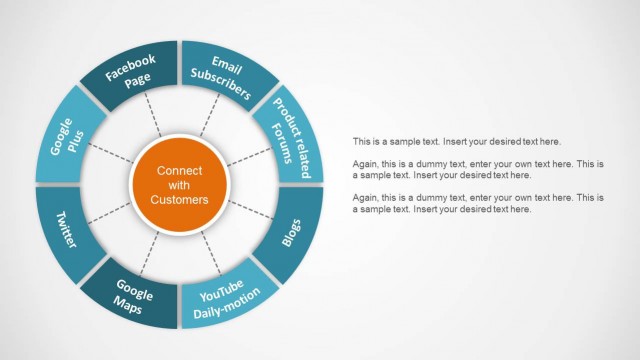
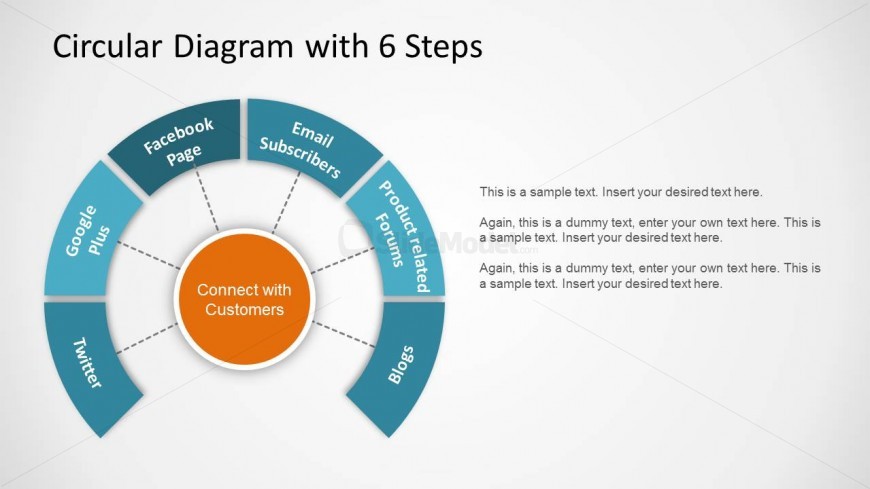
The Circular Diagram with 6 Steps slide from the Circular Diagram for PowerPoint template offers a clear visual tool for illustrating processes and marketing strategies. This slide layout uses editable shapes arranged in a circular cycle to represent interconnected elements such as customer engagement methods. It is ideal for business presentations and pitch decks that require a structured depiction of complex workflows, supported by additional text placeholders for detailed explanations.
What’s on This Slide
The slide features a circular diagram divided into six segments, each labeled with a different element such as 'Facebook Page' and 'Email Subscribers.' The segments are arranged in a clockwise direction around a central circle that reads 'Connect with Customers.' Each segment has a consistent shape and color, enhancing visual coherence. Text placeholders are present on the right side, aligned vertically, allowing for additional descriptive content. The overall layout emphasizes the central concept while providing space for supplementary information.
How to Use It
This layout serves as a circular diagram to illustrate a process or framework with six distinct components. It is suitable for presentations that require a visual representation of interconnected elements, such as marketing strategies or customer engagement methods. This slide fits well after a problem-framing slide, providing a clear transition into proposed solutions. It can be used in business meetings, marketing presentations, or educational contexts to visually convey complex relationships among various components.
Text Placeholders & Capacity
Keep your copy within these limits so it fits without resizing. Node labels can accommodate up to 20 characters each.
| Placeholder | Count | Max characters (approx.) |
|---|---|---|
| Slide title | 1 | 40 |
| Item heading | 6 | 20 |
| Body paragraph | 3 | 100 |
Slide Keywords
Download unlimited PowerPoint templates, charts and graphics for your presentations with our annual plan.
DOWNLOADReturn to Circular Diagram for PowerPoint.