Slide 2 of 2 from Circular Diagram for PowerPoint
Circular Diagram with 6 Boxes and Core element
Circular Diagram with 8 Steps for PowerPoint
- Diagram
- Circular Cycle
- Process Slide
- 16:9
- 100% Editable
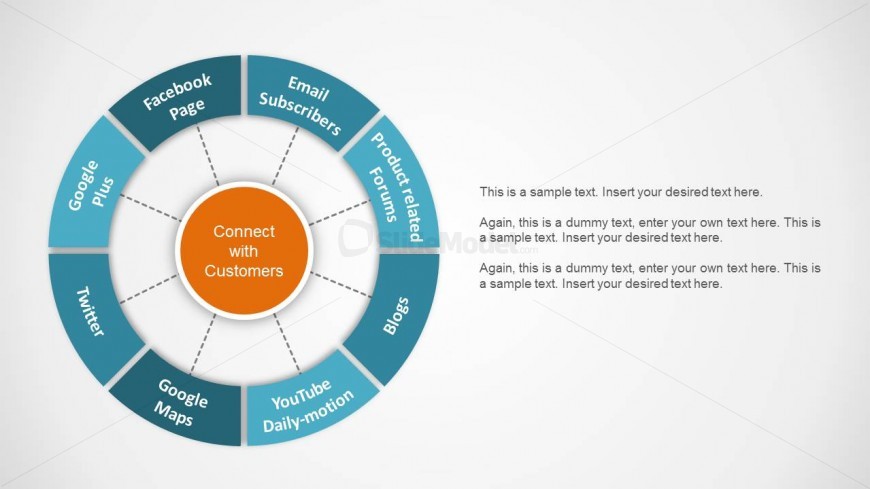
The Circular Diagram with 8 Steps slide from the Circular Diagram for PowerPoint template offers a clear visual representation of customer engagement strategies. This slide template is designed for business presentations and marketing pitch decks, featuring editable shapes and vector icons arranged in a circular cycle to illustrate interconnected processes effectively. It supports concise communication of multiple customer interaction channels within a professional slide deck.
What’s on This Slide
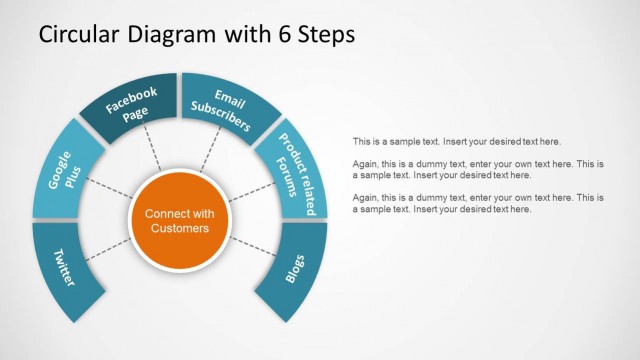
The layout features a central circular node labeled 'Connect with Customers' surrounded by eight evenly spaced segments. Each segment contains a label, such as 'Facebook Page' and 'Email Subscribers,' arranged in a circular fashion. The segments are colored in a dark blue hue, contrasting against a light background. Connecting lines radiate from the central node to each segment, emphasizing their relationship. Text placeholders are present for additional information, positioned to the right of the diagram, with a clear visual hierarchy. The overall composition is balanced and organized.
How to Use It
This layout serves as a circular diagram, ideal for illustrating processes or steps in a cycle. It fits well in presentations focusing on customer engagement strategies or marketing initiatives. The structure allows for clear communication of interconnected ideas. In business contexts, it can be used to present various channels for customer interaction, showcasing how each contributes to overall engagement. This layout is effective for summarizing key points in a visually engaging manner.
Text Placeholders & Capacity
Keep your copy within these limits so it fits without resizing. Node labels can hold roughly 20 characters each, body text slots are tight.
| Placeholder | Count | Max characters (approx.) |
|---|---|---|
| Item heading | 8 | 20 |
| Body paragraph | 3 | 100 |
Slide Keywords
Download unlimited PowerPoint templates, charts and graphics for your presentations with our annual plan.
DOWNLOADReturn to Circular Diagram for PowerPoint.