Our BANT Sales Process PowerPoint Template provides a pair of 100% editable slides with interactive process diagrams. Professionals can discuss the stages of the BANT sales process and design their sales strategies using this PPT template. BANT is a lead qualification process invented by IBM. It stands for Budget, Authority, Need, and Timeline. These four parameters are considered in a B2B sales process before finalizing the deals with leads. For instance, if a company comes to buy your product or service, the sales teams following this BANT approach ask for the budget conditions, authority & ownership, needs that must be fulfilled, and the expected timeline.
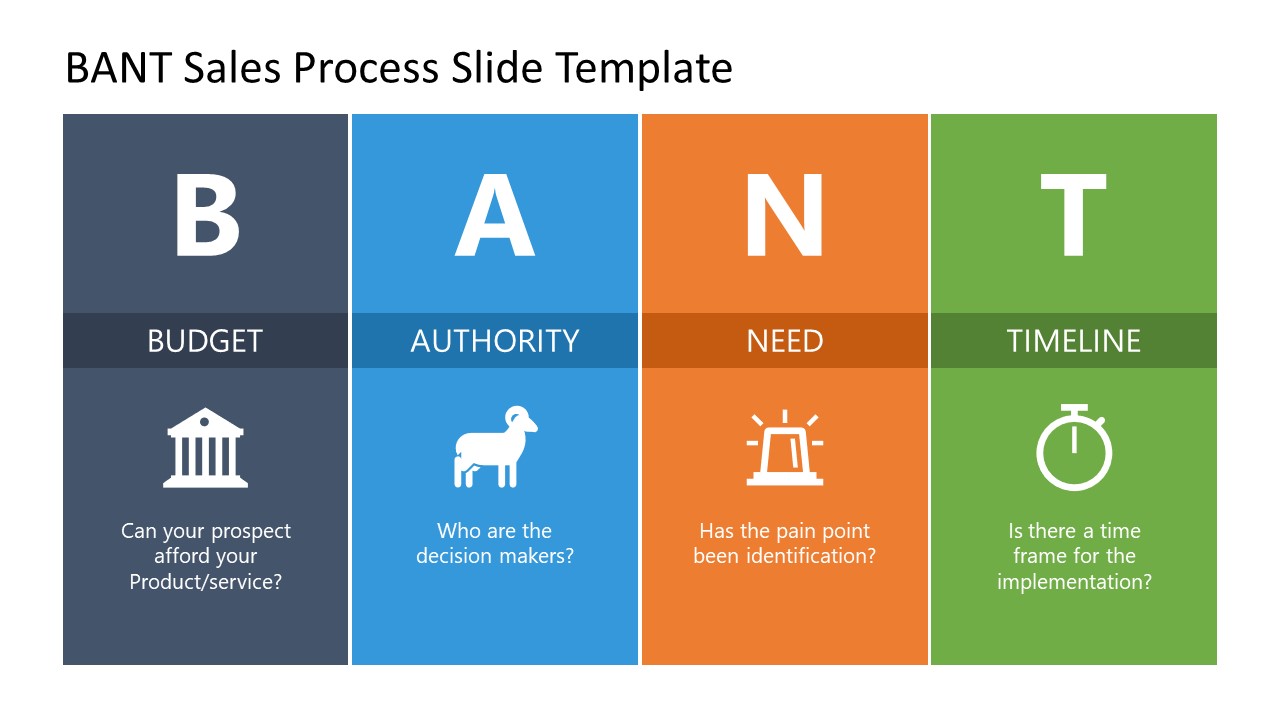
The first slide of our BANT Sales Process PowerPoint Template is a modern four-column design. Each vertical segment represents the phase of the BANT process. Different color fills are applied in each column and carry meaningful graphical PowerPoint icons for the process stages. The columns also contain bold alphabet letters and editable text boxes to mention relevant details and presentation points. Presenters can employ this slide for an engaging training presentation to elaborate on the importance of this simple-to-use sales methodology for screening qualified leads. The following slide has a horizontal layout, i.e., four horizontal rows beginning with circular PowerPoint shapes with infographic icons. Likewise, these rows display bold alphabet letters, title text, and editable text areas to mention the description or presentation points.
Professionals can conveniently use the slides for business meetings or sales team discussions. The color scheme and fonts can be modified according to the presentation theme. Likewise, the background settings can be adjusted to match the company presentation requirements. Users can edit the slides with all PowerPoint versions, Google Slides, and Keynote.
Alternatively, you can download other templates with vertical columns and letters in the slide design.
What’s inside this template
Example presentation scenarios
- Sales enablement managers can introduce a common BANT qualification standard during onboarding by using the four-column diagram to define each criterion and its guiding question.
- Account executives can review open opportunities in a team meeting by using the horizontal four-row process slide to test Budget, Authority, Need, and Timeline one deal at a time.
- Business development leaders can explain lead handoff expectations to marketing by showing which questions should be answered before a prospect moves to sales.
- Sales trainers can run a short workshop where participants map sample prospects against the four icon-labeled BANT criteria.
Features
- 100% editable presentation template
- Compatible with Microsoft PowerPoint and Google Slides
- 16:9 aspect ratio slides
- Scalable vector shapes, icons and illustrations
- AI-Ready for Microsoft Copilot and Claude
- Instant access and download
Frequently asked questions
Q: How should a presenter explain the BANT criteria without turning the slide into a checklist?
A: Use the vertical column slide as the teaching frame: define Budget, Authority, Need, and Timeline in order, then ask the questions shown under each icon. Keep discussion tied to one criterion at a time so the team can agree on what evidence qualifies a lead before moving to the next letter.
Q: When is this template the right choice for a sales team meeting?
A: It fits sales enablement, pipeline review, or B2B account planning sessions where the presenter needs a shared qualification language. The deck is best for sales managers, business development leaders, and trainers who want to show the four criteria quickly, then discuss how each one affects deal readiness.
Q: Why does the design use large letters, color blocks, and repeated icons?
A: The design uses the acronym as the organizing device, so the audience can remember the method by letter before reading details. The first slide creates a side-by-side comparison, while the second slide turns the same content into a row-by-row discussion path. The repeated icons and colors reduce relearning between slides.


BANT Sales Process PowerPoint Template
2-slide BANT sales process presentation template with four-column and horizontal lead qualification diagrams
The BANT Sales Process PowerPoint Template is a 2-slide presentation template for explaining Budget, Authority, Need, and Timeline qualification. It includes a four-column BANT diagram and a horizontal four-row process layout with icons, large letters, and editable text areas. It is intended for sales managers, trainers, and business development teams in Microsoft PowerPoint and Google Slides.
- Category
- Process Diagrams
- Rating

 Loading...
- Aspect ratio
- 16:9
- Item ID
- 21784-01
- Colors
 Microsoft PowerPoint
 Microsoft Copilot
 Claude for PowerPoint
Other formats supported
Subscribe today and get immediate
access to download our PowerPoint templates.