Slide 2 of 2 from 5-Item Feature Comparison PowerPoint Template
5-Item Feature Comparison Template Layout
5-Item Feature Comparison Template Overview
- Diagram
- Comparison Split
- Comparison Slide
- 16:9
- 100% Editable
The 5-Item Feature Comparison slide from the 5-Item Feature Comparison PowerPoint Template offers a clear, side-by-side layout ideal for business presentations and marketing analysis. This slide template uses editable shapes and a two-column design to compare product features effectively, making it a practical choice for pitch decks and corporate presentations that require detailed product differentiation.
What’s on This Slide
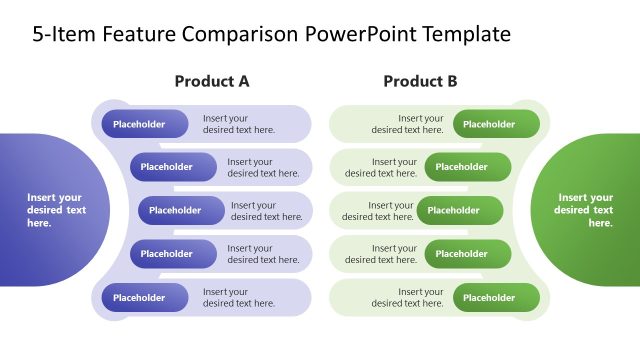
The slide features a two-column layout comparing Product A and Product B. Each column contains five horizontal feature bars, with placeholders for text. The left column is styled in blue, while the right column is green, both set against a dark background. The title is centrally positioned at the top, clearly labeling the comparison. Each feature bar is rounded and aligned vertically, with placeholders for text centered within them. The overall composition emphasizes a side-by-side comparison, facilitating easy visual differentiation between the two products.
How to Use It
This layout serves as a comparative analysis tool, ideal for showcasing features of two products. It fits well in presentations aimed at stakeholders, sales teams, or marketing efforts. The structure allows for clear side-by-side evaluation, making it suitable for product launches, feature updates, or competitive analysis. This slide can be used effectively in discussions where product differentiation is crucial, helping audiences quickly grasp key features and benefits.
Text Placeholders & Capacity
Keep your copy within these limits so it fits without resizing. Node slots can accommodate roughly 30 characters each.
| Placeholder | Count | Max characters (approx.) |
|---|---|---|
| Slide title | 1 | 40 |
| Item body | 10 | 30 |
| Body paragraph | 1 | 40 |
Slide Keywords
Download unlimited PowerPoint templates, charts and graphics for your presentations with our annual plan.
DOWNLOAD