Slide 12 of 19 from Free Blue Business Corporate Slide Deck
Donut Chart Data Driven Corporate PPT
Data and Charts Visualization Slide
- Chart
- Donut Chart
- Data Analysis Slide
- 16:9
- 100% Editable
What’s on This Slide
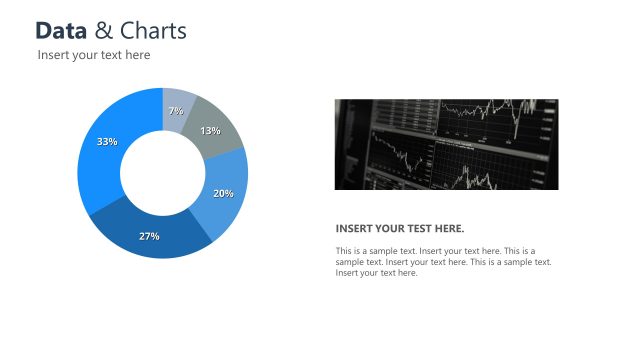
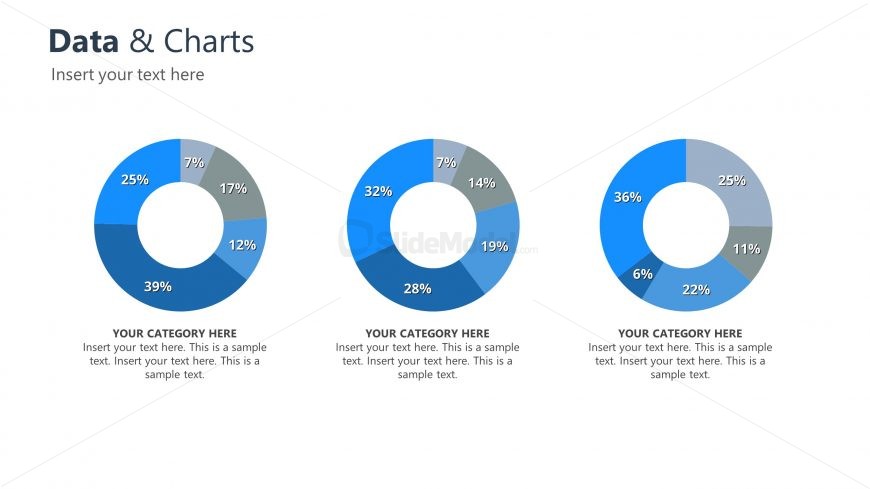
The slide features three circular charts arranged horizontally. Each chart displays percentage values in various shades of blue and gray. The leftmost chart shows segments labeled with percentages: 39%, 25%, 17%, 12%, and 7%. The middle chart contains segments labeled 32%, 28%, 19%, 14%, and 7%. The rightmost chart has segments labeled 36%, 25%, 22%, 11%, and 6%. Above the charts, there is a title area labeled 'Data & Charts,' and below each chart, there are text placeholders for category descriptions, aligned centrally. The overall layout is clean and structured.
How to Use It
This layout serves as a comparative analysis tool for displaying multiple data sets visually. It fits well in a presentation sequence after introducing data trends or insights. This slide is useful in business scenarios such as performance reviews, market analysis, or project updates, where visual data representation is essential. It allows for easy comparison of different categories or metrics, enhancing audience understanding of the data presented.
Text Placeholders & Capacity
Keep your copy within these limits so it fits without resizing. Node labels are tight, roughly 10 characters each.
| Placeholder | Count | Max characters (approx.) |
|---|---|---|
| Chart title | 1 | 30 |
| Item heading | 3 | 10 |
| Item body | 3 | 150 |
Slide Keywords
Download unlimited PowerPoint templates, charts and graphics for your presentations with our annual plan.
DOWNLOADReturn to Free Blue Business Corporate Slide Deck.