The presentation of the project outline and the professionals performing the key activities can be simplified with this editable Steering Committee PowerPoint Template. This presentation slide deck has a uniformly designed SlideMaster and a professional color scheme, making it an easy-to-edit template for professional meetings. Presenters are provided with project descriptions and planning slides in this best PPT template. It begins with an impactful slide with an image of an experienced team, followed by a slide for agenda points. The next slide shows the project objectives that can help indicate the key points around the project’s progress. The sections on this slide mention data points and text boxes with placeholders. Further, this PPT company template contains the slides for:
- Roles & responsibilities
- Agenda for the project
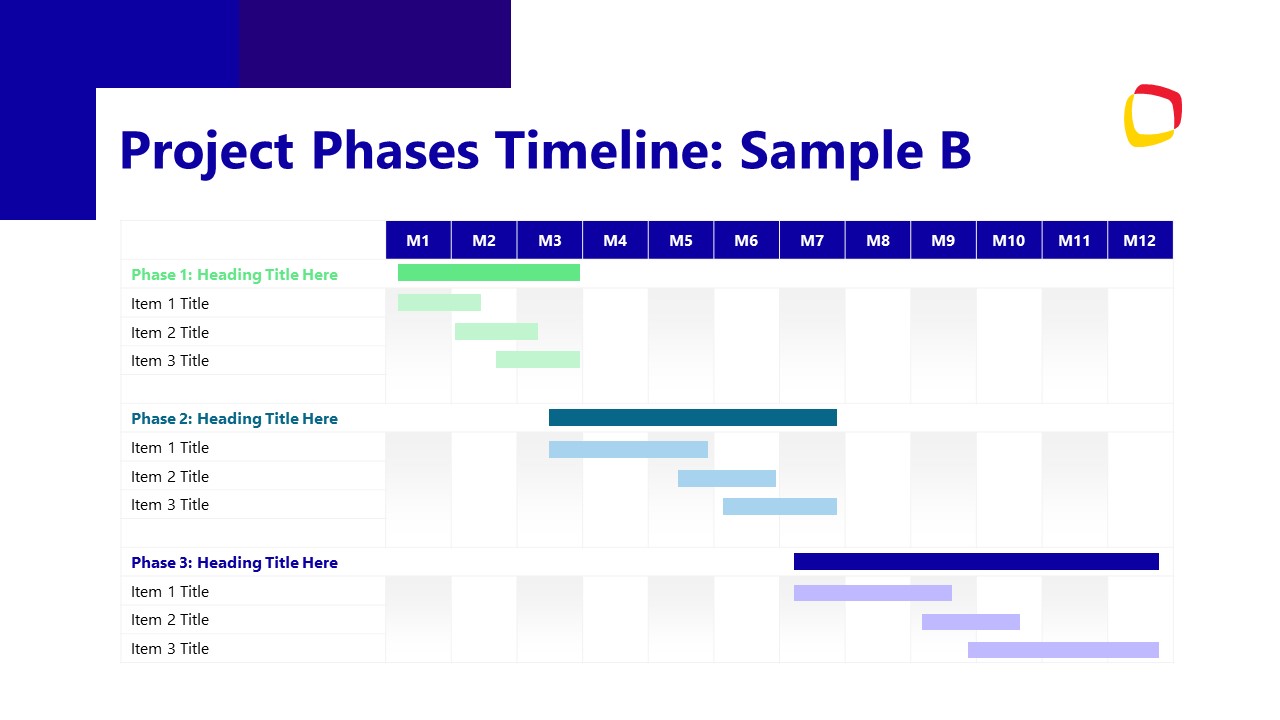
- Project timeline in multiple phases
- Project phases in the form of a table
- Key project deliverables
- Progress of the project through graphs
- Financial status with data-driven pie charts
- Upcoming activities summary
In addition to the core presentation areas, this Steering Committee PowerPoint Template also provides engaging slides for showing the risks & their mitigation plans, decisions needed with columns for pros & cons, and questions. Presenters can add relevant information on each slide using the dedicated sections provided. For instance, the progress report slide has a table diagram with rows mentioning the deliverables, dates, and statuses. It also has a pie chart with a results section to showcase the progress in a graph format. Similarly, the upcoming activities slide has a horizontal diagram with sections to indicate the activities to be performed individually. This animated PPT template can help create a professional presentation for stakeholder meetings and executive sessions. Users can add their company name, logo, and watermark for personalization. Download and try it now!
What’s inside this template
Example presentation scenarios
- A project manager can brief executive sponsors on current project direction using the project objective slide, phase timeline, and key deliverables table.
- A PMO lead can report schedule, budget, and delivery health by combining the Gantt-style timeline, progress to date slide, and financial status dashboard.
- A program manager can focus a governance meeting on decisions by presenting the risks and mitigation matrix followed by the decisions needed table.
- An operations leader can align cross-functional teams on near-term work using the roles and responsibilities slide, agenda slide, and upcoming activities layout.
Features
- 100% editable presentation template
- Compatible with Microsoft PowerPoint and Google Slides
- 16:9 aspect ratio slides
- Scalable vector shapes, icons and illustrations
- Ready with Animations & Transitions in PowerPoint
- AI-Ready for Microsoft Copilot and Claude
- Instant access and download
Frequently asked questions
Q: How should a presenter structure the discussion with this steering committee deck?
A: Start with the objective slide to remind sponsors what the project is trying to achieve, then use the phase timeline and deliverables table to show execution status. Move next into progress, financials, and risks so the committee sees evidence before being asked for decisions. Close with questions and contact details only after decisions are clear.
Q: Who is this template best suited for in a governance meeting?
A: This template fits project managers, PMO leads, and program owners who need to brief senior stakeholders in a formal review. The deliverables table, financial status dashboard, risk mitigation matrix, and decisions needed slide help a presenter separate reporting from decision-making, which is important when sponsors have limited meeting time.
Q: Why does the deck use timelines, tables, and status panels instead of only narrative slides?
A: Steering committees usually need to compare plan, progress, risk, and required action quickly. The timeline creates a time-based mental map, the tables make responsibilities and deliverables scannable, and the dashboard panels highlight budget and progress signals. This mix helps executives ask sharper questions without reading dense paragraphs.




Steering Committee PowerPoint Template
15-slide steering committee presentation template with project timelines, deliverables, risks, and financial status layouts
This is a 15-slide steering committee presentation template for project status meetings and executive reviews. It includes a project objective summary, roles and responsibilities list, phase timeline, Gantt timeline, deliverables table, progress report, financial dashboard, risk mitigation matrix, decision table, Q&A, and contact slide for PowerPoint and Google Slides.
- Category
- Business PowerPoint Templates
- Rating

 Loading...
- Aspect ratio
- 16:9
- Item ID
- 85189-01
- Colors
 Microsoft PowerPoint
 Microsoft Copilot
 Claude for PowerPoint
Other formats supported
Subscribe today and get immediate
access to download our PowerPoint templates.