Improve business reports with the Quality Management System Circular Diagram. The template design is appropriate for professional viewers. It is ideal for reports on management, progress, and production. The Office template is a simple diagram for Quality Management designs.
Quality is an important factor in any business. It assures buyers that they can trust in the product, as well as the brand. Good quality helps improve brand loyalty. It even encourages word-of-mouth references. This results in advertising that is free and reliable. Both of which are important to management and investors.
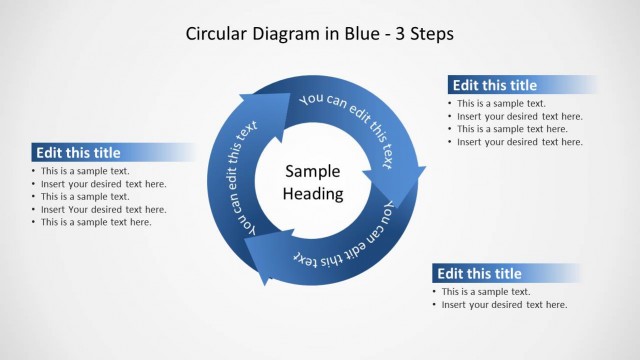
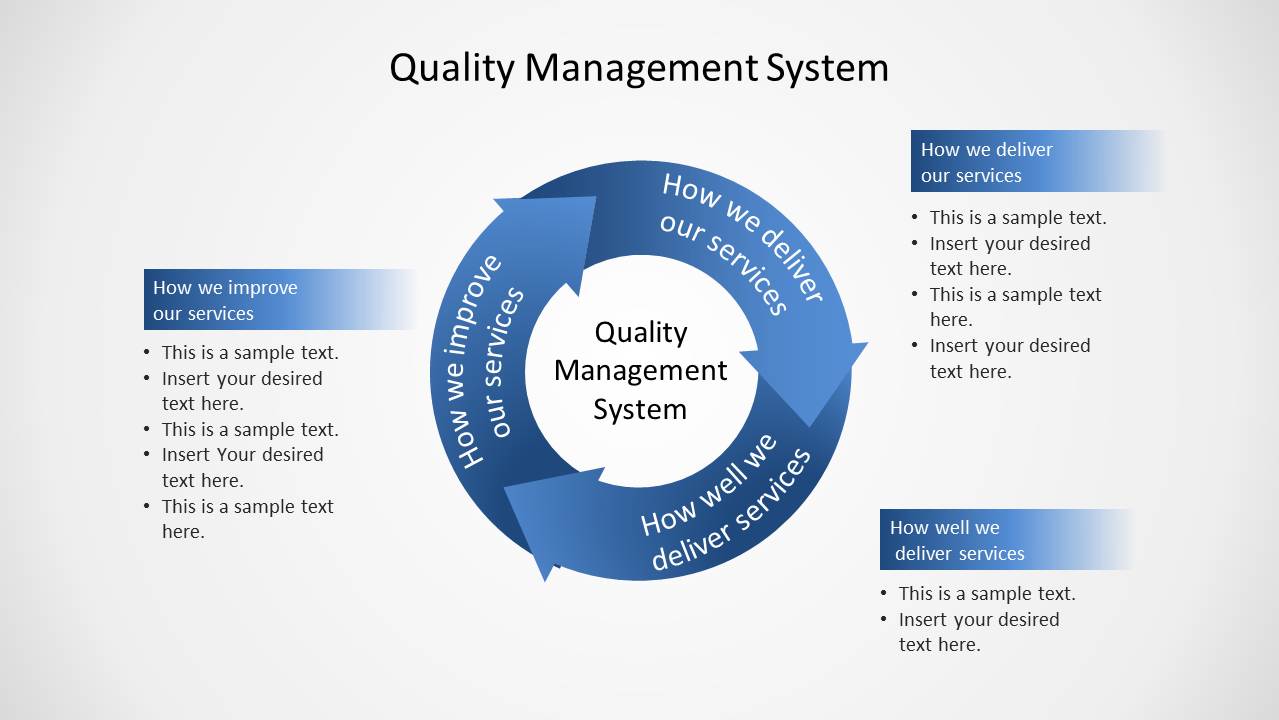
The diagram studies three basic elements. These are delivery, quality, and improvement. The first of which presents an objective view of the product. It shows the facts about company performance. This initial data can then be examined in the next stage. It involves assessing how well the services are delivered. The stage can involve customer and employee research. The research is commonly done through surveys and interviews. The last stage focuses on improvement. From the current state of quality, management must aim to perform better. The company must aim to improve constantly to keep ahead of their competitors.
Three curving arrows are at the center of the slide. Each arrow stands for an element. They surround a placeholder labeled Quality Management System. Three text placeholders are located on the slide. Each of these has a blue header for identification. The template uses a blue and gray color scheme to maintain a professional design. The PowerPoint objects are flexible and can be rearranged to suit the presenter’s specifications. Any changes, even to size, will not affect the image quality.
Quality Management System Circular Diagram for PowerPoint is suitable for management reports. It breaks the report down to three basic elements. The design allows the audience to connect the three together.
What’s inside this template
Example presentation scenarios
- A quality manager can use the circular arrow cycle to explain how delivery, measurement, and improvement connect during a management review.
- An operations lead can present the three callout blocks to summarize service delivery findings and assign discussion points to each stage.
- A consultant can use the center quality management label and surrounding arrows to introduce a TQM model before moving into detailed recommendations.
- A service team leader can use the bullet lists to compare how services are delivered with how well they meet internal or customer expectations.
Features
- 100% editable presentation template
- Compatible with Microsoft PowerPoint and Google Slides
- Scalable vector shapes, icons and illustrations
- AI-Ready for Microsoft Copilot and Claude
- Instant access and download
Frequently asked questions
Q: How should a presenter explain the quality management message with this diagram?
A: Start with the center label so the audience understands that all points belong to one system. Then move around the arrows in order: how services are delivered, how well they are delivered, and how improvement follows. Use the three callout blocks for evidence, observations, and next actions rather than long process descriptions.
Q: Who is this template best suited for in a business presentation?
A: This template fits quality managers, operations leaders, and service delivery teams who need to show a recurring improvement loop without building a full process map. It works well in management reports, TQM introductions, and progress updates where the presenter needs one clear diagram to connect process behavior with service outcomes.
Q: Why does the circular arrow metaphor work for quality management?
A: The circular arrows show that quality management is not a one-time checklist. The loop helps the audience see delivery, evaluation, and improvement as connected behaviors that repeat over time. The center label keeps attention on the system, while the three side callouts give room for practical details and decisions.
Quality Management System Circular Diagram for PowerPoint
1-slide PowerPoint diagram template for quality management systems, service delivery, and improvement cycles
Quality Management System Circular Diagram for PowerPoint is a 1-slide presentation template centered on a three-arrow circular process diagram. It includes a quality management center label, three service-focused cycle labels, and three bullet callout blocks for delivery, performance, and improvement points, aimed at managers preparing process or quality reports.


 Loading...
 Microsoft PowerPoint
  Microsoft Copilot
  Claude for PowerPoint
 Other formats supported
Subscribe today and get immediate
access to download our PowerPoint templates.