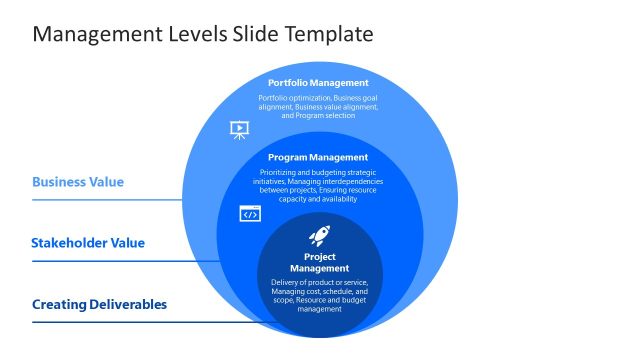
Showcase alignment across all ongoing projects by using our Program Management PowerPoint Template. A program is the collection of individual projects currently ongoing in the organization. Program management refers to managing all the projects to ensure they align with the company’s goals. A good program management strategy helps businesses align their programs and projects with the business goals and strategic objectives. It also helps professionals in corporate planning to improve, collaborate, work on issues, enhance performance, and drive positive changes in the company. Project management is the part of program management where the only difference is that the program involves multiple projects. We have created this engaging PPT template so managers can inform the company’s program management plans.
This Program Management PowerPoint Template is a slide deck with thirty-two slides for professionals and business managers to display a thorough program management charter in their executive meetings. The program management template covers three major sections of this particular framework, with many slides in each section to demonstrate the key points:
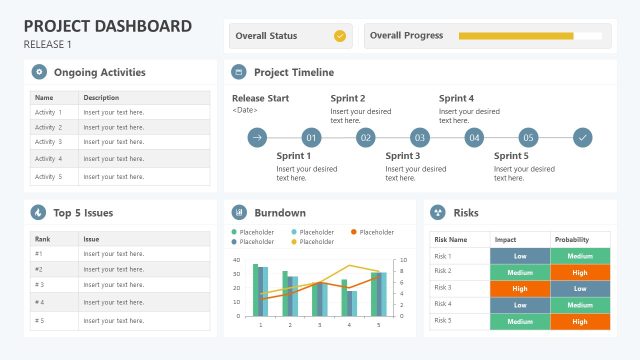
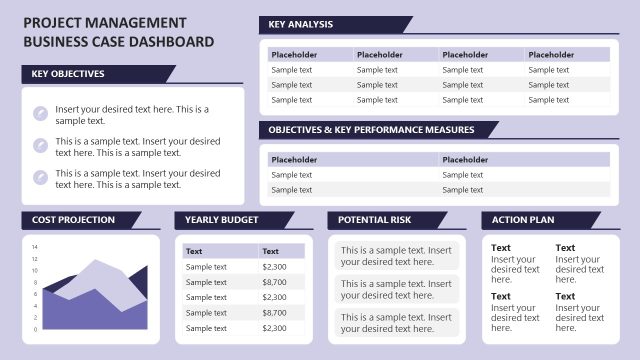
The define section has slides for presenting the business case studies and project factors. For instance, users can display the underlying problems, solutions to the issues, potential risks, and expected outcomes of the projects. They can also outline the risk management strategy, project scope, results of the SWOT analysis, and governance framework. Moreover, dashboard slides can help presenters visualize the cost-benefit analysis, budget and ROI estimation, financial standings, and relevant success factors associated with the projects in that program. A program manager is responsible for ensuring resource capabilities and availability. Also, professionals can present an extensive master milestones schedule to the stakeholders using the attractive slides of the program management template.
We have used colorful tables to make the data points prominent and understandable for the audience. Further, presenters can showcase the attributes of dynamic environmental assessment like feasibility study, comparative analysis, assumption analysis, etc. We have also provided colorful labels for the dashboards or tables so that professionals can prioritize the metrics on low, medium, or high levels.
In the deliver section, we provided slides showing business management aspects that align the program management plan with the organizational growth objectives. Users can also discuss stakeholder engagement and their involvement in the matters, the influence levels, and the communication with the stakeholders. They can present why, when, and how the change requests will be implemented in the program and the critical fields of the change request forms. Professionals can list the result reporting parameters and analyze the issue tracking within the programs using our editable slides template.
In the last close section, presenters can present the program results and achievements in program management. They can use horizontal timeline infographics to visualize the complete program journey chronologically. This helps users communicate the program performance metrics to the stakeholders and board members in the business meetings. Presenters can discuss the project closure factors and transition information using the close-section slides. Additionally, users can elaborate on the sustainability factors in the program management plan to confirm that the program observes the benefits of sustainability and adequately meets the organizational goals.
Furthermore, experts can examine the overall program and component objects, baseline, and real goal attainment in the benefits realization slide. This template is fully compatible with PowerPoint, Keynote, and Google Slides. Thus, if you want to present an impressive program management plan, download this modern template and edit it now!
What’s inside this template
Example presentation scenarios
- A PMO leader can use the framework agenda, dynamic charter, and business case slides to brief executives on why a program exists and how it supports organizational goals.
- A program manager can use the benefits roadmap, work breakdown structure, and master milestone schedule to align several project managers around dependencies, roles, and timing.
- A governance committee presenter can use the risk management strategy, benefits register, and governance framework slides to review controls, risks, and accountability across component projects.
- A change management lead can use the stakeholder engagement, stakeholder communication, and change request slides to explain who must be involved and how changes will be tracked.
- An operations manager can use the program reporting, issue tracker, closure, and transition slides to show final status, unresolved issues, and handoff responsibilities.
Features
- 100% editable presentation template
- Compatible with Microsoft PowerPoint and Google Slides
- 16:9 aspect ratio slides
- Scalable vector shapes, icons and illustrations
- AI-Ready for Microsoft Copilot and Claude
- Instant access and download
Frequently asked questions
Q: How should a presenter structure the message with this program management deck?
A: Start with the framework agenda so the audience sees Define, Deliver, and Close as the organizing logic. Use the business case and dynamic charter to confirm strategic fit before moving into the benefits roadmap, work breakdown structure, and milestone schedule. Save risk, stakeholder, change request, and issue tracker slides for governance decisions.
Q: Who is this template best suited for in a business review?
A: It is best suited for program managers, PMO leads, portfolio managers, and operations leaders who must explain one program made of several component projects. The deck supports audiences that need accountability details, such as executives, governance boards, sponsors, project managers, and change management teams.
Q: Why does the template use section dividers, registers, and status tables instead of only narrative slides?
A: Program management depends on control points, ownership, and decision records. The Define, Deliver, and Close dividers make the story easy to follow, while registers and status tables turn abstract governance into visible evidence. Color-coded ratings and status icons help stakeholders scan priorities without losing the audit trail.


Program Management PowerPoint Template
32-slide program management presentation template with SWOT, governance, and milestone planning for business teams
This 32-slide program management template helps program managers document a management charter across definition, delivery, and closure phases. Visible layouts include a SWOT analysis, benefits roadmap, work breakdown structure, master milestone schedule, risk register, stakeholder engagement table, change request log, and issue tracker for Microsoft PowerPoint and Google Slides.
- Category
- Business PowerPoint Templates
- Rating

 Loading...
- Aspect ratio
- 16:9
- Item ID
- 85038-02
- Colors
 Microsoft PowerPoint
 Microsoft Copilot
 Claude for PowerPoint
Other formats supported
Subscribe today and get immediate
access to download our PowerPoint templates.