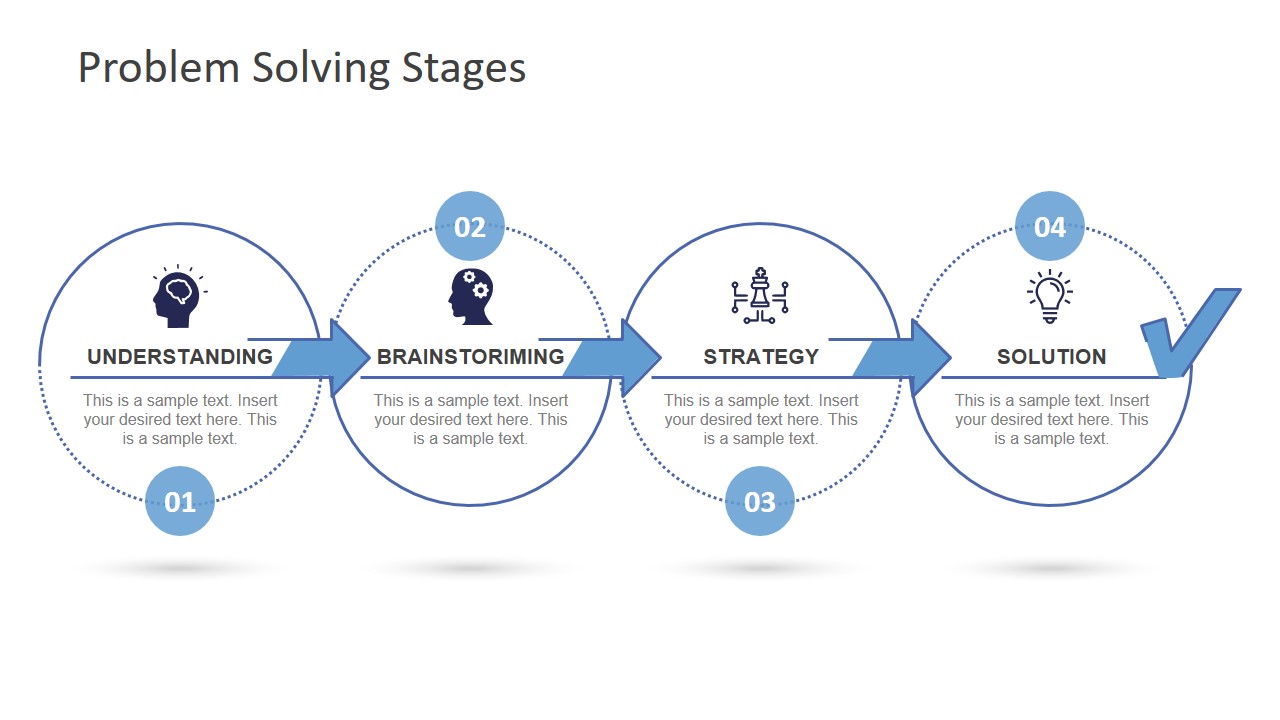
The Problem Solving Stages PowerPoint Template is a concept diagram design prepared as a presentation template for presentations on problem-solving topics. The problem-solving presentation template shows a linear process flow diagram containing four individual process cycles. Various problem-solving techniques & frameworks are available, depending on the issue’s complexity or corporate structure. Because some problems are small and can be resolved quickly while others are complex and need more research.
This presentation of 4-step problem-solving model provides a basic decision-making approach for solving a problem at hand. This diagram shows four main components of any problem-solving model in a horizontal process. These components include Understanding, Brainstorming, Strategy, and Solution. This problem-solving diagram could be used for personal, professional, and organizational difficulties. For example, threats, challenges, product quality, and risk management.
The 4-step PowerPoint diagram template is a useful tool for demonstrating problem-solving techniques, frameworks, and strategies as a learning experience. Further, it is suitable for organizations to outline their systematic approach to identify complications. And provide a visual roadmap to tackle them. The diagram of the problem-solving model illustrates an intensive thought process. The users can copy this diagram template to another presentation.
The problem Solving Stages PowerPoint Template contain 5 slides of various infographic icons. These graphics are a visual representation of each process. The first slide gives an overview of diagram while additional 4 layouts highlight each stage individually. Furthermore, all PowerPoint shapes are editable objects. Therefore, users can change icons and colors including backgrounds.
What’s inside this template
Example presentation scenarios
- A consultant can use the overview process diagram to introduce a client workshop on how the team will move from understanding the issue to selecting a solution.
- A project manager can use the stage highlight slides to align stakeholders on which activities belong in Understanding, Brainstorming, Strategy, and Solution.
- A corporate trainer can teach a decision-making framework by presenting one spotlight slide at a time and asking learners to add examples to the text placeholders.
- An operations leader can summarize a process improvement discussion with the four-step flow, using the Solution slide to show the final direction after analysis.
Features
- 100% editable presentation template
- Compatible with Microsoft PowerPoint and Google Slides
- 16:9 aspect ratio slides
- Scalable vector shapes, icons and illustrations
- AI-Ready for Microsoft Copilot and Claude
- Instant access and download
Frequently asked questions
Q: How should a presenter communicate the four-stage model clearly with this template?
A: Start with the full process diagram to establish the complete path, then move through the four spotlight slides without changing the visual structure. Keep each text placeholder focused on one decision or activity. This repetition helps the audience track progress while the emphasis shifts from Understanding to Brainstorming, Strategy, and Solution.
Q: Who is this template best suited for?
A: This template fits consultants, facilitators, team leads, and trainers who need to explain a simple problem solving framework rather than present a detailed operational plan. It works well for workshops, internal process discussions, and short training sessions where the goal is to give people a shared method for approaching a challenge.
Q: Why does the repeated process diagram improve the explanation?
A: The design uses a pathway metaphor: circles and arrows show movement from problem understanding to the final solution. Each spotlight slide fades the surrounding steps, so the audience sees both the current focus and its place in the full sequence. This reduces cognitive load and supports step-by-step facilitation.


Problem Solving Stages PowerPoint Template
5-slide problem solving presentation template with a 4-step process diagram and stage highlight layouts
The Problem Solving Stages PowerPoint Template is a 5-slide process diagram deck for explaining a four-stage problem solving method. It includes an overview flow and individual highlight slides for Understanding, Brainstorming, Strategy, and Solution. It is designed for consultants, managers, trainers, and team leads using Microsoft PowerPoint or Google Slides.
- Category
- Diagrams
- Rating


 Loading...
- Aspect ratio
- 16:9, 4:3
- Item ID
- 13123-01
- Colors
 Microsoft PowerPoint
 Microsoft Copilot
 Claude for PowerPoint
Other formats supported
Subscribe today and get immediate
access to download our PowerPoint templates.