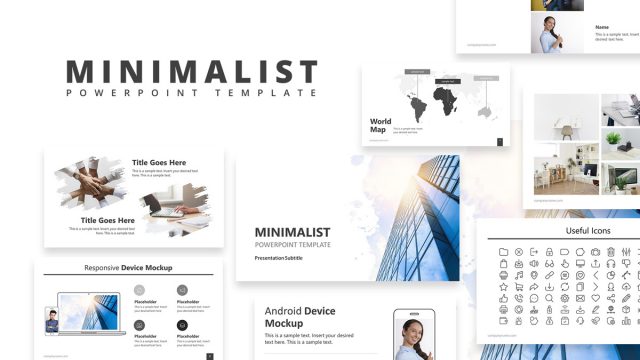
The Minimal General Purpose PowerPoint Template is a 21-slide presentation template for business purposes. The design of slides features the corporate environment through cutout images of skyscrapers and commercial buildings. These images in backgrounds and picture placeholder aid in presenting various business concepts. You can present a detailed business introduction to your clients using layouts on general-purpose PowerPoint. There are 21 slides of minimal design containing a variety of layouts including diagrams, timeline templates, charts, and maps. The blue and white PowerPoint theme provides a professional look, leaving your audience with a lasting impression. In this presentation, you can find:
- Table of Contents slide
- Slide with diagrams and photo placeholders
- Single content layouts to include company overview or introduction
- 3-Column slides
- Business diagram slides
- SWOT Analysis slide
- Slide to present Quotes
- Timeline slides
- Team Introduction slide
- World map slide
- Q&A slide
- Thank you slide
The Minimal General Purpose PowerPoint Template is a full-fledge presentation deck. It is an ideal business PowerPoint template for business introductions and sales pitch presentations. The PowerPoint shapes and graphics can assist business professionals to put together an outstanding executive corporate presentation. Alternatively, download a minimal presentation template to promote company’s services and experience online. One way is to embed the pre-design minimal PowerPoint Google Slide Templates on the business website. Users can also copy desired slide layouts for existing presentations. With the added advantage of editable components, users can incorporate aesthetic slides into their ready-made presentations.
To complement a business presentation, the minimal PowerPoint theme offers graphic elements. These include images, vector shapes, icons, and diagrams. You can select diagrams, such as 3 concentric circles and a SWOT analysis canvas for marketing presentations. For sales pitches, take advantage of segmented columns to present solutions or maps for business global reach. Slide deck templates for minimalist presentations contain team introduction slides and timeline templates to showcase company’s culture and goals. The collection of minimal general purpose PowerPoint helps put focus on speech while supporting the presentation content. Alternatively, check our complete collection of minimalist presentation templates.
What’s inside this template
Example presentation scenarios
- A founder can use the cover, table of contents, SWOT analysis, and timeline to introduce the company, explain its market position, and show progress to potential partners.
- A sales team can use the three-column slide, circular process diagram, and world map to explain service packages, delivery steps, and geographic reach to prospective clients.
- A consultant can use the text slides, concentric circle diagram, and quote slide to organize a business recommendation and support it with a clear executive message.
- A marketing manager can use the team slide, photo placeholder slides, and Q&A slide to build a short corporate capabilities presentation for an external audience.
Features
- 100% editable presentation template
- Compatible with Microsoft PowerPoint and Google Slides
- 16:9 aspect ratio slides
- Scalable vector shapes, icons and illustrations
- AI-Ready for Microsoft Copilot and Claude
- Instant access and download
Frequently asked questions
Q: How should a presenter structure a company introduction with this template?
A: Start with the cover and table of contents to set context, then use the two-column and three-column slides to explain core messages. Move into the SWOT analysis or world map when the audience needs strategic evidence. Close with the team, timeline, Q&A, and thank-you slides so the deck ends with credibility and a clear discussion point.
Q: Who is this template best suited for in a business presentation?
A: This template fits presenters who need to explain a company, service, or pitch without dense visuals. Founders, consultants, sales teams, and marketing managers can use the map, process diagram, team slide, and timeline to describe what the organization does, where it operates, who is involved, and what comes next.
Q: Why do the circular shapes and building photos work for this deck?
A: The building photos create a corporate setting without taking over the message, while the circular overlays give repeated visual rhythm across text, map, team, and Q&A slides. That repetition helps the deck feel connected. The diagrams use simple circles and cards, which makes business concepts easier to scan during a live presentation.


Minimal General Purpose PowerPoint Template
21-slide presentation template with SWOT, timeline, world map, and company introduction layouts.
Minimal General Purpose PowerPoint Template is a 21-slide business presentation template for company introductions and pitch decks. The contact sheet shows a table of contents, SWOT analysis, world map, team slide, timeline, photo layouts, and Q&A close. It is built for Microsoft PowerPoint and Google Slides.
- Category
- Template Backgrounds
- Rating

 Loading...
- Aspect ratio
- 16:9
- Item ID
- 8416-01
- Colors
 Microsoft PowerPoint
 Microsoft Copilot
 Claude for PowerPoint
Other formats supported
Subscribe today and get immediate
access to download our PowerPoint templates.