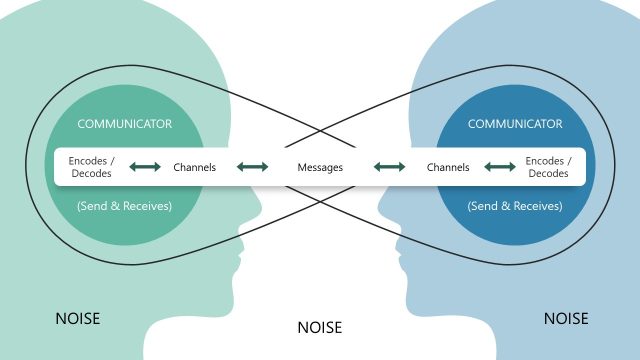
The Interaction Model Communication PowerPoint Template is a diagrammatic representation of the interaction model that describes the communication between a sender and a receiver. This model emphasizes various components in the two-way communication process to initiate or produce a response. In this process, the two active components are:
- Sender: the one who sends the information after encoding it
- Receiver: the one who receives, decodes, and understands the message from the sender
The message or information passes through a medium and gets affected by several context factors (broader factors such as physiological and physical). Noise can be physiological when it comes to biases and distractions in the response and physical due to surroundings. Another key component of this model series is feedback, the receiver’s response to the message. This model is frequently used in business and training instances to understand the communication between the two parties, e.g., instructor & student, presenter & audience, or leaders & teams. The feedback estimation is done before initiating a new communication at any level.
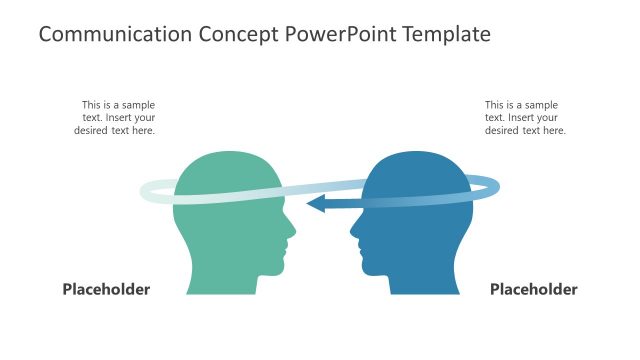
This Interaction Model Communication PowerPoint Template is a one-pager slide design provided in two background color options. The slide shows two human symbols, a male and a female, on either end of the slide. Between them is a double-headed arrow representing the medium. On both sides of this arrow, the physiological and physical factors are mentioned, with noise being in the middle mentioned in a prominent shape. Some vertical lines are also drawn on this channel, indicating the sound transmission from one end to another. Users can add relevant description text in the provided text boxes and change other features on the slide according to the requirements. In addition to formal use cases, this PPT template is ideal for spreading information, teaching about communication concepts, and similar purposes. It can be edited with all PowerPoint versions, Google Slides, and Keynote!
What’s inside this template
Example presentation scenarios
- A corporate trainer can use the sender receiver diagram to teach employees how encoding, decoding, and feedback influence workplace conversations.
- An instructor can use the noise burst and context labels to explain why psychological and physical factors change how a message is understood.
- An HR facilitator can present the message feedback channel to help managers diagnose communication breakdowns during performance discussions.
- A team leader can use the editable text boxes to map a specific presenter audience or leader team exchange before a workshop activity.
Features
- 100% editable presentation template
- Compatible with Microsoft PowerPoint and Google Slides
- 16:9 aspect ratio slides
- Scalable vector shapes, icons and illustrations
- AI-Ready for Microsoft Copilot and Claude
- Instant access and download
Frequently asked questions
Q: How should a presenter explain the interaction model with this slide?
A: Start with the two silhouettes as the active parties, then move across the message and feedback channel. Explain encoding on the sender side and decoding on the receiver side before calling attention to the central noise burst. Finish by asking the audience to name physical or psychological context factors that could distort the exchange.
Q: Who is this template best suited for?
A: This template is best for trainers, instructors, HR facilitators, and managers who need to make a communication concept visible quickly. It works well when the goal is to discuss interpersonal exchanges, feedback loops, or misunderstandings without building a full course deck or communication strategy presentation.
Q: Why does the diagram use a noise burst between the sender and receiver?
A: The burst shape makes interference hard to ignore, which supports the main teaching point: communication is not just message transfer. Placing noise between the two people, above the feedback channel, helps the audience see that context and distraction affect both the original message and the response.


Interaction Model Communication PowerPoint Template
2-slide interaction model presentation template with sender receiver communication diagrams and noise context labels
This 2-slide diagram template explains sender and receiver interaction in a communication process. It includes a two-person communication model, bidirectional message and feedback channel, noise burst, encoding and decoding labels, and physical and psychological context callouts for trainers, managers, and educators using Microsoft PowerPoint or Google Slides.
- Category
- Models
- Rating

 Loading...
- Aspect ratio
- 16:9
- Item ID
- 21950-01
- Colors
 Microsoft PowerPoint
 Microsoft Copilot
 Claude for PowerPoint
Other formats supported
Subscribe today and get immediate
access to download our PowerPoint templates.