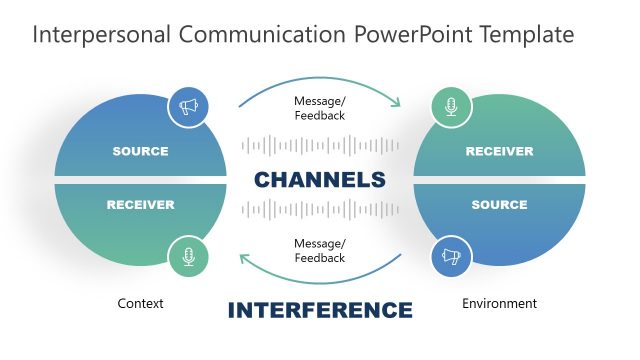
Are you looking to work on your employees’ collaboration and need to discuss the importance of communication? Look no further; try our engaging Interpersonal Communication Diagram PowerPoint Template and showcase the scenario, how two persons connect, what channel they use, and how they can communicate their messages and receive their signals. It can also be done via verbal or nonverbal communication. Nonverbal communication can relate to body language and gesture exchange. Interpersonal communication enables colleagues to share information and build trust and respect for one another, enhancing the overall efficiency of the employees. Trainers, project managers, scholars, and related professionals can use this slide template with PowerPoint, Google Slides, and Keynote.
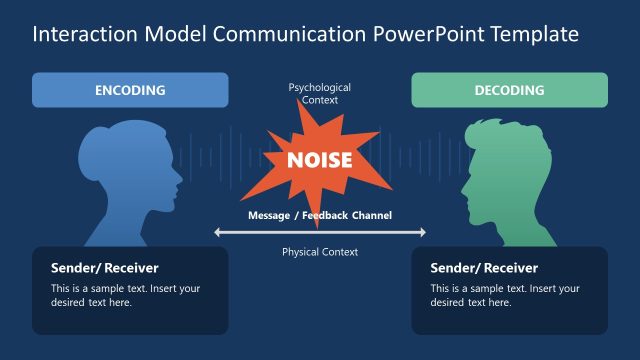
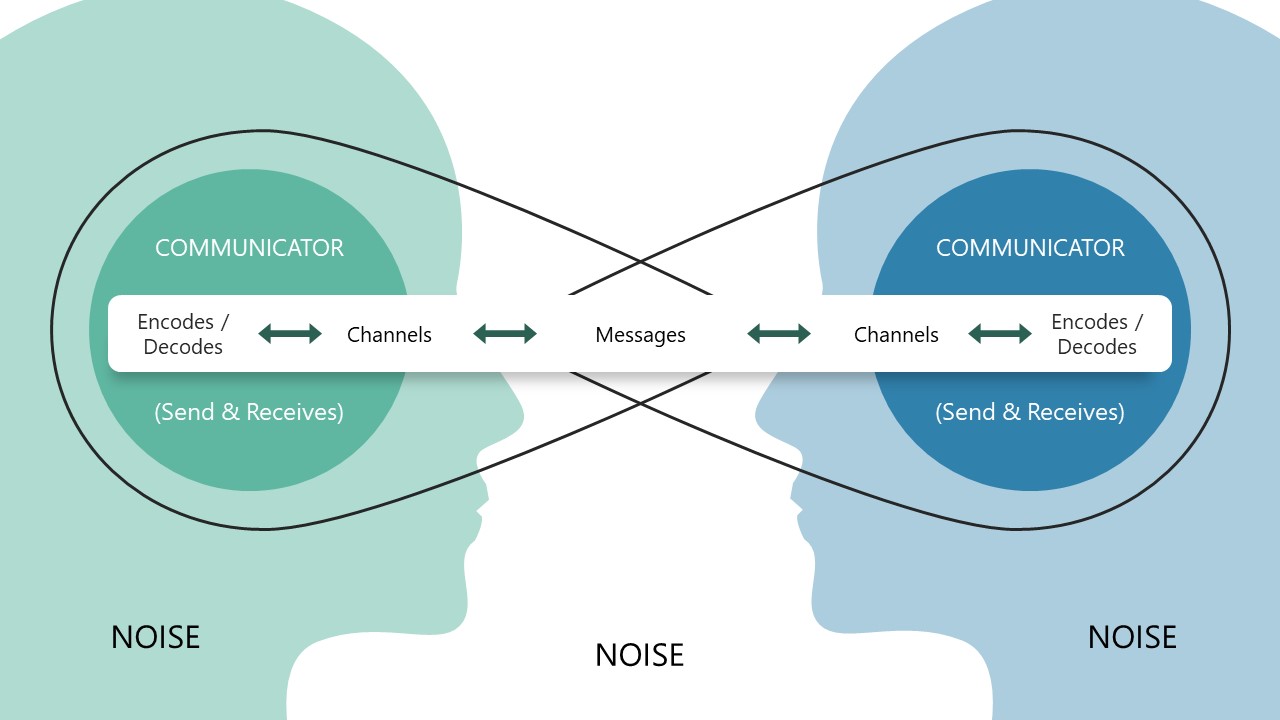
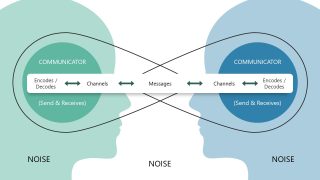
The Interpersonal Communication Diagram PowerPoint Template has only one page and a creative diagram. The diagram shows two human headings facing each other. Inside each head illustration, a circular shape shows the title ‘Communicator’ who sends and receives messages. This indicates two human beings sharing information and talking to each other. Each circle has a horizontal location marker shape, intermingle in the center of both heads. Next, a round-edged horizontal bar shows the following texts separated by double-headed arrows: Encodes/decode, Channels, Messages, Channels, Encodes/decode. This pattern allows users to discuss the mechanism of interpersonal communication, i.e., how two persons connect through multiple channels.
Below, we have provided a text “Noise,” indicating disruptions in the communication or connection. You can change the fonts, lines, or shapes used in the template and edit the text to showcase your corresponding details in the presentation. Download the interpersonal communication PPT template and edit it for your training sessions. Personalize it for your employees today!
What’s inside this template
Example presentation scenarios
- A corporate trainer can use the facing communicator diagram to explain how encoding, decoding, channels, and messages work during an employee communication workshop.
- A project manager can show the noise labels and crossed loop lines to discuss why project updates are misunderstood and how team members can reduce interruptions.
- An educator can use the bidirectional message bar to teach students the difference between channels, messages, and sender-receiver roles in interpersonal communication.
- An HR facilitator can present the two head silhouettes during a conflict resolution session to separate what each person intends to send from what the other person receives.
Features
- 100% editable presentation template
- Compatible with Microsoft PowerPoint and Google Slides
- 16:9 aspect ratio slides
- Scalable vector shapes, icons and illustrations
- AI-Ready for Microsoft Copilot and Claude
- Instant access and download
Frequently asked questions
Q: How should a presenter explain the communication process with this diagram?
A: Start with one communicator, move across the central bar from encodes/decodes to channels and messages, then show the return path from the second communicator. Call out that both people send and receive, not just speak and listen. Finish by using the noise labels to discuss interruptions, assumptions, emotions, or unclear wording.
Q: Who is this template best suited for in a business or learning session?
A: This template fits trainers, HR facilitators, project managers, and instructors who need to explain a two-person communication exchange without adding a full lecture deck. It is especially useful when the session goal is to improve listening, feedback, collaboration, conflict handling, or clarity between colleagues, students, patients, or stakeholders.
Q: Why does the design use two head silhouettes and a central message bar?
A: The mirrored heads make the exchange feel personal and mutual, while the central bar turns abstract communication terms into a readable path. The repeated arrows show movement in both directions, and the noise labels create a simple metaphor for interference that can happen outside either person's intent.
Interpersonal Communication Diagram PowerPoint Template
1-slide presentation template for interpersonal communication, message channels, and noise in a two-person diagram
The Interpersonal Communication Diagram PowerPoint Template is a 1-slide diagram for explaining how two communicators send, receive, encode, decode, and exchange messages. It shows facing head silhouettes, communicator circles, a bidirectional channel and message flow bar, loop lines, and noise labels for trainers, managers, and educators using Microsoft PowerPoint or Google Slides.
- Category
- Diagrams
- Rating

 Loading...
- Aspect ratio
- 16:9
- Item ID
- 22779-01
- Colors
 Microsoft PowerPoint
 Microsoft Copilot
 Claude for PowerPoint
Other formats supported
Subscribe today and get immediate
access to download our PowerPoint templates.