Download our Individual Development Plan Template for PowerPoint and prepare a comprehensive presentation about your company’s development plan for the employees. Employee elevation is the greatest measure any company can take to improve its performance and boost its development process over time. Keeping the benefits of this aspect, organizations focus on employee development through proper protocols. This IDP or individual development plan is an all-rounder process that includes analyzing the current situation, setting the goals, making an action plan, tracking the progress, and acknowledging the efforts. We have created this 100% editable slide deck to share the details of this plan with employees and HR teams. Users can download and edit this template with PowerPoint, Google Slides, and Keynote.
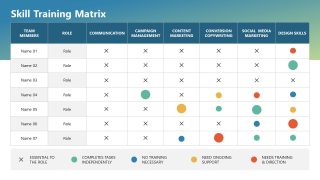
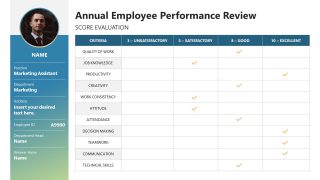
This professional Individual Development Plan Template for PowerPoint begins with a title slide having a background image and space to mention the title & caption. Presenters can add their company logo to this PowerPoint slide for personalization. The next slide of the template has a multi-segment layout for creating a record of the current details and key points of the IDP. It has sections to insert points like employee name, current designation, area of development, development actions, results, involvement of others, milestones, status, and follow-up. Following is a skill training matrix to clarify the current roles and to point out the weaker areas. Likewise, the next slide has a table to mention the performance review of the employees of the latest year. It helps the teams know about the workers’ performance status from the previous year. Professionals can change the values and titles of these slides according to their requirements.
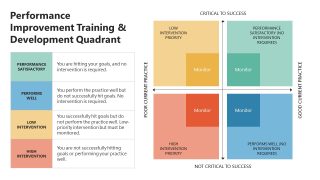
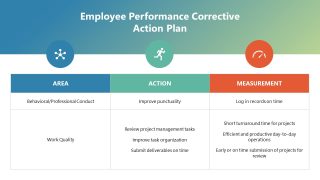
This PPT template also includes a three-segment slide for action plan presentation and a four-quadrant slide for discussing the performance improvement training. Presenters can change the text, color scheme, fonts, and design to meet the requirements. It is ideal for HR and development teams to prepare a comprehensive employee training program. Download and prepare your outline now!
What’s inside this template
Example presentation scenarios
- An HR manager can use the IDP worksheet to document an employee's current role, development actions, milestones, and follow-up dates during a formal development planning session.
- A learning and development lead can use the skill training matrix to compare team members across communication, content marketing, social media, and design skill categories before assigning training.
- A direct supervisor can use the annual performance review table to discuss criteria such as productivity, work consistency, attendance, decision making, teamwork, and technical skills.
- A people operations presenter can use the improvement quadrant and corrective action plan to explain which performance issues need monitoring, intervention, or measurable follow-up.
Features
- 100% editable presentation template
- Compatible with Microsoft PowerPoint and Google Slides
- 16:9 aspect ratio slides
- Scalable vector shapes, icons and illustrations
- AI-Ready for Microsoft Copilot and Claude
- Instant access and download
Frequently asked questions
Q: How should a presenter communicate an employee development plan with this template?
A: Start with the IDP worksheet to establish the employee's role, development area, actions, milestones, and follow-up commitments. Then use the skill matrix and performance review table as evidence, not as isolated forms. Close with the quadrant and corrective action plan so the audience sees the path from assessment to measurable behavior change.
Q: Who is this template best suited for in an organization?
A: This template is best for HR managers, people operations teams, supervisors, and learning leaders who need a structured employee growth conversation. It works especially well when the presenter must align employee goals, training needs, performance ratings, and corrective actions in one short review meeting or internal development briefing.
Q: Why does the template use matrices, quadrants, and tables instead of narrative-only slides?
A: Employee development discussions can become subjective if feedback is presented only as text. The matrix makes skill gaps visible across competencies, the review table ties ratings to criteria, and the quadrant separates low-priority monitoring from high-priority intervention. These layouts help managers explain decisions with structure and reduce ambiguity.



Individual Development Plan Template for PowerPoint
6-slide presentation template for employee development plans, skill matrices, and performance review discussions
The Individual Development Plan Template for PowerPoint is a 6-slide planning deck for HR, managers, and employee development teams. It includes a title slide, IDP record worksheet, skill training matrix, annual performance review table, improvement quadrant, and corrective action plan. The template is built for Microsoft PowerPoint and Google Slides.
- Category
- Timelines & Planning
- Rating

 Loading...
- Aspect ratio
- 16:9
- Item ID
- 21814-01
- Colors
 Microsoft PowerPoint
 Microsoft Copilot
 Claude for PowerPoint
Other formats supported
Subscribe today and get immediate
access to download our PowerPoint templates.