Slide 25 of 31 from Go-To-Market PowerPoint Template
Partner Process Strategy PowerPoint
Partner Process Strategy Diagram for Presentations
- Diagram
- Process Flow
- Strategy Slide
- 16:9
- 100% Editable
The Partner Process Strategy Diagram from the Go-To-Market PowerPoint Template offers a clear visualization of partner strategy stages using editable slides. This slide template is ideal for illustrating marketing processes, project management workflows, and business presentation strategies with a horizontal flowchart design that supports effective communication in corporate presentations.
About This Slide
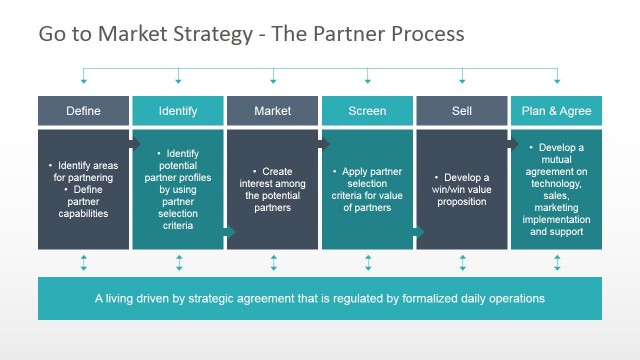
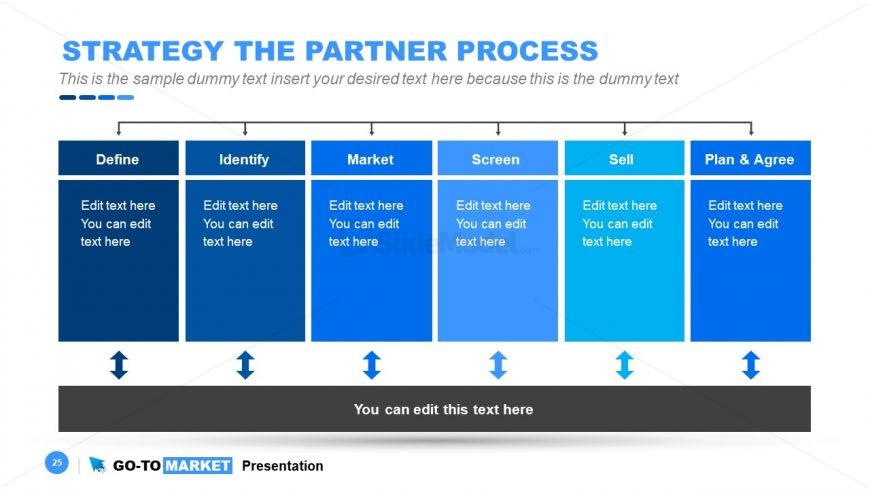
Six component channel partner diagram design for PowerPoint presentations with text placeholders and categories: Define, Identify, Market, Screen, Sell, Plan and Agree. This slide can be used to prepare a channel partner strategy and present it to an audience.
What’s on This Slide
The layout features a horizontal flowchart divided into five sections labeled Define, Identify, Market, Screen, and Sell, with a sixth section for Plan & Agree. Each section contains text placeholders aligned centrally, allowing for editing. Below each section, there are downward arrows indicating progression. A larger text placeholder spans the bottom of the slide, centered and highlighted. The background is a gradient of blue tones, with a dark gray footer. The visual hierarchy emphasizes the section titles with bold text against the lighter backgrounds.
How to Use It
This layout serves as a process flow diagram, illustrating the steps involved in a partner strategy. It fits within a presentation sequence that discusses strategic planning or partnership processes. This structure is useful for business scenarios such as outlining partnership stages, marketing strategies, or project management workflows. It can be employed in discussions about collaboration, sales processes, or operational strategies.
Text Placeholders & Capacity
Keep your copy within these limits so it fits without resizing. Body slots can accommodate around 10-15 words each.
| Placeholder | Count | Max characters (approx.) |
|---|---|---|
| Slide title | 1 | 30 |
| Item heading | 5 | 20 |
| Body paragraph | 6 | 50 |
| Callout | 1 | 40 |
Slide Keywords
Download unlimited PowerPoint templates, charts and graphics for your presentations with our annual plan.
DOWNLOADReturn to Go-To-Market PowerPoint Template.