Slide 22 of 31 from Go-To-Market PowerPoint Template
Go-To Market Partnering Plan PPT
Partnering Overview in Go-To-Market Strategy
- Diagram
- Matrix Quadrant
- Strategy Slide
- 16:9
- 100% Editable
The Partnering Overview Diagram slide from the Go-To-Market PowerPoint Template offers a clear visual framework for partner strategy discussions. This editable slide template highlights key aspects such as partner networks, value propositions, and selection criteria, making it suitable for corporate presentations focused on collaboration and stakeholder engagement within a business presentation or pitch deck template.
About This Slide
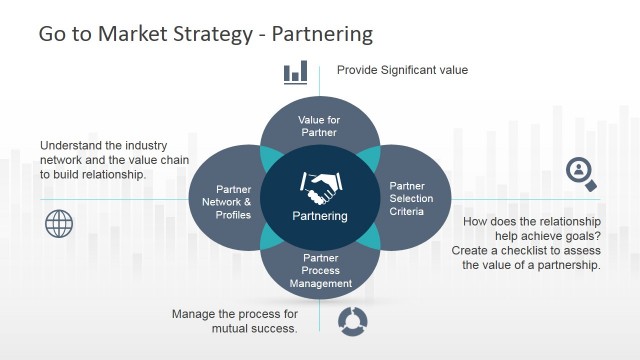
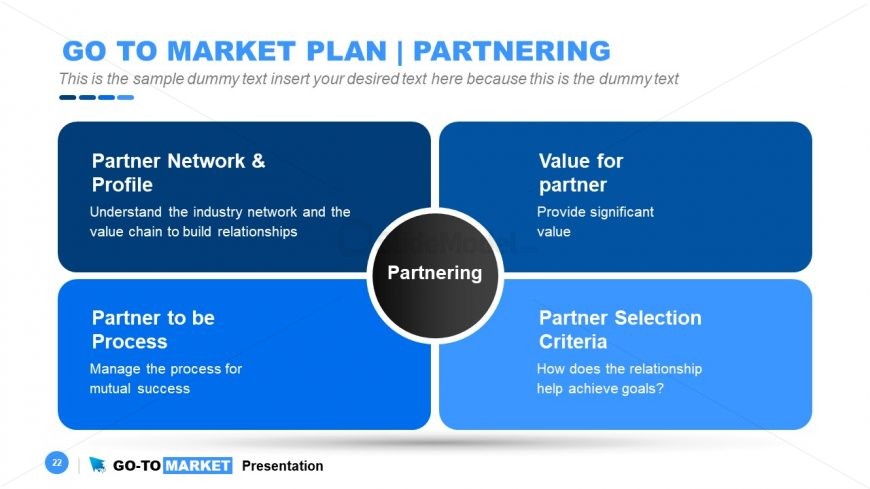
This image showcases a PowerPoint slide from a go-to-market (GTM) plan presentation, specifically focused on the aspect of Partnering. The Partnering slide template is structured around a central circle labeled “Partnering”, with four rectangular nodes connected to it, creating a visual representation of a partnership network.
Each rectangle contains a key component of the partnership strategy:
Partner Network & Profile: This node emphasizes the importance of understanding the industry network and the value chain to build relationships. It suggests a strategic approach to identifying and profiling potential partners within the market.
Value for Partner: This section is about the benefits that partners can gain from the collaboration. It stresses the need to provide significant value to partners to maintain a mutually beneficial relationship.
Partner to be Process: Here, the focus is on managing the process for mutual success. It highlights the operational aspect of partnering, suggesting that there is a clear process that ensures both parties work effectively together.
Partner Selection Criteria: This part discusses how to choose the right partners based on how the relationship helps achieve the company’s goals. It prompts the presenter to elaborate on the criteria for selecting partners that align with the business objectives.
What’s on This Slide
The layout features a central circular node labeled 'Partnering' surrounded by four rectangular sections positioned in a 2x2 grid. The top left section is labeled 'Partner Network & Profile,' the top right is 'Value for partner,' the bottom left is 'Partner to be Process,' and the bottom right is 'Partner Selection Criteria.' Each section contains placeholder text aligned to the left. The background is predominantly blue with a black circle for the central node. The overall composition emphasizes the central theme of partnering while clearly delineating each aspect.
How to Use It
This layout serves as a visual representation of key elements in a partnering strategy, making it suitable for discussions on collaboration and relationship management. It fits well in a presentation sequence after outlining market strategies and before detailing execution plans. This structure is useful for business scenarios such as partnership evaluations, stakeholder engagement discussions, and strategic alliance presentations, providing clarity on the roles and values of partners involved.
Text Placeholders & Capacity
Keep your copy within these limits so it fits without resizing. Node body slots can accommodate roughly 15-20 words each.
| Placeholder | Count | Max characters (approx.) |
|---|---|---|
| Slide title | 1 | 40 |
| Item heading | 4 | 30 |
| Item body | 4 | 100 |
| Footer | 1 | 40 |
Slide Keywords
Download unlimited PowerPoint templates, charts and graphics for your presentations with our annual plan.
DOWNLOADReturn to Go-To-Market PowerPoint Template.