Slide 10 of 20 from Data Lineage PowerPoint Template
Critical Data Elements Bar Chart Dashboard Slide for Data Lineage Template
Critical Data Elements Overview Slide
- Diagram
- Other
- Context Slide
- 16:9
- 100% Editable
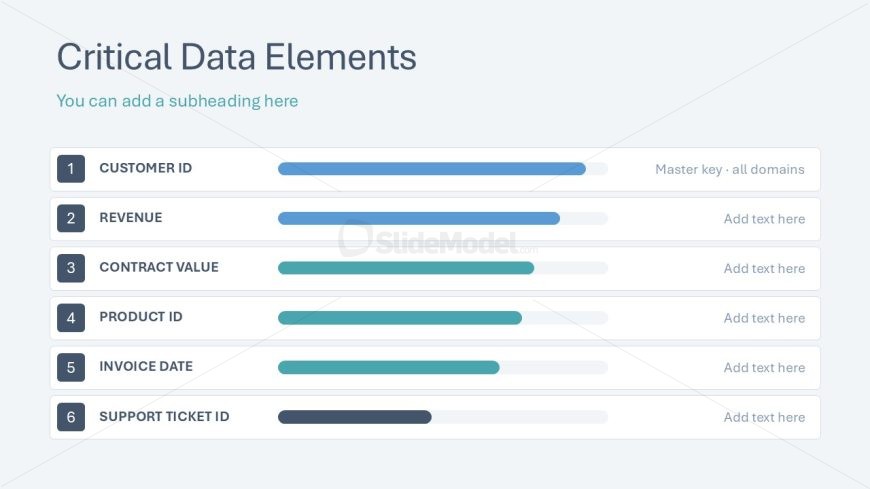
The Critical Data Elements slide from the Data Lineage PowerPoint Template offers a clear visual layout with editable shapes to track key metrics like Customer ID and Revenue. Ideal for business presentations and data management discussions, this slide uses horizontal progress bars to represent the status of essential data points, enhancing corporate presentation clarity and supporting effective performance tracking.
What’s on This Slide
The slide features a title at the top left, stating 'Critical Data Elements,' with an optional subheading below it. Below the title, there are six horizontal progress bars arranged vertically, each representing a critical data element. Each bar is labeled with a corresponding item, such as 'Customer ID' and 'Revenue.' The bars vary in length, indicating different levels of completion or importance. Text placeholders are present for additional descriptions beside each bar. The background is light blue, providing a clean and professional appearance.
How to Use It
This layout serves as a visual representation of key data elements and their statuses, fitting well in a presentation discussing data management or analysis. It is useful for highlighting critical metrics in business contexts, such as performance tracking or data governance discussions. This slide can follow a problem-framing slide, providing clarity on essential data points that require attention or improvement.
Text Placeholders & Capacity
Keep your copy within these limits so it fits without resizing. Node labels can accommodate about 20 characters each, while body text can hold around 50 characters.
| Placeholder | Count | Max characters (approx.) |
|---|---|---|
| Slide title | 1 | 30 |
| Item heading | 6 | 20 |
| Item body | 6 | 50 |
Slide Keywords
Download unlimited PowerPoint templates, charts and graphics for your presentations with our annual plan.
DOWNLOADReturn to Data Lineage PowerPoint Template.