Slide 16 of 20 from Data Lineage PowerPoint Template
Gap Analysis Comparison Table PowerPoint Presentation Template
Gap Analysis Table for Data Lineage
- Table
- Data Table
- Gap Analysis Slide
- 16:9
- 100% Editable
The Gap Analysis Table slide from the Data Lineage PowerPoint Template offers a structured layout ideal for strategic planning sessions and stakeholder presentations. This editable slide features a clear table format to assess current challenges against target states, helping teams prioritize actions and evaluate impact effectively within business presentations. Its design supports data management assessment by organizing key issues and priorities in a concise, professional format suitable for corporate presentation needs.
What’s on This Slide
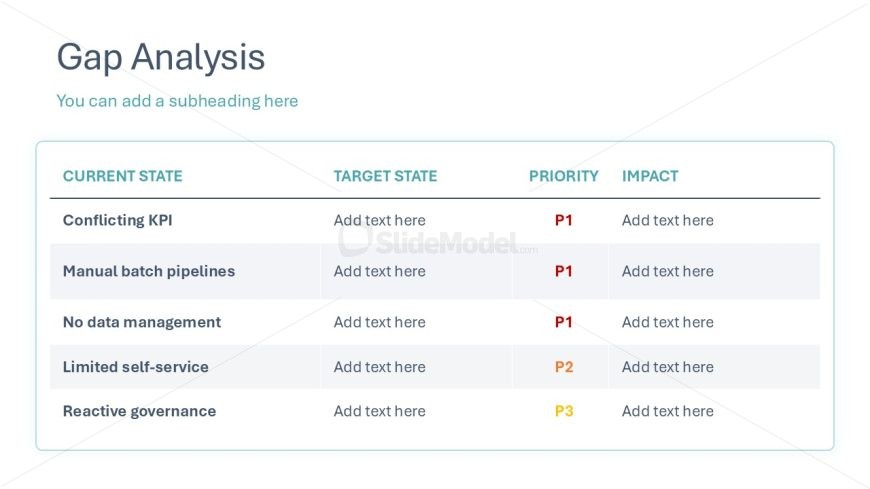
The layout features a table divided into four columns labeled 'Current State', 'Target State', 'Priority', and 'Impact'. The first column contains five rows listing various issues such as 'Conflicting KPI' and 'Manual batch pipelines'. Each row is separated by horizontal lines, enhancing clarity. The 'Priority' column includes labels like 'P1' and 'P2' in a bold format. Text placeholders are present for 'Target State' and 'Impact' sections, aligned centrally within their respective cells. The overall composition is clean and organized, with a light background and subtle borders around the table.
How to Use It
This layout serves as a gap analysis tool, allowing users to identify current issues and desired outcomes in data management. It fits within a presentation sequence focused on data governance or modernization efforts. This table is useful for business scenarios where stakeholders need to assess existing challenges against targeted improvements, particularly in data architecture and management strategies. It can effectively summarize priorities for decision-making and resource allocation.
Text Placeholders & Capacity
Keep your copy within these limits so it fits without resizing. Cell slots can accommodate concise phrases, roughly 5-7 words each.
| Placeholder | Count | Max characters (approx.) |
|---|---|---|
| Slide title | 1 | 30 |
| Subtitle | 1 | 40 |
| Column header | 4 | 20 |
| Row label | 5 | 30 |
| Cell | 20 | 30 |
Slide Keywords
Download unlimited PowerPoint templates, charts and graphics for your presentations with our annual plan.
DOWNLOADReturn to Data Lineage PowerPoint Template.