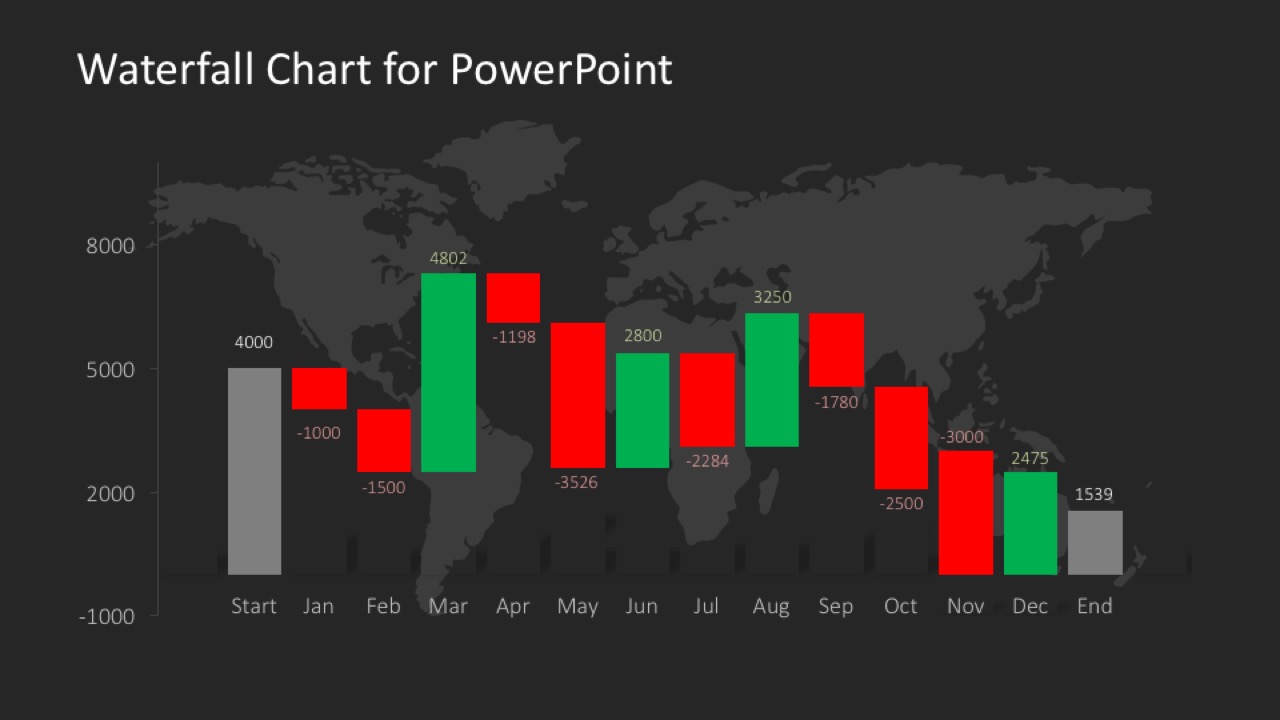
Data Driven Waterfall Chart for PowerPoint – Create professional PowerPoint presentations involving a waterfall chart with this data driven design. The chart is created with a traditional stacked column chart, allowing every user of PowerPoint to edit this chart through excel values. The tutorial How To Create a Waterfall Chart in PowerPoint and Excel explains how to create the chart and clarifies any doubt of the series editions.
The waterfall chart is a visualization traditionally used to explain the cumulative effect of positive and negative values introduced sequentially. It is also known as flying bricks chart and even as Mario chart. This names are a consequence of the metaphor of suspension columns (bricks in the air).
What’s inside this template
Example presentation scenarios
- A finance manager can use the waterfall chart to explain how monthly gains and losses move revenue from the starting value to the ending value.
- A business analyst can present a variance bridge to executives by using the red and green columns to separate negative and positive drivers.
- A consultant can summarize performance change across periods with the labeled columns and dark world map background during a client review.
- An operations leader can report cost movement by replacing the month labels with process steps and using the start and end bars as baseline and final totals.
Features
- 100% editable presentation template
- Compatible with Microsoft PowerPoint and Google Slides
- 16:9 aspect ratio slides
- Scalable vector shapes, icons and illustrations
- Data-driven charts, editable in Microsoft Excel
- AI-Ready for Microsoft Copilot and Claude
- Instant access and download
Frequently asked questions
Q: How should a presenter explain the waterfall chart so the audience follows the change?
A: Start with the gray starting column, then move left to right through each red and green bar as a separate driver of change. Name the business reason behind each large movement rather than reading every label. Close on the gray ending column and state the net result in one sentence.
Q: Who is this template best suited for in a business presentation?
A: This slide is best for finance managers, analysts, consultants, and executives who need to explain why a number changed over time or across categories. It fits revenue bridges, margin walks, budget variances, and performance reviews where the key point is the cumulative impact of positive and negative values.
Q: Why does the suspended column design work well for this message?
A: A waterfall chart uses a flying brick metaphor: each floating bar shows an incremental gain or loss between the starting and ending totals. That visual structure makes cause and effect easier to read than a standard column chart because the audience can see the running path of change.
Data Driven Waterfall Chart for PowerPoint
1-slide presentation template with a data-driven waterfall chart and world map backdrop
Data Driven Waterfall Chart for PowerPoint is a 1-slide chart template for presenting sequential gains and losses. It includes a waterfall column chart with start and end bars, positive and negative monthly bars, value labels, vertical axis, and a gray world map background for business, finance, and performance reporting.
- Category
- Data & Charts
- Rating


 Loading...
- Aspect ratio
- 16:9
- Item ID
- 6195-02
- Colors
 Microsoft PowerPoint
  Microsoft Copilot
  Claude for PowerPoint
 Other formats supported
Subscribe today and get immediate
access to download our PowerPoint templates.