Slide 13 of 22 from Free Professional Thesis PowerPoint Templates
Professional Thesis Result Summary PowerPoint
Results Summary Slide for Thesis Presentation
- Diagram
- Circular Cycle
- Evaluation Slide
- 16:9
- 100% Editable
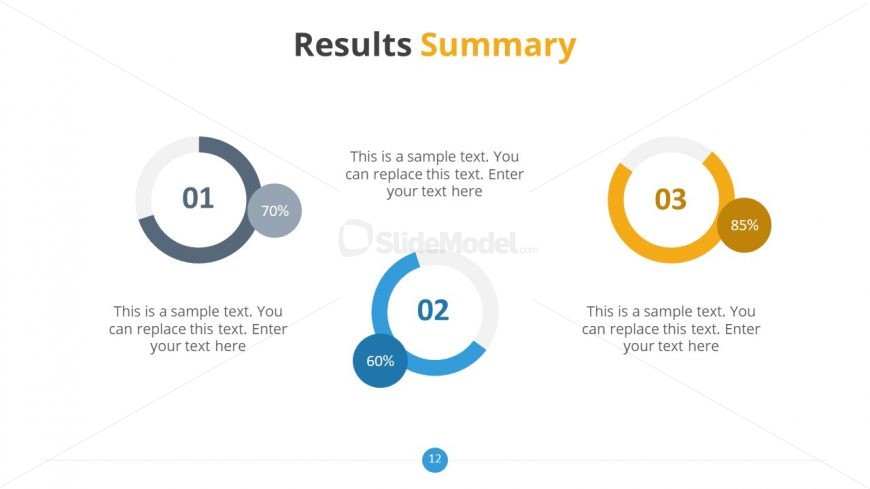
The Results Summary slide from the Free Professional Thesis PowerPoint Templates offers a clear visual layout with circular progress indicators to present key performance metrics and project outcomes. This slide template is ideal for academic or business presentations requiring a concise recap of findings, making it a valuable addition to any slide deck focused on summarizing data effectively. Its editable shapes and clean design support professional corporate presentations and pitch deck templates.
What’s on This Slide
The layout features three circular progress indicators aligned horizontally. Each circle displays a number and a percentage, with the first circle on the left, the second in the center, and the third on the right. Below each circle, there are text placeholders for descriptions, aligned centrally beneath the corresponding indicators. The circles vary in color, with the first in gray, the second in blue, and the third in yellow. The slide title 'Results Summary' is prominently placed at the top in a larger font, with 'Summary' highlighted in yellow. The background is light and minimalistic.
How to Use It
This layout serves as a summary of results, effectively showcasing key metrics or findings in a visually engaging manner. It fits well in a presentation sequence after detailed analysis slides, allowing for a concise recap. This structure is ideal for academic or business presentations where summarizing data or performance metrics is necessary. It can be used in contexts such as project updates, performance reviews, or research findings, providing a clear overview of essential information.
Text Placeholders & Capacity
Keep your copy within these limits so it fits without resizing. Node body slots can hold about 10 words each.
| Placeholder | Count | Max characters (approx.) |
|---|---|---|
| Slide title | 1 | 30 |
| Item heading | 3 | 2 |
| Item body | 3 | 50 |
Slide Keywords
Download unlimited PowerPoint templates, charts and graphics for your presentations with our annual plan.
DOWNLOAD