Slide 2 of 4 from Thin Border Flow Chart Template PowerPoint
Customizable Thin Border Flow Chart PPT Layout
Marketing Funnel Graphic for PowerPoint
- Diagram
- Flowchart
- Process Slide
- 16:9
- 100% Editable
The Marketing Funnel Graphic slide from the Thin Border Flow Chart Template PowerPoint offers a clear process visualization ideal for business presentations. This editable slide uses flowchart elements to map decision-making paths and user flows, enhancing corporate presentations and pitch decks. Its vector icons and shapes are designed for easy customization, making it a practical choice for illustrating marketing funnels and workflow processes within slide decks.
What’s on This Slide
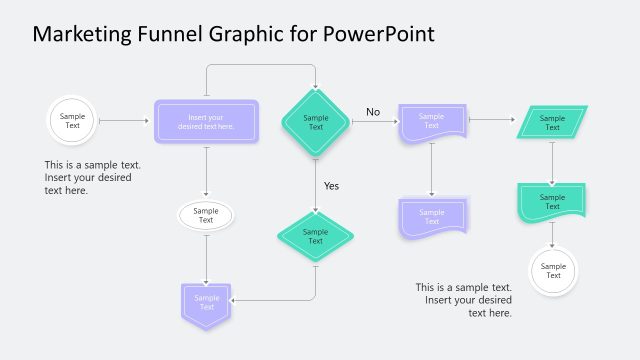
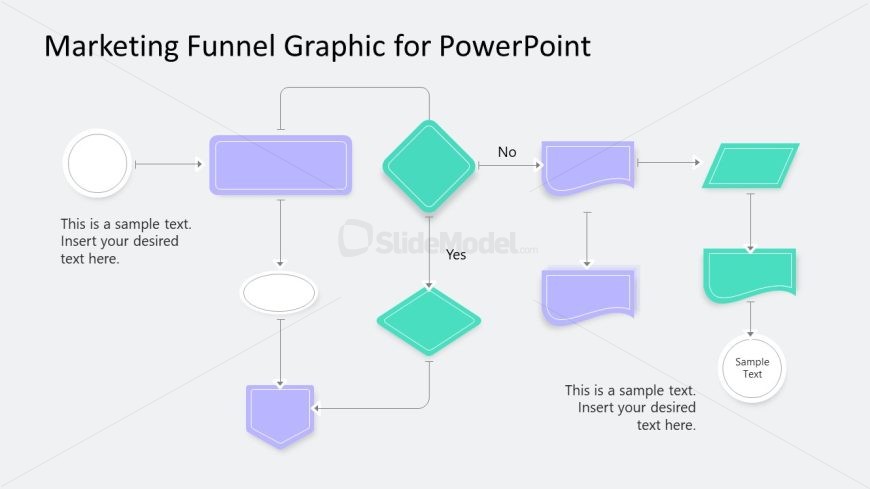
The layout features a flowchart design with various shapes. A circular node is positioned on the left, leading to a diamond shape above the center. Below this, another circular node connects to a diamond shape below it. Two rectangular shapes extend from the diamond on the right, indicating a decision path. Text placeholders are present within each shape, aligned centrally, indicating where content can be inserted. The background is a light gray, providing contrast to the colored shapes, which include purple and green elements. The overall composition flows from left to right and top to bottom.
How to Use It
This layout serves as a decision-making flowchart, ideal for illustrating processes or user flows. It fits well after problem identification slides and before solution proposals in a presentation sequence. Businesses can use this structure to depict marketing funnels, customer journeys, or workflow processes. It is suitable for both internal strategy discussions and client presentations, helping to clarify decision points and outcomes visually.
Text Placeholders & Capacity
Keep your copy within these limits so it fits without resizing. Node body slots can hold roughly 8 words each.
| Placeholder | Count | Max characters (approx.) |
|---|---|---|
| Item body | 6 | 40 |
Slide Keywords
Download unlimited PowerPoint templates, charts and graphics for your presentations with our annual plan.
DOWNLOADReturn to Thin Border Flow Chart Template PowerPoint.