Kaizen PowerPoint Templates
Continuous improvement programs live or die on whether teams can see progress between events, not just during the improvement workshop itself. A kaizen PowerPoint template gives that ongoing initiative a visual structure, mapping the current state, the target state, and the small, incremental changes connecting them. Our kaizen templates are designed for operations leaders and lean practitioners who run these events on a recurring basis, not as a one-time project. The layout holds up whether the event covers a single workstation or a full production line.
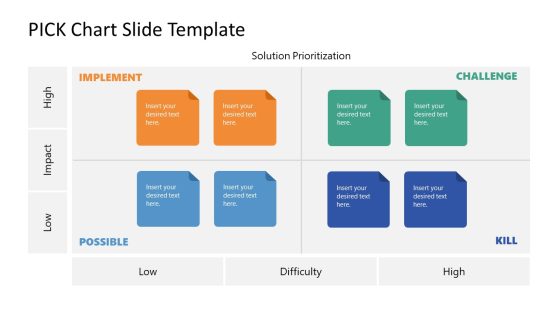
Kaizen PICK Chart Template for PowerPoint
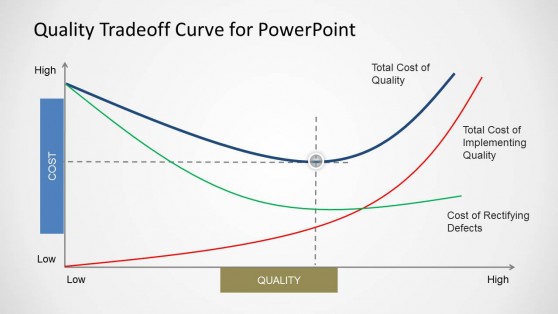
Quality Tradeoff Curve for PowerPoint
Why Lean Practitioners Choose Kaizen Slides
A kaizen event produces a lot of detail, current state observations, root cause notes, and a list of small changes, and presenting all of it clearly afterward is part of what makes the improvement stick. Kaizen templates are built around that specific structure, so a facilitator can walk a leadership team through the before-and-after comparison without having to reformat notes from a whiteboard. The repeatable layout also helps when the same team runs kaizen events quarterly, since each report follows the same current-state-to-target-state logic, making it easier to compare across cycles. Practitioners already following a broader lean startup methodology in a business context find the kaizen format equally useful for smaller, faster improvement loops.
What’s Inside a Kaizen PowerPoint Template
A kaizen PPT template is a slide set built around the current-state-to-target-state structure used in continuous improvement events. The core elements usually include:
- Current state and target state comparison slides
- Root cause analysis layouts such as fishbone or five-whys diagrams
- Action item tracking slides tied to specific owners
- Before-and-after process diagrams showing the improvement
Where Kaizen Templates Get Used
Operations leaders use the current-state-to-target-state layout to report kaizen event results to plant or department leadership, while lean coaches use the root cause slides to teach root cause analysis during training sessions. Quality teams adapt the action item tracker to follow up on improvements after the event ends, and consultants running kaizen workshops for client organizations use the same structure across engagements, so results stay comparable. Because kaizen events often bring together people from multiple departments, presenting from Google Slides lets participants from different teams review the outcome without needing the same software installed. Manufacturing plants that run multiple kaizen events per year also use the comparable format to track which areas of improvement deliver the most measurable gains over time.
What is a kaizen presentation template?
Continuous improvement events run on a specific structure, current state versus target state, so the template mirrors that discipline instead of a generic before-and-after slide.
How do I create a kaizen PowerPoint template?
Start with a layout where the before-and-after comparison is already structured, then fill in your event’s root cause findings and the specific actions the team committed to.
Where can I find a free kaizen presentation template?
Our collection includes free and premium kaizen layouts, from single comparison slides to full decks covering root cause analysis and action tracking.
Are kaizen templates specific to manufacturing, or do they work in other industries?
The current-state-to-target-state structure applies to any process. Manufacturing, healthcare, and administrative workflows all use the same format, since the layout tracks process steps rather than industry-specific equipment.
Can the current-state-to-target-state comparison include more than two states, like an interim milestone?
Yes, an interim state can be added between the current and target states, which is useful when the improvement occurs in a planned intermediate stage rather than in a single jump.
Are the fishbone and five-whys layouts interchangeable, or suited to different kaizen situations?
They suit different situations: fishbone works better for problems with several category-based contributing factors, while five-whys fits a single causal chain traced step by step.
Do the action item tracking slides integrate with external project management tools?
No direct integration; action items are entered manually, so the slide works as a standalone visual regardless of which project tool your team uses elsewhere.