Slide 1 of 1 from Sequence Diagram for PowerPoint
UML Sequence Diagram PowerPoint Template
Sequence Diagram for Event Management Process
- Diagram
- Sequence Diagram
- Process Slide
- 16:9
- 100% Editable
The Sequence Diagram for Event Management slide from the Sequence Diagram for PowerPoint template offers a clear visualization of event handling workflows using editable shapes and vector icons. This slide template is suitable for software development presentations and UML process explanations, helping to communicate system interactions effectively within a business presentation or technical pitch deck.
About This Slide
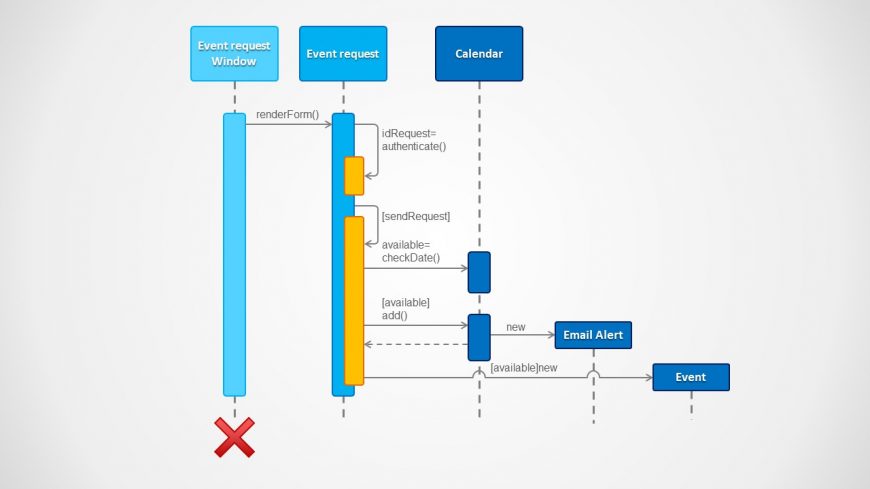
This slide contains an UML Sequence Diagram PowerPoint Template to edit and create software sequence diagrams. The user can model object oriented programming routines, flows or use cases using this Unified Modelling Language diagram. The slide provides the Objects, the sequence arrows, the duration, the scopes, the events, the callbacks and the return statements. Each UML objects and tools is created as a PowerPoint shape, allowing the user to fully customize it properties giving maximum flexibility to the diagram.
What’s on This Slide
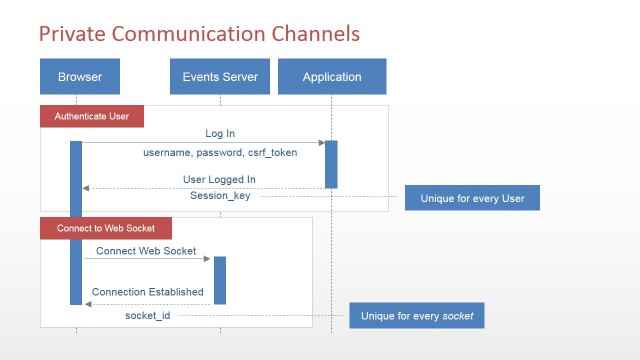
The slide features a sequence diagram illustrating an event management process. It includes vertical lifelines for 'Event request Window,' 'Event request,' and 'Calendar,' positioned at the top. Horizontal arrows indicate interactions, with method calls like 'renderForm()' and 'idRequest=authenticate()' shown. A red 'X' denotes an error or cancellation point. The diagram's flow is left to right, with nodes of varying heights representing different processes. Text placeholders for method names are centrally aligned within their respective shapes, while a light background enhances clarity.
How to Use It
This layout serves as a sequence diagram, ideal for illustrating processes in software development or programming contexts. It fits well in presentations discussing system interactions, use cases, or UML diagrams. Use it to clarify complex workflows, such as event handling in applications. This structure is beneficial for software engineers and designers explaining system functionality or for training sessions on software architecture. It effectively communicates the sequence of operations and interactions among components.
Text Placeholders & Capacity
Keep your copy within these limits so it fits without resizing. Node labels can accommodate up to 30 characters each.
| Placeholder | Count | Max characters (approx.) |
|---|---|---|
| Item heading | 5 | 30 |
| Item body | 5 | 50 |
Slide Keywords
Download unlimited PowerPoint templates, charts and graphics for your presentations with our annual plan.
DOWNLOADReturn to Sequence Diagram for PowerPoint.