Slide 1 of 7 from Project Status Timeline Template for PowerPoint
6093-01-project-status-powerpoint-template-1
Project Status Timeline for PowerPoint
- Diagram
- Timeline Horizontal
- Timeline Slide
- 16:9
- 100% Editable
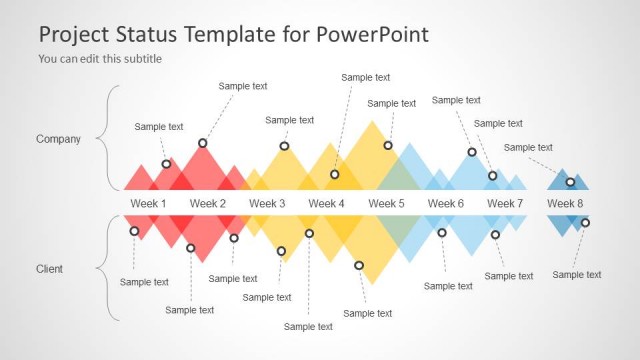
The Project Status Timeline slide from the Project Status Timeline Template for PowerPoint offers a structured horizontal timeline ideal for project status updates and schedule reviews. This slide layout uses editable shapes and vector icons to clearly mark weekly milestones, making it suitable for business presentations and corporate slide decks that require clear timeline visualization.
What’s on This Slide
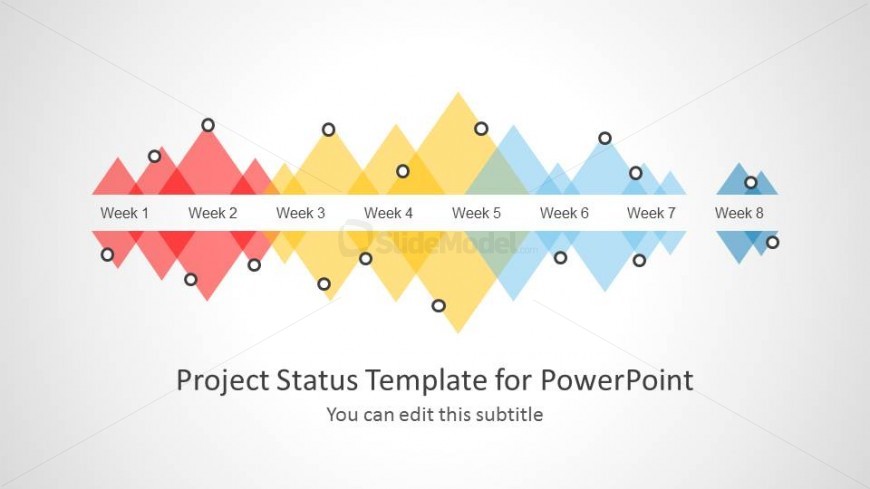
The slide features a horizontal timeline divided into eight segments labeled Week 1 through Week 8. Each week is represented by a diamond shape, alternating in color between red, yellow, and blue. These shapes are connected by a central horizontal line. Above each diamond, there are small circular markers. The slide includes a title placeholder at the bottom center, with a subtitle placeholder directly beneath it. The background is light, enhancing the visibility of the colored shapes and text. The overall layout is clean and structured.
How to Use It
This layout serves as a timeline diagram, ideal for presenting project status updates over an eight-week period. It fits well at the beginning of a presentation to outline project phases or milestones. This structure is useful for project managers to communicate progress and timelines effectively. It can be applied in meetings, reports, or status updates to visually represent project schedules and phases. The layout allows for easy modification to reflect specific project details and timelines.
Text Placeholders & Capacity
Keep your copy within these limits so it fits without resizing. Node labels can hold about 2 words each.
| Placeholder | Count | Max characters (approx.) |
|---|---|---|
| Slide title | 1 | 40 |
| Subtitle | 1 | 50 |
| Item heading | 8 | 10 |
Slide Keywords
Download unlimited PowerPoint templates, charts and graphics for your presentations with our annual plan.
DOWNLOAD