The MoSCoW Method PowerPoint Template is a matrix presentation of prioritizing technique. It is a business analysis concept use in project management and product development processes. The project development team works with all stakeholders to analyze importance of multiple deliverables. This placement of deliverables based on priority is known as MoSCoW method. Further, the term MoSCow is an acronym for Must have, Should Have, Could Have, Won’t Have). These are the four priority categories with additional O’s to make pronounceable terminology.
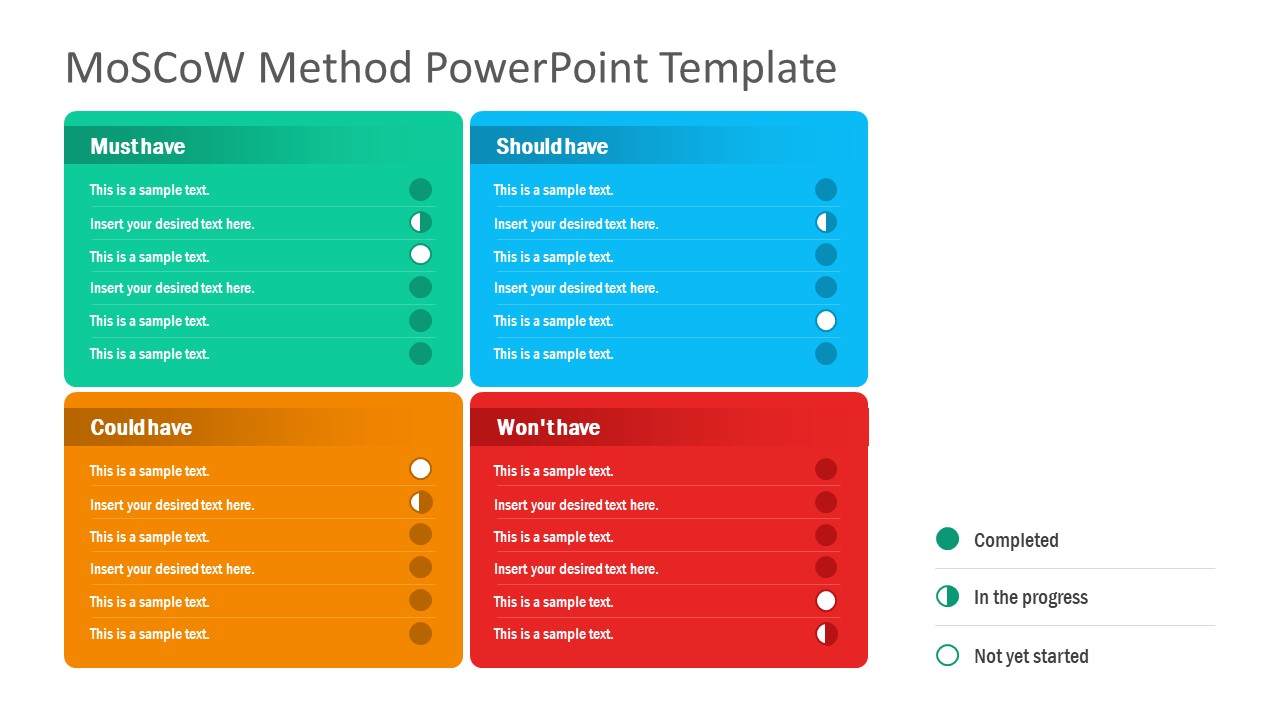
The MoSCoW method PowerPoint provides an eye-catching layout of 4 category segments. Each of these segments further displays the progress status of activity line. The status types include Complete, in progress, and not yet started. These three status are symbols derived from Harvey balls concept chart Therefore, the users can change these activity status symbols as see fit.
The MoSCoW Method PowerPoint Template helps present the immediate business benefits to the audience. Because this template highlights the most important deliverables that client can expect to receive first. For example, the Must have and Should have processes are priority initially. But tasks in Could have and Won’t have categories may also change according to time. The MoSCow method basically enables stakeholders to understand impact of priorities on performance and speed.
MoSCoW priority model present following processes and activities under each category.
- Must have: Critical to current delivery timebox.
- Should have: Important but not necessary for current delivery timebox.
- Could have: If there are time and resources available to improve user experience.
- Won’t have: Least critical deliverables that are not appropriate for current delivery time.
What’s inside this template
Example presentation scenarios
- A product owner can use the four-quadrant matrix to explain which backlog items are Must have, Should have, Could have, or Won't have before a sprint planning meeting.
- A project manager can present the status legend and task rows to show stakeholders which priority items are completed, in progress, or not yet started.
- A business analyst can use the light-background version to document requirement priorities during a client workshop and align expectations on delivery scope.
- A delivery lead can use the dark-background version in an executive review to focus discussion on critical deliverables and deferred work.
Features
- 100% editable presentation template
- Compatible with Microsoft PowerPoint and Google Slides
- 16:9 aspect ratio slides
- Scalable vector shapes, icons and illustrations
- AI-Ready for Microsoft Copilot and Claude
- Instant access and download
Frequently asked questions
Q: How should a presenter explain the MoSCoW categories without overloading the audience?
A: Start with the Must have quadrant, then move clockwise through Should have, Could have, and Won't have. Keep each task label short and use the circular status markers to answer the next likely question: what is already complete, what is underway, and what has not started.
Q: Who is this template best suited for in a project discussion?
A: This template fits project managers, product owners, and business analysts who need a shared view of scope tradeoffs. It works best when stakeholders already know the project context and need to compare deliverables by urgency, value, and delivery status rather than review a full project plan.
Q: Why does the four-quadrant layout make prioritization easier to discuss?
A: The quadrant metaphor separates competing work into visible decision zones, which reduces debate around individual task importance. Color blocks make the priority categories distinct, while the status legend adds delivery reality to the priority view, helping the audience distinguish importance from progress.


MoSCoW Method PowerPoint Template
2-slide presentation template for MoSCoW prioritization matrices and project delivery status
The MoSCoW Method PowerPoint Template is a 2-slide 16:9 presentation template for prioritizing project deliverables. It shows a four-quadrant MoSCoW matrix, task list rows, circular status indicators, and a completion legend in light and dark versions for project managers, product owners, and business analysts using Microsoft PowerPoint or Google Slides.
- Category
- Models
- Rating


 Loading...
- Aspect ratio
- 16:9
- Item ID
- 20297-01
- Colors
 Microsoft PowerPoint
 Microsoft Copilot
 Claude for PowerPoint
Other formats supported
Subscribe today and get immediate
access to download our PowerPoint templates.