Prepare your business presentation with our MEDDIC Framework Template for PowerPoint. MEDDIC sales qualification framework is a series of standard steps B2B sales teams follow in shortlisting and targeting their potential buyers. These steps are essential for businesses that close regular deals worth millions of dollars as they are more concerned about potential buyers that won’t make their selling efforts wasteful in the end. MEDDIC is an acronym for the analysis steps:
- Metrics: Recognize the goals (quantifiable) that can help you create a pitch advocating the benefits of your solution or product.
- Economic Buyer: See if the prospect you are targeting for promotion is interested in paying for your service or not. This can be understood after looking at the previous buying history of the prospect.
- Decision Process: This step determines how your prospect decides about purchasing something. By knowing that process, you can highlight such features that can directly impact your customer’s wish.
- Decision Criteria: Another essential factor after decision criteria that can further help you directly tailor your pitch according to your buyer.
- Identify Pain: Understanding your buyer’s pain points is the key to creating a deeper contact with the buyer leading to a sale.
- Champion: A champion in this process is the direct point of contact from the prospect side. His interest must be developed to make a sale as he is the one who will promote your service before other involved members.
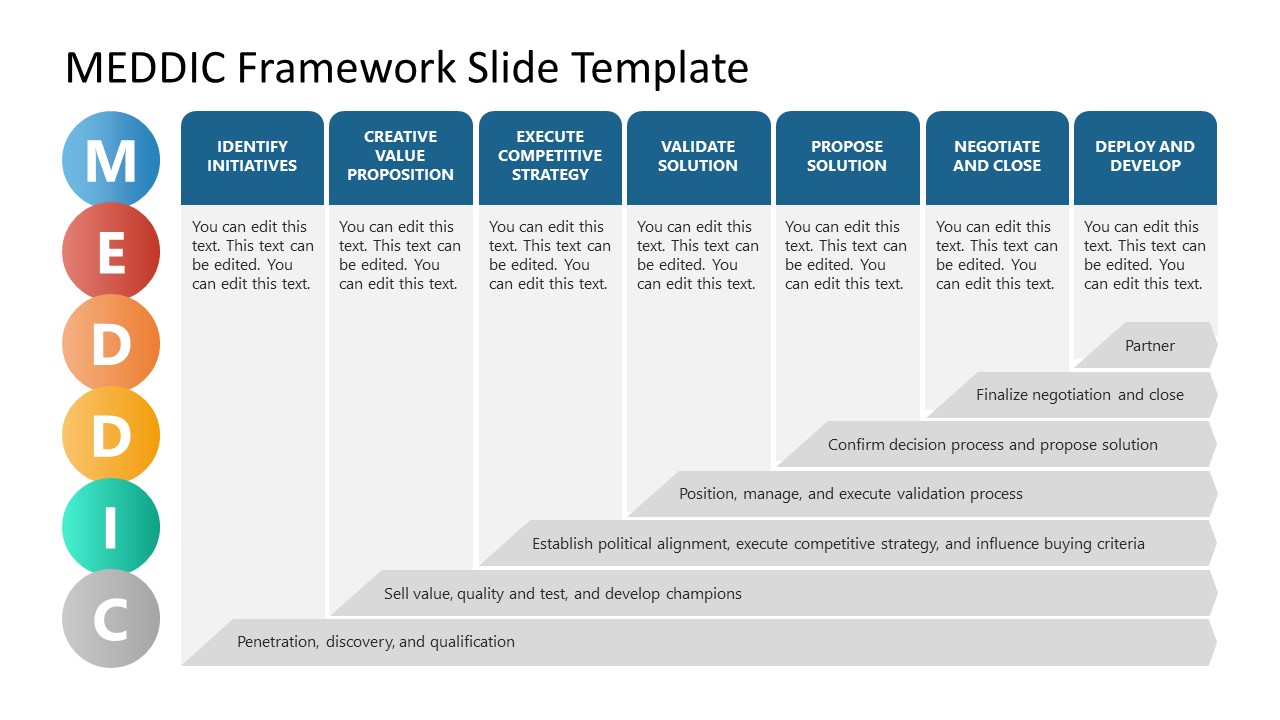
Our MEDDIC Framework Template for PowerPoint features three slide templates with sample text to explain and discuss each phase of MEDDIC. The first slide shows six circular PowerPoint shapes carrying representative infographic icon illustrations like a flow chart for metrics, a checklist for decision criteria, a medal for the champion, etc. These circles are attached to the corresponding letters through dotted lines. The following slide has a similar circular representation but provides editable text boxes to mention relevant descriptions. Professionals can use this slide to create discussion slides or showcase their strategy before new team members. The last slide is a tabular diagram that highlights key strategic points kept in mind at each stage. It carries 6 vertical columns and displays the individual alphabets along the rows. Between the columns and rows, horizontal bars of varying lengths predict how the relationship proceeds with a buyer as the seller follows these steps.
This best PPT Template is 100% editable with PowerPoint and Google Slides. Professionals can prepare business or sales presentations by editing the placeholder text. The slides can also be used for training and teaching business students about this process.
What’s inside this template
Example presentation scenarios
- A sales enablement manager can use the six-step definition diagram to teach new account executives how Metrics, Economic Buyer, and Champion fit into deal qualification.
- A sales leader can use the process matrix to explain how a strategic account should move from discovery and qualification toward negotiation and partnership.
- An account executive can use the acronym overview to frame a pipeline review and identify which MEDDIC elements are missing in a high-value opportunity.
- A revenue operations team can use the editable text cards to standardize qualification language before rolling out a MEDDIC-based sales playbook.
Features
- 100% editable presentation template
- Compatible with Microsoft PowerPoint and Google Slides
- 16:9 aspect ratio slides
- Scalable vector shapes, icons and illustrations
- AI-Ready for Microsoft Copilot and Claude
- Instant access and download
Frequently asked questions
Q: How should a presenter explain MEDDIC without making it feel like a checklist?
A: Start with the acronym overview to establish the six ideas, then move to the definition slide to explain the selling question behind each one. Close with the process matrix so the audience sees MEDDIC as a relationship-building method, not a form to complete. Keep the language tied to one real deal or account.
Q: Who is this template best suited for in a sales organization?
A: This template works best for B2B sales leaders, account executives, and sales enablement teams that need to qualify complex opportunities. It is especially useful when the buyer group includes budget owners, decision processes, pain points, and internal champions that must be understood before a proposal or negotiation.
Q: Why does the design use circles first and a matrix at the end?
A: The circle slides make the MEDDIC acronym easy to remember before adding detail. The final matrix changes the message from definition to action by showing how activities build over time. That sequence helps the audience move from learning the terminology to applying it in a deal strategy conversation.




MEDDIC Framework Template for PowerPoint
3-slide MEDDIC framework presentation template with sales qualification diagrams and process matrix for B2B teams
MEDDIC Framework Template for PowerPoint is a 3-slide sales qualification template for B2B sales teams, trainers, and managers. It includes a MEDDIC acronym overview, a six-step definition diagram, and a process matrix showing relationship progression across buyer qualification stages. The template is built for Microsoft PowerPoint and Google Slides.
- Category
- Business PowerPoint Templates
- Rating

 Loading...
- Aspect ratio
- 16:9
- Item ID
- 21648-01
- Colors
 Microsoft PowerPoint
 Microsoft Copilot
 Claude for PowerPoint
Other formats supported
Subscribe today and get immediate
access to download our PowerPoint templates.