Slide 1 of 2 from Industry Digital Twin PowerPoint Template
Industry Digital Twin PPT Design
Digital Twin System Comparison Slide
- Diagram
- Comparison Split
- Context Slide
- 16:9
- 100% Editable
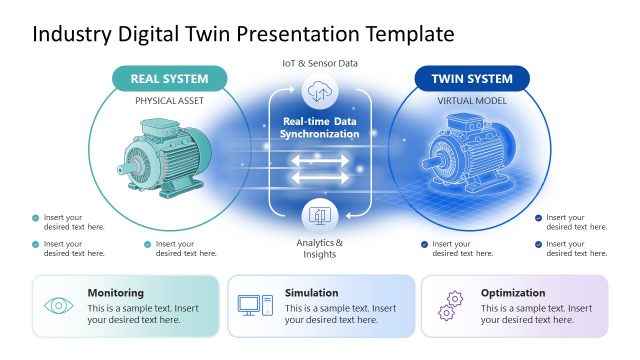
The Digital Twin System Comparison slide from the Industry Digital Twin PowerPoint Template offers a clear diagram layout ideal for technology presentations and IoT strategy meetings. This slide template features editable shapes and vector icons to visually contrast real and virtual systems, facilitating discussions on digital transformation and real-time data synchronization within corporate presentations.
What’s on This Slide
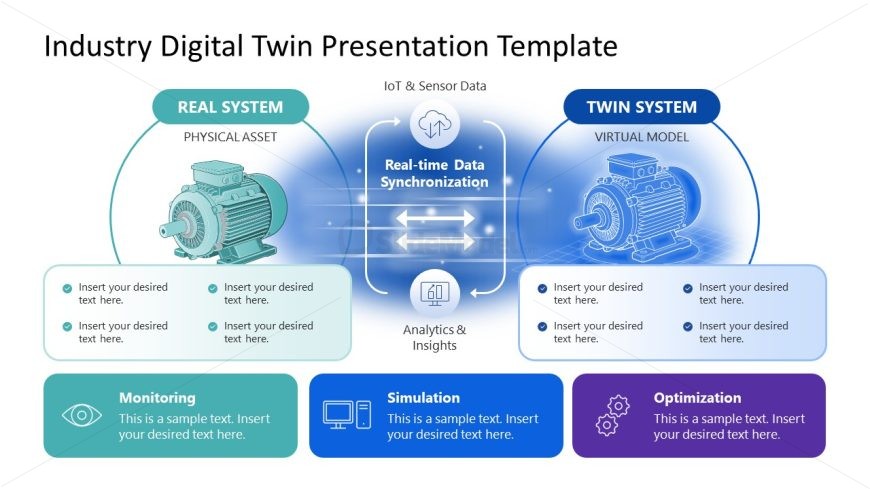
The layout features two main sections labeled 'Real System' and 'Twin System' positioned on the left and right sides, respectively. Each section contains a visual representation of a motor, with the real system shown in color and the twin system in a blue outline. A central area labeled 'Real-time Data Synchronization' connects the two sections with arrows indicating data flow. Below each section are text placeholders for monitoring, simulation, and optimization, arranged in rectangular boxes. The overall color scheme includes soft blues and greens, with a white background.
How to Use It
This layout serves as a comparative diagram, illustrating the relationship between a physical asset and its digital twin. It is suitable for presentations discussing digital transformation in industries, particularly in contexts involving IoT and data synchronization. This structure can effectively communicate concepts in technology briefings, training sessions, or strategic planning meetings, where clarity in the comparison of real and virtual systems is essential.
Text Placeholders & Capacity
Keep your copy within these limits so it fits without resizing. Node body slots can accommodate about 10-12 words each.
| Placeholder | Count | Max characters (approx.) |
|---|---|---|
| Slide title | 1 | 30 |
| Item heading | 2 | 20 |
| Item body | 6 | 50 |
Slide Keywords
Download unlimited PowerPoint templates, charts and graphics for your presentations with our annual plan.
DOWNLOADReturn to Industry Digital Twin PowerPoint Template.